

 Maintenance Connection Everywhere (MCe) · EAM/CMMS manuals
DataHub
Adding a Required Column
How to Add a Required Column in a DataHub Connector
Overview
In some cases, the source data does not contain all required fields for the destination entity. For example, when importing Assets, the Parent Asset is required but may not exist in the source CSV/Spreadsheet.
This document explains how to add and populate a required column (example 'Parent' in Asset) using a DataHub mutator.
Note: This changes keys, while it works, it gets rid of a lot of the optimizations in the DataHub, it is able to do dramatic optimizations when the key is not modified. If you need more performance, use our API so you can optimize it 'knowing' your data.
Problem
Source CSV:
id,name,Active
1,Calgary,FALSE
Missing:
- Parent Asset, required field
Solution
We dynamically mutate and populate the ParentID field in the DataHub connector using Manipulators
Steps
- In the Datahub connector edit page, Navigate to Mappings
- Check for...
- Navigate to the manipulators tab.
- Add a new manipulator
- Give a name, Choose the In Fields and Out Fields. In my example we will choose Active as the 'In' Field and ParentID as the 'Out' Field
- Write the mutator code in the script
- Run the DataHub.
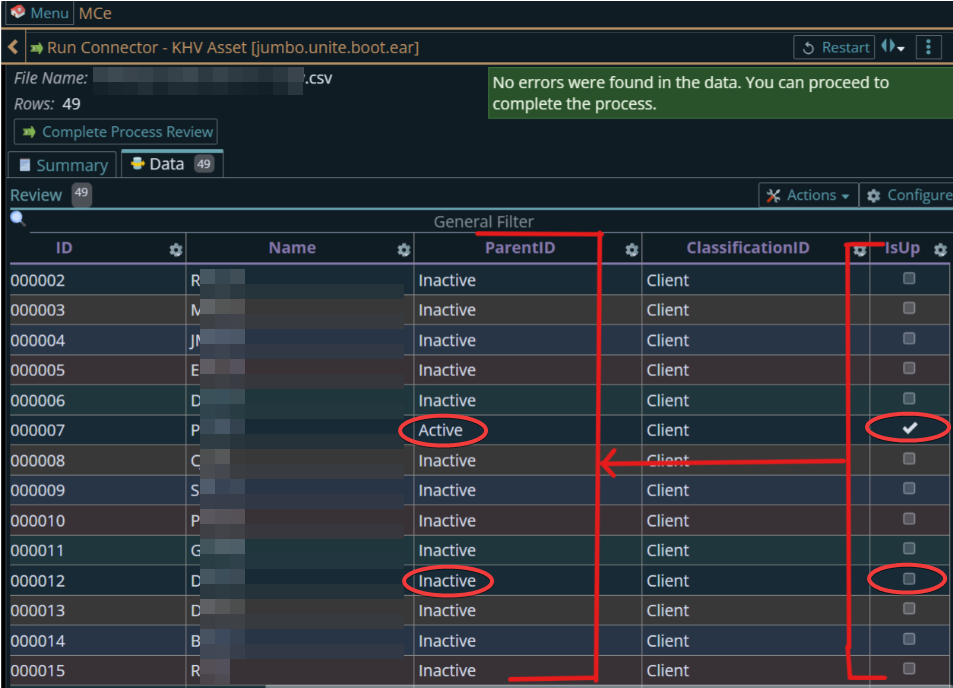
- You will find that the ParentId gets field.
Example Mutator
return function mutate(sourceData, columnNames, rowObject, connectionData, createError)
{
    const [raw] = sourceData; // Active column
    if (raw == null || raw === "") {
        // this shows treating missing value as an error
        // You could have treated it as being Active or Inactive instead of you wanted.
       	createError("Active value is missing");
        return [];
    }
   const val = (raw + "").trim().toUpperCase(); // treat ' true   ' as TRUE
    if (val === "TRUE") {  // you could also check for '1' or 'YES' or 'T' if you wanted
        return ["Active"]; // because in this database, this is the AssetID for the Active Location
     }
    else {
        return ["Inactive"]; // because in this database, this is the AssetID for the Inactive Location
    }
}
Result
The Parent is dynamically assigned:
- TRUE → Active
- FALSE → Inactive
Notes
- The Parent assets must already exist in the system.
- The CSV file remains unchanged.
- This approach keeps the connector flexible and reusable.