

 Maintenance Connection Everywhere (MCe) · EAM/CMMS manuals
The error message
Access was granted but the operating system reports an error preventing access. Check OS settings, see if another device is using the camera, for more ideas/details: Check OS settings, see if another device is using the camera.
As of mid 2020, Apple has fixed their major bug and 8.9 takes advantage that they fixed it to give the same advanced features that our Android and Windows users have enjoyed for years.
Overview
This error is not an error in our application. This means that we have been told that there is a camera on your device, but the OS (operating system) has denied us access to it.
It could be that the camera is broken
Try your basic camera app on your device to see. Realistically, if your camera isn't working you already knew that so if you came to read this document, this is not the likely cause.
Make sure there isn't another application using the camera
Sometimes this is obvious – you have another browser or paint application or just a general camera application.
Other times it is less obvious – an application such as another browser may not have properly released the camera so the operating system thinks that application still has exclusive access to it.
Usually just having the other app stop using the camera is all it takes, other times it may be necessary to reboot the computer to clear the lock. None of these can be fixed by our application, the problem is between the operating system and that other application.
Make sure you give access to the camera
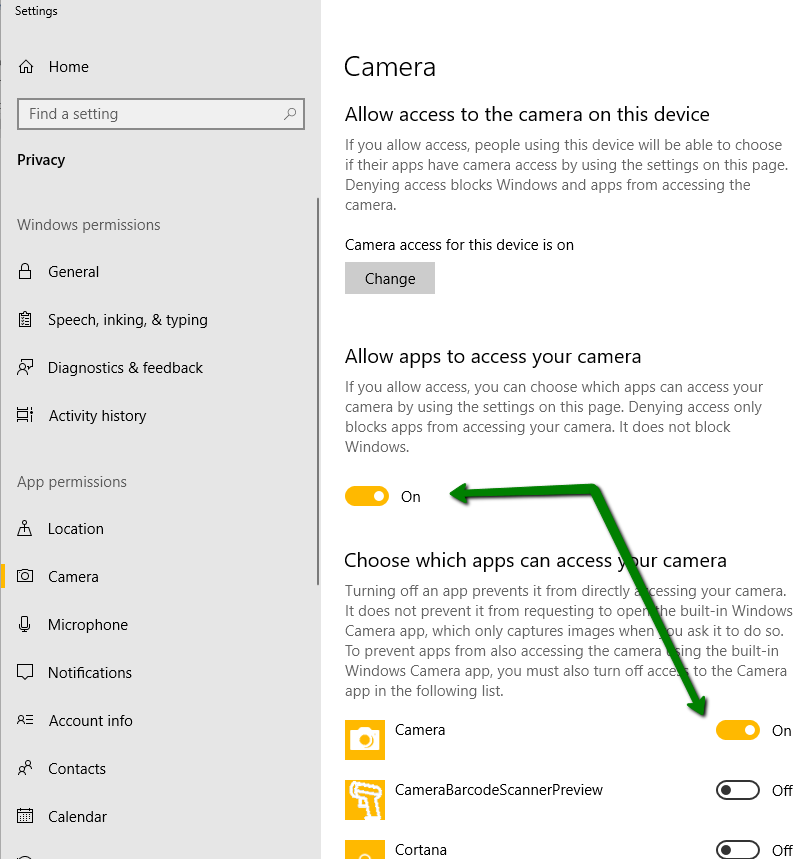
If the operating system (OS) is set to not allow us access to the camera, then obviously we can't take photos, video, software barcoding. For Windows 10, see the 2 top settings (switches), make sure they are on.
Also note, we have an advanced, proprietary barcode reader built into the product. You can also use hardware barcode readers and ones that come on your device, in which case you may have to grant them access to the camera as well. While we think our barcode reader is better than most others based on our testing, if you have other options – try them all and use the one that is best in your environment.
There is no similar settings in Android … the browser is where you can block access and it doesn't cause the error message that this is about.
Restart the browser
Sometimes a bug in the browser (we have seen this in all the major browsers, although admittedly, the last time was in 2017 when the browsers were going through a major change in the HTML5 standard for media access) where the browser doesn't properly release the camera. Shut down all windows for the browser you are using then restart.
Before you contact your hardware supplier – try rebooting the computer/tablet/cell phone.
I know there are jokes about restarting a device to fix it, and I know that users of Apple devices typically think it is never necessary to fix problems this way, but if the OS has gotten confused – has a bug, and it decided the camera is broken or in use or reserved, then rebooting (turning off and letting it start) can be an effective solution.