

 Maintenance Connection Everywhere (MCe) · EAM/CMMS manuals
When you create a new item of any sort, in almost every case there will be some fields that are required. In the internet there is a least a dozen 'non standards' for how this should be done. The major companies such as Google (Alphabet), Meta, Apple, Microsoft have changed several times each how they define 'required' fields. So how does MCe do it?
In most cases:
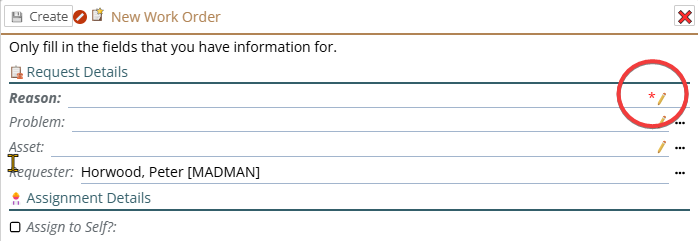
- A red * shows up beside the pencil or carot when there is not yet a value in the field. Once there is a value in the field, the red * disappears, but the label stays bold, letting you know that it has a value, but it is still a required field.
A fairly rare case is where you have to enter 'at least one of' such as the following. You can enter Users, you can enter Contacts, but you have to enter at least one user or contact. So in this case the header, the "To:" is bold, indicating you have to enter some part of the items below. In these cases the red * may not be able to be visible - since neither of the 2 fields are required.
The priority is a normal one, you have to have a priority.
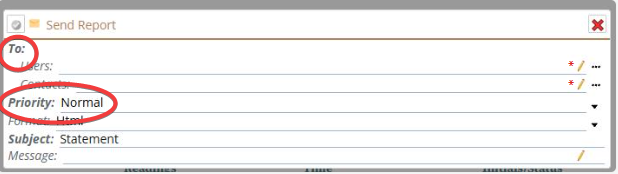
Note that wherever possible, we provide a default value that gets filled in for you so, such as Priority above where a priority of 'Normal' is the default.