Maintenance Connection Everywhere (MCe) · EAM/CMMS manuals
If you are reading this before you have upgraded – when installing the licenses, use a browser or computer that does not have any unsaved (unsync'd) changes. Then you don't have to worry about anything in this document.
As of 2026.02 we are pretty sure all our customers with 8.0 or earlier have now upgraded, making this document obsolete. We'll keep it around for a few more years just in case.
This document handles 'fixing' a very unlikely situation:
- If you had MCe 8.0 or older installed on this computer (cell phone & tablets are computers)
- AND you had unsync'd changes that you care about
- AND you go in to the 'license manager' of 8.1 or later with the same browser (hint: follow the instructions to use a different browser or different computer!)
- Then you will not have your unsaved changes automatically updated.
Note: This only works on a Windows browser, iOS and Android don't give practical access to the tools needed to do this.
This document is designed to help you retrieve and save your unsync'd changes. If you aren't worried about saving them (or didn't have any) then you can forget this and say you are done.
To recover, we need you on a 'benign' page that can 'make changes', the easiest is to be on the about page 1st. The Session Token you see there will not be the correct one for this process 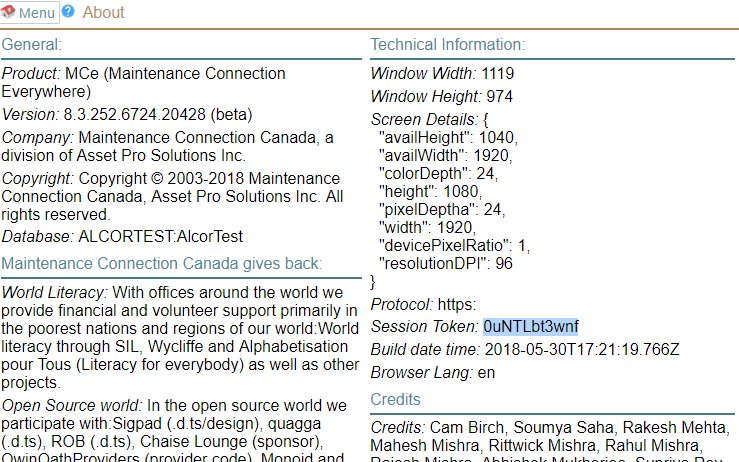
Then find the OLD Session Token, about the only practical way to find it is to type in your old URL in your browser. You can hit F12 and find it as in the picture below:
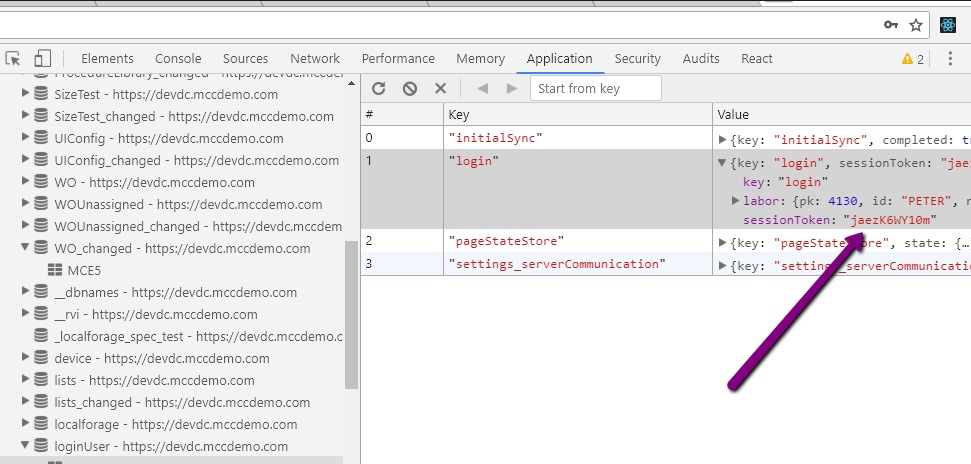
Record this value, or at least memorize the 1st 2 or 3 characters.
Now delete these 2 databases: Note that in the image shot below, the database has '-PETER' in the name, this is because that was name of the entity (ent) database that the user connected to to test this situation.
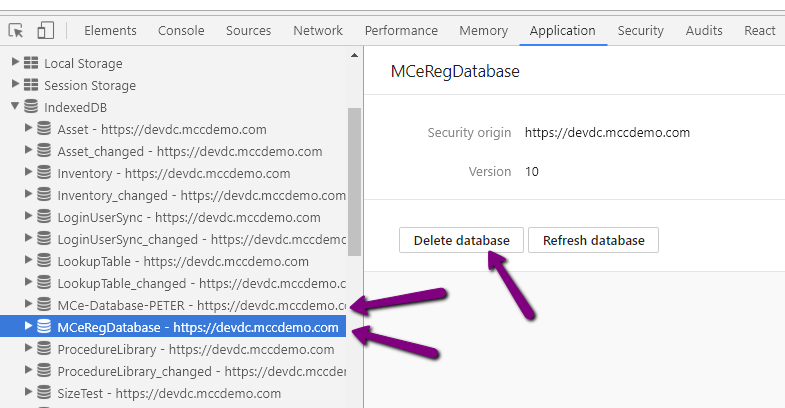
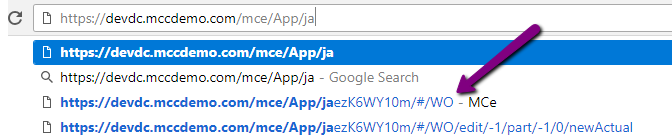
Once you have deleted the 2 databases, go to the old 8.0 or 6.9 or 5.3 etc.., URL. In my example below, everything up to and including /mce/ is where the app was stored, so to whatever your version was you add /App/ then add one or two letters of the session token, ja in my example, to find one of the old URL's
So to be clear: https://devdc.mccdemo.com/mce is the part that was 'specific' to this installation, you will always (with 8.0 and older) have the '/App/' part and then the jaez… part was the 10 digit code that you wrote down or memorized. Since there will be very few – probably only one – of these, typing in the first letter, j in my test case, should be enough to have the browser show you the rest of the 10 digit code.
If you get this result, it means you are using the wrong 10 digit session token (possibly an older one.) If you are unsure, make sure you have nothing other than a / after your 10 digit code.