

 Maintenance Connection Everywhere (MCe) · EAM/CMMS manuals
This is an always changing game, in the first have of the 2010's it seemed that every time we found a way to quickly, at a glance, tell one browser from another, they would go and change. Chrome seemed to be the one that liked to randomly change their look and feel the most, but none of the browsers were immune from applying random changes.
In the late 2010's, the top bar is usually the quickest way to tell the major browsers apart. Note that several of the browsers below say "… skin on …" this is because iOS and Android don't allow 'other' browsers.
Cheatsheet
 If it has a house with a door and the door has no bottom, it is likely IE or EDGE,
- If it has a black bar with misc. icons at the top, it is Edge on Android
- If it has no black bar at the top
- If the house is on the right it is IE
- If the house is on the left it is Edge
 If it has a house with a bottom and no door, it is likely Chrome or the UC Browser. Chrome currently has slanted tabs
  , UC 2018.09 has square tabs
If it has no house, it is Chrome on Desktop or Safari
- If it has an 'open book' to the right of the URL, it is Safari
- If it has your name 'embossed' on the top near right, it is Chrome
If it has a red lion face  : it is Brave, a stylized V
  : Vivaldi, a Red O
  : Opera, a blue brine shrimp
  : Sea Monkey
 If it has a red lion face, has a house with a door and the door has a bottom, it is Brave on Android
Browsers we try very hard to support at all times
There was a 2 week window in 2016 where we were unable to support Chrome, they had a 'bad bug' that they quickly and silently fixed before we were able to create a work-a-round (and we tried very hard because we didn't know how long they were going to have that bug.)
There have been a few days when we didn't run in Edge, but again, Edge fixed their bug.
There have been several times for up to 2 weeks that we didn't run on Safari, but in most cases we were able to create a fix within hours that worked around the bugs they. Safari has not been as fast as Microsoft or Google at fixing bugs they introduce so usually we end up needing our patches for 6 months or so until Apple fixes their bugs, in one case several years. Generally, if you can avoid upgrading to a x.0 Safari upgrade you are advised to not upgrade. But don't worry – we upgrade as soon as we can and test Safari continuously. Also note that except one time, any bugs introduced in Safari on iOS were also introduced in Edge and Chrome on iOS because Apple forces Edge and Chrome to use the Safari engine (WebKit) and their JavaScript (Nitro), so any bugs in those 2 engines affect all 3 products.
Chrome (Chromium engine and V8 JavaScript) on Android last validated 2018.08.30
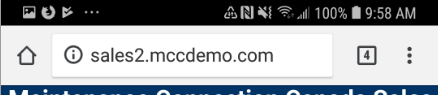
Notes: The 'house' icon is very plain, no door (cf Edge or Brave)
Chrome on Desktop (Chromium engine, JavaScriptCore JavaScript engine) last validated 2018.08.30
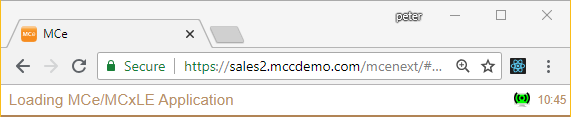
Notes
- there is no 'house' icon
- The hamburger menu is three vertical dots (old versions of chrome used 3 horizontal lines arranged vertically)
- We recommend Edge and Chrome as the 2 fastest that we have tested. Brave is a wonderful and much faster browser for general web browsing, but for apps it is much slower.
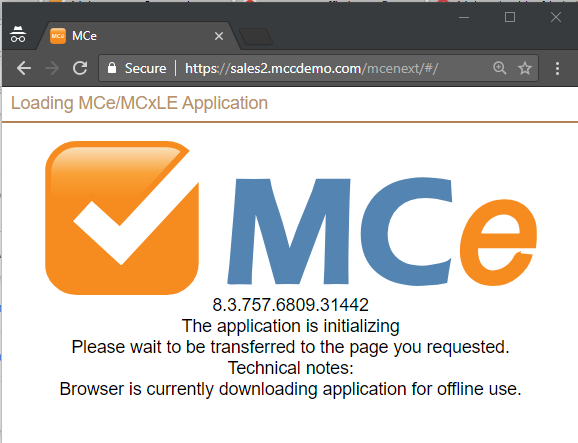
Chrome on Desktop Incognito – NOT supported (it will never work)
Chrome does not support most advanced features like data caching when running in incognito mode. As a result it looks like this: (It appears to be hung, but if you check the developer console, you'll see that it refused to let us run.) Chrome's stated design for Incognito means they purposely stop applications like MCe from running in incognito mode so this will never be supported.
Edge on Desktop (EdgeHTML engine based originally on Trident, Chakra JavaScript) last validated 2018.08.30

Notes:
- The house icon is on the left of the search
- The house icon has no 'bottom' on the door.
Safari on iOS (WebKit engine aka Nitro, JavaScriptCore JavaScript engine) last validated 2018.08.30
----- end of the browsers we officially support ----
Browsers we continue to evaluate to possibly support (again) in the future and try to keep running when we can
The following we are sometimes able to support and sometimes not. For example the Chrome skin on iOS 'broke' when they upgraded to version 69, reporting that they are 'Safari version 0' which we obviously don't support
Chrome skin on iOS (WebKit engine, JavaScriptCore JavaScript engine) last validated 2018.08.30
Edge skin on Android (Chromium engine, V8 JavaScript) last validated 2018.08.30
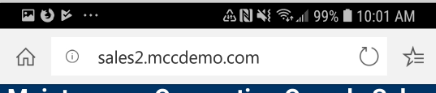
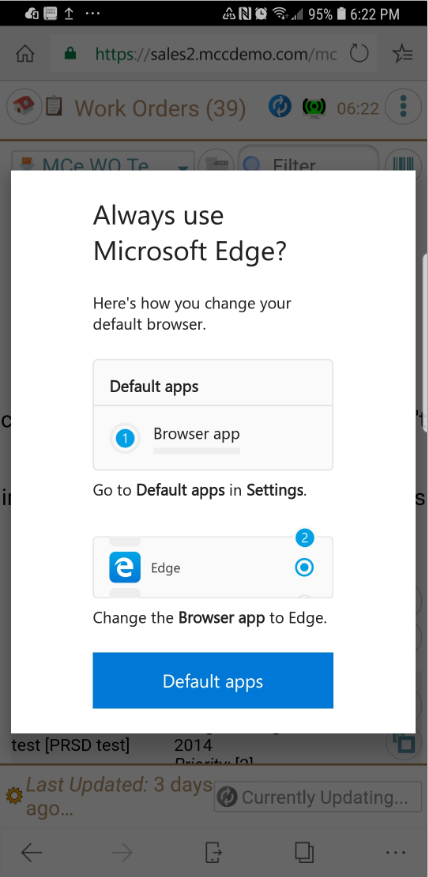
There is one 'irritating' feature in Edge, at least circa 2018.09.14 is that every time I load, it comes up with the screen to the left every time you load the product instead of letting you use the product.
There is no obvious (actually none at all that I can find) to get rid of this message.
If you click on Default apps, you can then click the back, then back buttons to work your way into the browser.
Then just avoid restarting Edge more often than necessary – but if you do, you'll get this popup, just follow the same steps again to get rid of it.
This was reported to Microsoft in early September 2019, so hopefully it will go away soon.
Shift
As a Canadian browser, with Chromium engine, we try to keep this one running. It has worked consistently from early 2025 to 2026.02 (last time this was updated).

The word 'Shift' in the upper left corner makes it easy to identify. The big shopping card with "Upgrade" on it is a tell tale that you have Shift, but you are running the 'free' version of it.
Vivaldi
As a European browser, with Chromium engine, we try to keep this one running. It has worked consistently from early 2025 to 2026.02 (last time this was updated).
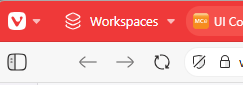
If not modified, Vivaldi is easy to recognize by their V logo in the upper left. However, Vivaldi is a stylistic chameleon, you can set it up in many different ways visually.
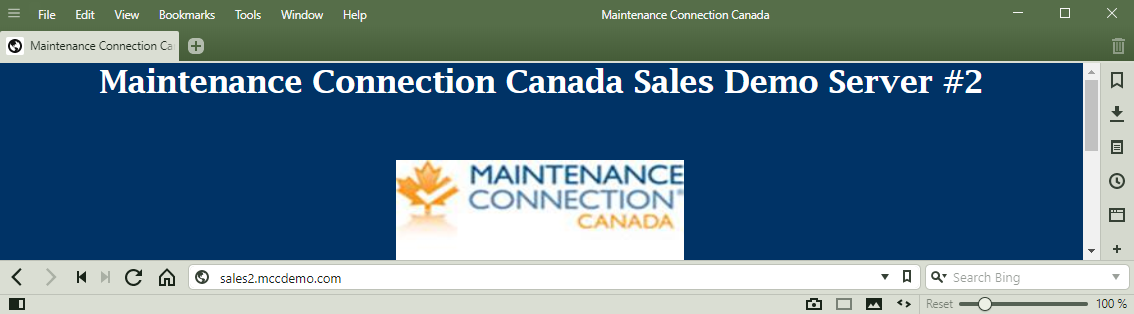
The following is also Vivaldi with many customizations. Notice that the Vivaldi logo is gone
Brave on Android last validated 2026.02
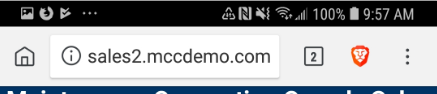
We have inconsistent results with this browser from time to time. A great browser for personal browsing, but it's inconsistent results with complex apps like ours means that it often, without warning, stops working for weeks or months at a time.
Brave on Desktop last validated 2026.02

Most recently, for about a month in late 2025/early 2026 it wasn't working. The problems probably relate to their desire to be very 'private', and they likely at times get to aggressive.
Notes:
- This one is easy to distinguish, notice the brave lion icon.
- Also the 3 line hamburger menu
Firefox (Mozilla engine, Spidermonkey JavaScript engine) on Android last validated 2018.08.30

Browsers we don't support and currently have no intention of supporting
UC Browser last validated 2018.09.04
 This is the most popular browser in India, it was written in China. But in India Chrome is still the most popular browser. Only in a few African countries and Papua New Guinea is the UC Browser the 'most popular browser. See the yellow below.
O 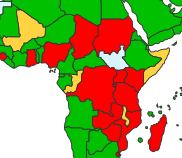 utside of the listed countries UC is hardly used at all except by people like us who test on different browsers periodically.
It even runs on Windows Phone, something the Author of this document quips that he is one of the 17 people in the world that still has a Windows Phone. (And he loved it as his favorite phone but out of necessity uses an Android phone and an iPhone for daily use.)
SeaMonkey on Desktop last validated 2018.09.04

Note the blue circle on the right with a stylized brine shrimp aka 'sea monkey'
Opera on Desktop last validated 2018.09.04
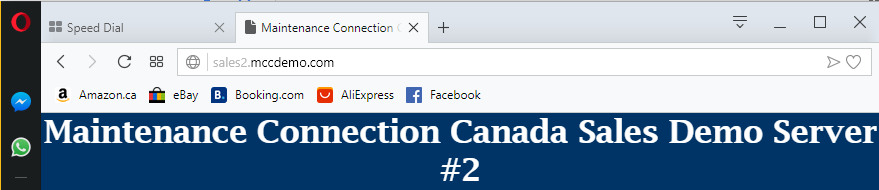
Note the red circle on the upper right, the 'Opera' logo
T 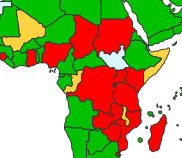 he only places where Opera is the 'major' browser is in several African nations, see the red in the map.
IE on Desktop last validated 2018.08.30


Notes:
- Look at the 'house' – it is on the right hand side of the Search.
- Look at the 'door' – it does not have a bottom, just like the house on Edge (but remember, MS considers Edge to be THE upgrade for the outdated IE browser)
What about browser 'x' – my favorite?
First a funny side note: It turns out there is a browser named 'Browser-x' and a browser named 'X-Browser'. But in this context I was thinking that you would fill in x with the name of your favorite browser.
There are 100's of browsers out there, likely more than 1000, last time I checked. Most, like Netscape, have stopped development (given up), but there are still some specialized ones sticking around and several crop up every month hoping to be the new Chrome or hoping to survive in a new niche. Most of these are buggier than any of the browsers above – so few people test them, but some people swear by each of them. None of them are ever likely to run a full bore application like MCe, though some may run MC since most of its features were taken from the old IE browser.
Site Specific browsers
There are 'site specific' browsers that only work with one site and typically have special features that only that site uses. Obviously none of these will ever work with MC or MCe or MC Express
Comments on all the other browsers
Then there are special purpose ones, the following are just ones I happen to have come across, don't read between the lines based on them being here, and realize, because so few people use them, these browsers all tend to be very buggy with new bugs coming and going with each release.
NOTE: Most of these have NOT been tested by us. The comments on what they are good for are taken by users of each of the browsers and are not a claim by us nor an endorsement by us. Our reason for including them here is for some awareness when a user says 'but I like browser x not the browsers you support'.
In the random ordered list below, once a browser is discontinued and no longer available, I remove its description and list it as discontinued, but I leave it in so I don't get questions about why I removed 'your', favorite browser.
If I'm missing 'your' favorite browser, or you know of an interesting/unique browser I should add to the list, send us a link to their web site and we'll consider adding it to the list.
Writing your own browser
Did you know you can write your own browser? There are several ways you can do this:
- Start from scratch. This obviously will be the hardest, but you can truly call it your own
- Start with one of the major engines, either current ones like Chromium (the most popular starting point), Mozilla or WebKit, or you can pick one of the old outdated ones such as the one IE was built based on. You can add your own UI look and feel, or you could have one with no UI at all – a command line driven one, whatever your fancy is.
It is these kits, these starting points that are a major part of the reason that there are over 1000 browsers available – if you can find them, and why you can create your own if you don't like the current set of choices. Note that the Canadian (Shift) and European (Vivaldi) browsers have a lot of USA content because they are built on Chromium.
As of 2018.01.05 I have stopped maintaining the following list of browsers. I've left it here to give you a starting point, but I found this page https://www.webdevelopersnotes.com/browsers-list which, while it claims by its title to be a list of all the browsers in the world, it is not even close, in part because of reasons listed above, but it is a much more comprehensive list than mine, it has about 115 browsers currently, and it appears the author is trying to keep it alive and updated.
A list of some of the other browsers
MxNitro. A tiny fast browser, it has NO options, it is missing any functionality they think will slow it down. You will never be able to run anything other than plain jane web pages (if even them) properly on this.
Torch. Designed to be your multi-media centre, focusing on playing music and videos.
Midori, discontinued
Citro. A faster, simpler version of Chrome. They try hard to release lots of upgrades with bug fixes asap. If you have trouble downloading large files, you might consider this browser as a special purpose browser just for that feature – it is their crown jewel and they work hard on restarting successfully (so you don't get to 95% and then have to start over) and they are reported as being a tiny bit faster generally for downloads.
Ghost, multi-session browsing. Lets you log into multiple facebook, Twitter etc.., accounts at the same time.
Baidu, A Chinese browser for social media and downloading videos
Sleipnir. A browser that brings the iOS look and feel to Windows and Android, it's claim to fame is easy to read fonts, and a few features for tabs.
Rockmelt, discontinued
Shilra a discontinued browser for MacOS
iCab a browser for MacOS
konqueror, a web and filesystem browser
WaterFox, based on an older version of FireFox, designed to work with legacy FireFox addons. They also claim to be 'ethical', "The 100% fresh, free-range, ethical browser' as they call themselves
Amaya, discontinued
Comodo Dragon, based on Chromium, no user tracking
K-Meleon, goal is fast and reliable
GNU IceCat (previously IceWeasel)
Pale Moon, goal to be as customizable as possible
GreenBrowser, low memory use. Simplified Chinese is included in the browser.
AOL Browser, discontinued, it's goal was to have people who don't know how to cancel their automatic credit card monthly withdrawals continue to pay them money.
EPIC. A browser dedicated to privacy and security 'out of the box' (and of course that blocks many things you MIGHT want to do – but it blocks many things you ought not to do.)
Ulli. Claims to have 'AI' (artificial intelligence) that guesses at what links you will next want to go to.
WebbIE. A browser specifically designed for people who are blind or have profound lack of vision. See also (sorry, the pun was NOT intended) MozBraille, pwWebSpeak, EMACSPEAK, eGuideDog, Simply Web 2000, EIA, netECHO, PnC Net, QualiSURFb(dufinct), ReadText, WYNN Wizard and WYNN Reader
LUNASCAPE. Multiple rendering engines. It's other claim to fame is an MDI interface (think really old Windows 3.11 style)
NetSurf, lightweight and portable
Slimbrowser. Its goal is to be slim and fast.
Lynx. Text based only. No JavaScript, not pictures to clutter up your experience. No ability to run anything really other than display plain text, integrates well with screen readers. May be particularly useful for visually impaired people.
Fluid. Stays on top, never lets another window go in front of it. Used for watching videos.
PirateBrowser. Its goal is to work around government restrictions, such as Chinese and Russian, also for anyone who believes in conspiracy theories in the USA that want to avoid having the Government of the US knowing what you are browsing.
Lion. An accountability browser, lets a list of people know everything you view. Used for example by people addicted to porn that want to get out of that trap.
Maelstorm. A peer to peer browser, used to minimize traffic and to get access to sites that are currently (or permanently) down.
Tungsten. Another slimmed down browser. Its claim to fame is integrating your local hard drive storage nicely into the WWW.
Blisk. A browser designed to help web developers test their work on the fly, rendering in multiple different sizes/browser emulations at the same time.
Darknet browsers
I have heard there are also 'Darknet' browsers that give access to various information that is so called part of the 'Dark Internet'. I have never done research in this, so I admit, my knowledge fits in as follows:
- There is no 'dark net', really it is a collection of hard to normally access or find info and each dark net info provider can have their own ways of accessing the 'hidden info'. I have heard that there is a calculator that if you type the correct expression into it, will give you a browser access to portions of 'the dark net'. Not sure if the source was reliable or whether they picked it up from the next source, but it is certainly plausible and it would be easy to create by someone with just a beginner knowledge of programming.
- I have seen it on TV shows, not a good source of real info.
- I have seen it in reference to 'going viral' and news reports
- I have seen snippets of information 'from' the dark net according to major news agencies (what USA President Trump calls 'fake news')
- I believe it exists in some way shapes and forms, though I suspect much of it requires access information that you need to get from 'a friend of a friend'.
- I believe it mostly exists as a sub-portion of 'the internet' and is more that access is blocked by obfuscation or security codes and visibility is limited. It is possible that normal DNS servers won't know where much of it is, even if they serve up the DNS records for it.
- I have never needed access to said info enough to try to figure out how to access it
- A large portion of the info on it would be generally considered 'illegal' or at least 'illegal in some jurisdictions'.
- A lot of the info is available by TOR, so browsers that can access TOR like TOR and Brave can access this info if you know where it is.
- Depending on how broad you want to call 'it', we have some of 'it' - our application lets only customers use and access their data, and there are no links to tell you which sub domains to go looking for, so while it in no way matches what TV means by 'the dark net' it does technically meet all the qualifications!
And every time I say 'it' above - remember, 'it' is really just 1000's of mostly unrelated portions of the internet, likely in the cases that most people would describe as the 'dark net' purposely made hard to find for parents, law enforcers and others.
So … it is likely true that there are some 'darknet' browsers that give access to specific sets of information that would normally cause errors (not found errors for example) when using standard browsers and standard methods, but I have no information to share on them beyond this, and you can be pretty sure that those browsers would not bother to have features to run advanced applications like MCe – though they will have equally advanced features for other purposes.