

 Maintenance Connection Everywhere (MCe) · EAM/CMMS manuals
What is sync'ing?
Sync'ing (Synchronizing) is the process by which data on your cell phone, tablet or computer is sent to the server and the sever sends updated data to your device: It puts your data and the server data 'in sync'.
Each version of MCe does more and more for you. With Version 11, you almost never have to press the sync button manually, it almost always happens automatically for you fast enough that you won't want to press the manual sync. But we still provide you with a manual sync button for those rare cases that you don't want to wait for the automatic sync'ing to happen.
Overview
Unlike the close button on elevators, when you press the manual sync button, if you have enough of1 an internet connection, MCe will sync 'now'.
Most of the time, sync'ing happens in the background. Your changes are saved, you get new data without having to worry about forcing a sync 'now'.
But there are times when you might benefit from forcing a sync 'now' – or at least feel better about it!
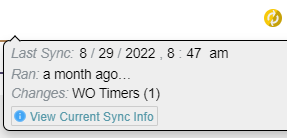
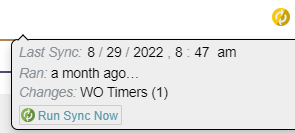
If there are no changes on your device that haven't been sent to the server, you will see the blue
 sync button. If it is orange, it means there are pending changes.2
Reasons to press the sync button (MCe 11.0 and later)
I'm going to be offline; I want to make sure I have everything I need
If you have a more or less working internet connection, even if it is flakey or goes out for a few minutes at a time, we will successfully sync data every 1 to 30 minutes.
If you want to have the most up to date data to work on while you are offline, such as when you are about to go on an airplane that doesn't have internet, or you are going out to the stockroom for several hours, if you don't have all the data you will be needing, sync'ing to get it on your device makes sense.
I'm done my shift now and I see there are changes pending.
We don't save every change the instant you make it. Why? So you can have time to make corrections without having every little detail recorded forever as a change. As a result, if you have a more or less OK internet connection, we are saving all your changes after a few minutes, up to 10 by default. If you go from one work order to another, we will take that as a sign that it is OK to save that work order, but if you continue to work on the same one – we might not.
So if you are coming to the end of your shift and you see there are changes that haven't been sync'd to the server, doing a manual sync tells the system "I'm done – don't wait, save everything ASAP."
I fixed an error, or My manager fixed an error, I want to verify it is fixed
If you have had an error and think it has been resolved – either on your device or on the server, you can do a manual sync to check, rather than having to wait 1 to 10 minutes for it to happen automatically, or perhaps 30 minutes if you are working on something else (we sync what you are working on more frequently than things you are not currently working on.)
MCe 8.0 and earlier
Yes. To save your changes to the server and to get new data, you need to sync.
Typically you will sync twice a day (morning and evening), evening to push your changes to the server, morning to get anything new for you. And then maybe once again at lunch time, or when you have been told there are changes you need. If you are assigned WO's during the day, then perhaps every half hour or so you will want to do a manual sync
Think of 8.0 as 'everything optimized for offline use'. Many features that logically required you to be 'online' live were simply not available.
If you are reading this in 2023 or later:
- Ask your service provider to update you!
- Once we are confident everyone has been updated, we'll be removing this section from this document.
MCe 8.1 to 10.x inclusive
8.1 is a major upgrade for the sync process compared to 8.0. Under normal circumstances, this version should have been named 9.0 but at the time we were trying to keep our numbers in concert with MC so we named it 8.1.
Think of 8.1 as optimized for both online and offline. When you are online you have more features. When you step into a zone that doesn't have network connection, you still have all your offlined data available to worked on – even if you want to go back and forth between several wo's or other data such as assets.
Footnotes
-
1: If you have NO internet access, we can't do a sync until you get back in range. But if you have a so called 'flakey' internet, perhaps as you are walking around the inventory shelves and occasionally get a connection for a few seconds – that is "enough of" to allow us to sync – it may take a lot longer depending on what percentage of time you have connections and depending on how long each connection time is … but we'll still keep working as you get connections. ↩
-
2: If you have the very rare blue/yellow color deficiency (blindness,) we are told that we have picked colors that will let you distinguish by shades – if that is wrong, let us know and we'll work something out with you. But as of this writing, we have had to go based on documentation because we don't know of anyone that has blue/yellow color deficiency. ↩