

 Maintenance Connection Everywhere (MCe) · EAM/CMMS manuals
TL;DR
2026.03.To avoid data corruption and UI problems in Accruent MC it is urgent that you update to using the "Desktop App for MC" immediately.
On purpose by Google Chromium, 1% of users will start experiencing March 2026 and by September 2026 100% of users will be experiencing. You need to start using the "Desktop App for MC" before it affects you.
And after you do, for the other reasons, you won't ever want to go back to a browser for MC!
Permanent solution
Our "Desktop App for MC" is a general release product as of version 3.0
It is available at NO EXTRA CHARGE for customers that get their MC SMA through Asset Pro Solutions Inc dba Maintenance Connection Canada or ITIQPro Inc.
For more info and to get the product see Desktop App for MC - So much better than in a browser
Products affected (without the Desktop App for MC):
- Accruent's MC, all versions from MC 1.0 to MC 2025 (Verified explicitly on MC 2025, MC 2022, MC 8.9, MC 8.0, MC 6, MC 3.5). See experience section below for more details on how it affects.
- Chromium is not just targeting Accruent's software, it is against a wide number of other web applications on the internet, their results will vary depending on how they use this browser feature.
Sometime likely in Oct 2026 or later, the easiest temporary work around fixes will cease to work, and a longer term but still temporary fix will be available by Chromium for all devices under Enterprise policy, likely with some overlap. If you are using a temporary fix, make sure you switch to "Desktop app for MC" ASAP.
Switching to Edge or Brave or Chrome (whichever you aren't currently using) won't work, they use the Chromium engine. It may APPEAR to work if it is before Sept 2026 because only a percentage are affected - and you roll the dice again when you switch to a different browser.
Switching to Firefox or Safari won't work - they have had this issue going back many years and is one of several reasons that neither Firefox nor Safari are compatible with MC.
Does not affect:
- MCe (all products and versions)
- Software that doesn't use the deprecated event.
Announced by Chrome in 2019:
In 2019 with subsequent announcements after, (see https://developer.chrome.com/docs/web-platform/deprecating-unload) effects starting in 2025 for major web applications and 2026 for all remaining web applications such as Accruent's MC. As you can see on that link, as of June 2nd, 20% of people and sites are affected. That means if Chromium/Google picks your URL - everyone will have the problem. If they don't pick your URL then statistically 20% of your users will be affected. And as you can see at the link, they have not published the algorithm for how they are picking which site and who will be affected, just the statistical probability, so there may be some variation in how it is applied that we have no control over.
Experience if you aren't running in the "Desktop App for MC":
Random UI failures, each time in and/or each user may experience one or more of:
- you hit the save button, but data is 'randomly' not actually saved
- data 'randomly' does not visually update properly
- buttons, like Save or Cancel, 'randomly' do not show up
- Sections of the page, like toolbar, 'randomly' do not show up
They aren't technically random, and may be based partly on timing, partly on Chromium rolling the dice. So something that works 'this time' doesn't work 'next time' having therefore the effect of appearing random.
We suspect, at times, it will appear consistent for a while (whether broken or fixed), a while perhaps meaning days, due to page caching.
It will be frustrating for Accruent as they may think they have fixed all the issues only to find out that some where 'hidden' and only show up for some people. Our "Desktop App for MC" fixes it from the opposite direction - by getting rid of the problem at the source.
In the developer tools 'console' the browser even tells you when it is purposely corrupting the UI.
Getting to the Developer console
There are rare times you want to get into the 'developer console' in a browser. When you do there are several ways. In Windows, the most reliable way is to hit right mouse and choose inspect, if your Fkeys have not been reassigned, you can often press F12 function key in your browser to get developer tools, unfortunately a lot of software reassigns Fkeys so this may not work for you. On many browsers, click the three-dot menu in the top-right corner, go to More Tools, and select Developer Tools. On many browsers, pressing Ctrl + Shift + J will work. In the Android and Apple apps, there is a button is the user button that lets you open up the console on the device, it also works on other devices,
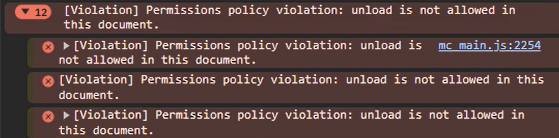
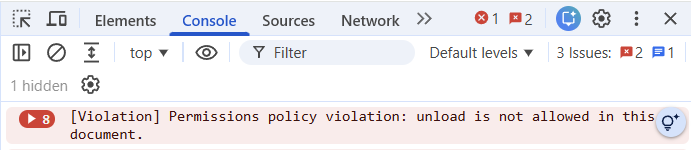
Cause, Chromium (Chrome, Edge and more):
Chrome (Chromium) 146.0 on March 10th has picked 1% of page loads to break a feature than MC has used heavily since version 1.
Google promises that 2026.09.22 (Sept 22) 100% will be broken unless you set the special option. They are not yet saying when that special option is removed nor when the longer lived Enterprise Policy solution will be removed.
More information from Chromium directly https://developer.chrome.com/docs/web-platform/deprecating-unload
Solutions:
"Desktop App for MC"
The best solution. And an excellent product you should be using even without this problem.
This provides permanent solution, and is especially important for customers who:
- will be willing to upgrade to Accruent's fix, as above, when Accruent has it ready. For them, this solution, though permanent, can be treated as a temporary fix if you want, turning the need to upgrade from a requirement before Chromium breaks them permanently, into a 'upgrade when convenient for you'. However - once you try the Desktop App for MC, you won't ever want to go back because of the many other benefits we've taken advantage of since 2017.
- are not ready to upgrade to newer Accruent MC due to a multitude of very good reasons known to them and sometimes us, and in most cases, Accruent. Most are around changes or bugs that break their critical functionality, others are around having a very large amount of custom code that can not easily be upgraded to newer fork points, others are around an external app they have created that interfaces with MC (like our LoginHub, DataHub, API, MCe etc.., do) and requires changes to work with the new version of MC, new details of which not known until Accruent releases their release that fixes this.
- We don't yet know whether any fix by Accruent will fix custom pages. They may need to be paid to be customized again if you don't want to use our free solution.
- who own their Accruent MC but are not under SMA with Accruent and are are therefor not eligible to receive any upgrade
- Do NOT have 100% of their computers that access MC under Enterprise policy.
This is an 'included at no additional cost' product for customers who already have their MC under SMA through us. For other users with Accruent MC we have options to come to us for SMA.
This also will be bringing soon the benefits of the Desktop App for MC on Mac and Linux.
Accruent, new version no date yet:
Accruent is working on a new version that fixes it. This is going to take them a lot of work to get it done and done correctly.
We will update this page as soon as we get updates from Accruent (last verified 2026.05.15) and when we have a version from them ready for customers that fixes it. We intend to upgrade our SaaSs to this as soon as it is available and tested. This should work on all platforms Accruent MC runs on.
Temporary Solutions.
A browser setting in every user's browser
This solution, according to Chromium, should work until at least Sept 21 2026, and (not according to Chromium) likely until the end of October or November 2026. But you wont' get the other benefits of the "Desktop App for MC"
On an individual browser you can set:
1. Type the following in on the browser URL line. (This works for Chrome and Edge, edge will change the 'chrome;' part to 'edge:')
chrome://flags/#deprecate-unload
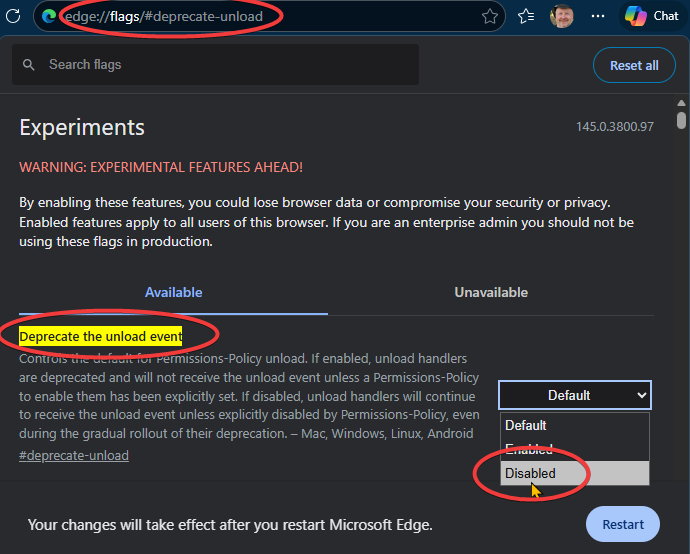
2. Choose disable
3. Click on restart
Enterprise policy (As in, server/software applied enterprise policy)
If you are able to implement a Enterprise policy you can do the above for now and, there will be a solution available from Chromium before the above temporary solution is fazed out.
I will only work for devices that are under your Enterprise policy. Watch the Chromium blog from the link above if this is the path you want to go.
To be clear, the longer term 'temporary fix' Chromium is promising, will ONLY be available to devices that are under enterprise policy, there will be ability to use it for individual devices.
Chromium is not yet saying how long that temporary fix will work