

 Maintenance Connection Everywhere (MCe) · EAM/CMMS manuals
This document looks at the experience after you have a correct, tested URL for Direct Entry, and the problems that can occur.
The Direct Entry is a way for you to use a URL to take a user directly to an Asset or WO or other object.
This could be done by emailing you a URL, giving you a QR code that was generated in MCe (or any other QR code generator off your choice). It could be a link in your GIS or your CRM. It could even be that you are in the asset or other item on your desktop and you pull up the QR code to go to it on your cell phone.
Once the IT department has got the links working (and tested), this doc looks at the user experiences that can occur.
There are 4 general states you can be in:
- No one is logged in and no one has used this system1 before
- No one is logged into MCe but someone has used this system before, but not you
- No one is logged into MCe but you have used this system before
- You are logged into MCe
- Someone else on this system is logged into MCe
So what is the flow
When you start with a system that you have never logged into. You will first be presented with a login page before you are taken to the object (such as an asset.) This is state 1 above.
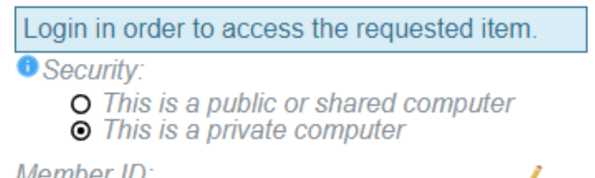
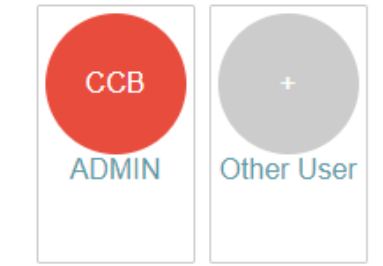
If you or someone else has already used the system but you or all of you are logged out, you'll be presented with the same page, but presented with the user(s) already set up on this device and the option to sign in as a new user. This covers states 2 and 3 above.
If you are already logged in, this covers state 4 above, we bypass the above and take you straight in.
If another user was logged in, then you will end up being logged in under their name. On shared devices this will always be a problem, not just from Direct Entry, and as such shared devices should always be logged out from when you are done using MCe. It is quick and easy to get back in, even when offline as long as you remember your pin, so there is no reason to not logout frequently on shared devices.
For most companies, you only have one database, and therefore all users with access to the system likely have access to that DB. If you have 2 or more databases, and a user uses a Direct Entry link to a database they don't have access to, they will get the following message:
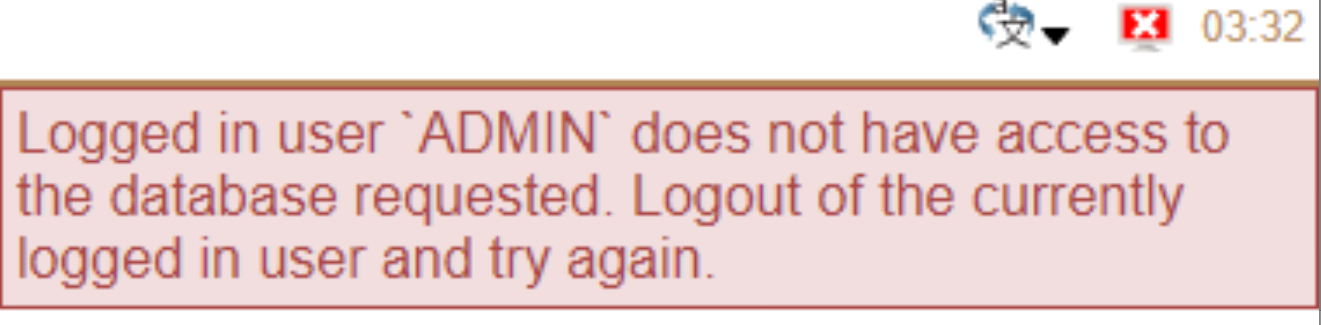
You can also get that error of there are 2 people who can log in on the same system (so a shared tablet, a shared cell phone or 2+ users sharing a login on a Windows, Mac or Linux computer, but having their own separate MCe logins as required by license.) In this case it may be that one of the other users (state 5) was already logged in, and when the current person tried to go to the Direct Entry link, it of course used the logged in user to attempt to go there. The error message that comes up tells them which user didn't have access to try to make it obvious what the problem is.
Of course the problem could be that someone forgot to give this user access to the database, in which case the solution is to have an administrator grant them access.
Footnotes
-
1: In this context, 'system' means, the computer, the user logged in on the OS (Typically not an option on iOS or Android, but a common option on Windows, Mac and Linux), and the browser. ↩