

 Maintenance Connection Everywhere (MCe) · EAM/CMMS manuals
Accruent's MC has been adding support for Timezones.
Right now you MUST make sure the Server Time Zone is set to the ACTUAL Server time zone. Faking it to try to solve 1 problem will cause multiple other problems. So for example, if you are running on one of our Pacific time zone SaaSs, you must set and leave the Server Time Zone preference at Pacific Time. (Which will automatically dance between Standard and Daylight time.)
- It doesn't matter that some of our servers are physically in CST year round.
- It doesn't matter that everyone in your company is in Eastern Time Zone and switch between EST and EDT based on the provincial government's whim.
Then you must, for each repair center, set the 'client' time zone to the correct time zone. For 85% of our customers, all repair centers are in the same Time Zone.
Then all users affected must log out and back in.
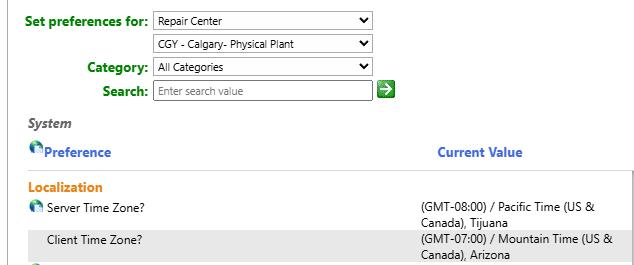
If your client time is WEST of Pacific - talk to us. See 'Why Pacific' below. So we can work with you to make sure things work as best they can.
Gotcha's:
It is really minor, but if you are not in Pacific Time, the "time change" twice a year will hit you 4 times a year. Let's say you are in Eastern, it will hit you around 2:am when you change and it will hit you around 5am when Pacific time changes. This may result in a small amount of data having the wrong time. But trying to fix it will make it worse (fix it in one place, but make it wrong in another.)
If some of your people in a repair center are in one time zone, but any others are in a different time zone. Seriously consider splitting into 2 or more repair centers.
If you 'lie' about the server time. It might SEEM to fix some problems, but all your data will be stored one or more hours off from reality, and when you realize you have to fix it to say the server time, that data will always be off by that number of hours. So ... don't do it, use the server zone time.
As above, it doesn't matter where the server physically is, it matters what the server time zone is.
Why Pacific?
Why do we set most of our SaaS servers to Pacific time? Because there is an issue with PMs and some MC automations around the definition of Midnight. If the server is EAST of the Client, you can end up with things like WOs saying "due yesterday", because they only look at the day, and generated at Midnight 'today' is 'yesterday' for everyone West of the server (but East of the international date line.) To avoid this problem, we recommend that most automations NOT run between Server midnight and Client midnight.
A bit more detail or another way of explaining it: if the server is EAST of the user, it creates things 'yesterday' (or 'today' if you look at it before you change to tomorrow.) For example if you create WOs at midnight server time and the server time is 2 hours east - for the next two hours it will say it is 'due today', but more realistically, when the user comes in in the morning, it says it is 'due yesterday'. This is because MC doesn't use any 'dates' it only uses 'datetimes' so something on the server that is 'today at beginning of day' is <today>:00:00:00 … which, if you are 1 or 2 timezones West translates to <yesterday>:23:00:00 or <yesterday>22:00:00
So if the 'furthest West user' is 3 hours, 3 timezones, later - run your PMs after 3am server time.
This gets a little trickier when your server is in Pacific time and you have users in Australia, China, Philippines etc.., Talk to us if this is your case and we'll try to assist.
// are you on our SaaS or on Prem?
You are a SaaS customer if you access MC through a URL like one of these (where * means "any value") https://*.mycmms.ca or https://*.mcc-on.ca or https://*.maintenanceconnection.ca . Most other URLs means that your IT department or someone in your company controls the server(s) that your MC/MCe system is sitting on.