

 Maintenance Connection Everywhere (MCe) · EAM/CMMS manuals
Note Modern MCe 12.1 and higher has a fix that works around this Safari bug
If you have come to this document because of clicking on the link of the following error message. What you really need to know is: You should reboot your device, or at least reboot the app (i.e Apple’s Safari browser).The link for instructions on how to reboot your iPhone/iPad and Safari are here.
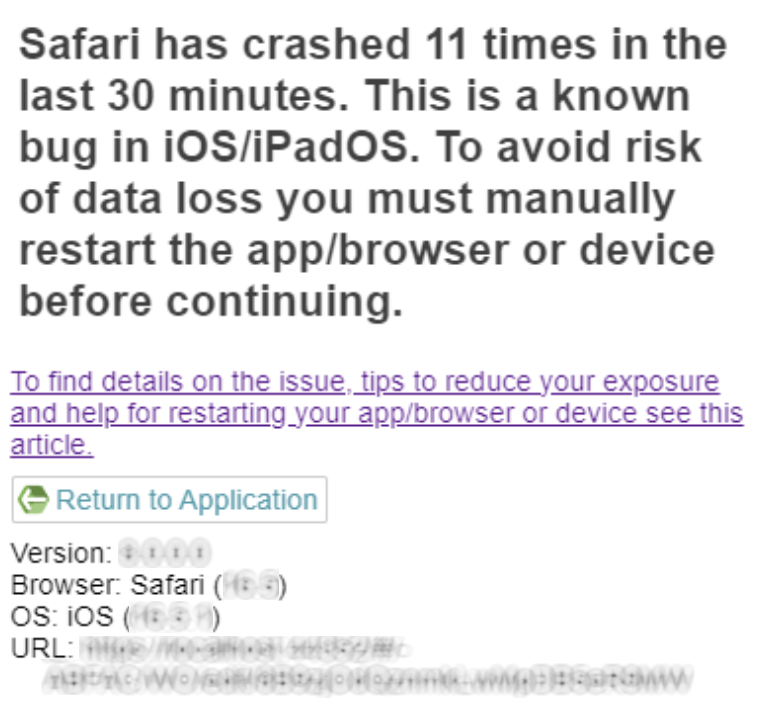
Prior to MCe 10.1 we received a different error that we just reported: InvalidStateError: Failed to execute 'transaction' on '<db>' - The database connection is closing.
Apple technical documentation about the Apple/Safari/Webkit bug discussed in this article:https://bugs.webkit.org/show_bug.cgi?id=197050(Webkit is the base engine that Apple writes for Safari)
The TL;DR version of how to restart the app/browser or device is as follows:
Reboot your i*OS device every day or two, here is Apple’s instructions for how:
Restart your iPhone:https://support.apple.com/en-ca/HT201559
Restart your iPad:https://support.apple.com/en-ca/HT210631
When you run into an error that tells you to reboot the app/browser or OS, either follow the above or you can try first:
Quit and reopen an app on iPhone:https://support.apple.com/en-ca/guide/iphone/iph83bfec492/ios
When Apple breaks the above links in a site we will update them as soon as we are aware. So … if you find the above don’t work, please let us know and we’ll update them.
We are continuing to improve our code that works around this Apple bug, and we’ll continue to look for ways until we have completely worked around it, or Apple has finally fixed it. (Apple has been trying for 5 years.
For those that want to understand the technical details:
If you want to understand the error more, this document attempts to do it. But for many users, this is either going to be too technical, or just plain boring. The link at the top gives you the practical advice of what to do and a quicker ‘layman’s’ explanation.
A memory leak refers to a type of resource leak that occurs when a computer program incorrectly manages memory allocations in such a way that memory which is no longer needed is not released. In other words, it's when a program uses memory to store data and then fails to free up that memory when it's done with it. This causes the application to consume more and more memory, which can slow down the application or even the entire system.
Every device (iPhone, iPad, Mac, Windows computer, Android cell phone, Android tablet, Linux box) has a limit to how much memory it has. What you use the computer for, yes a cell phone is a very sophisticated computer, determines how much memory you likely need.
Memory leaks can be especially problematic in long-running software, like servers or devices that rarely reboot. Browsers like Safari, also tend to be started when the device is started, and never restarted. Over time, the leaks can accumulate and consume a large portion of system memory, reducing the amount available for other applications and potentially leading to system-wide slowdowns or crashes.
The most common causes of memory leaks include:
Failure to free up memory: When an application uses memory to store data and then fails to free it up after it's done with it.
Dangling pointers: This occurs when an object is deleted or deallocated, but references to it still exist elsewhere in the program.
Cyclic references: This happens when a group of objects reference each other in a cycle, preventing each other from being garbage collected even when no other part of the program still needs them.
Memory leaks can occur in almost any language, but they're particularly common in lower-level languages like C and C++ where developers have to manage memory directly. Modern languages like C#, Python, Java, JavaScript and Swift use a feature called garbage collection to automatically free up memory that it determines is no longer being used, which can help minimize the memory leaks, especially compared to programs written in languages like C and C++. However, memory leaks can still occur in these newer languages, often due to programmer error.
Not "every" computer or program will have significant memory leaks, but they are common in software because they can be difficult to prevent entirely. Even small memory leaks can add up over time, so it's important for developers to be aware of the potential for memory leaks and to use tools and techniques to minimize them. These include good programming practices, code reviews, and automated testing tools that can detect potential memory leaks. This reduces the number of leaks. And as soon as we can find some perfect humans who can program perfectly, we will get rid of even more! Sadly, some leaks will still occur, because in some cases it is impossible to figure out when something is not needed, all we can do is make good guesses.
So now, we come to the problem at hand.
For purposes of this discussion, Safari is two different programs:
- The part that handles the UI, what you see
- The part that handles storing the data in the background, the “database manager”
When Safari, iOS, iPadOS or MAC find themselves running out of the memory they have available to them, they have to do something. They can swap tabs out of the runtime to slower memory, where slower is like the different between a rocket and a sloth, literally 1000x’s of times slower. They can close applications that aren’t running but whose programmers have said “you can close me if you need memory.” And they can just arbitrarily close things that aren’t being used.
The problem that we are encountering with this bug is likely that the OS (Operating system, iOS, iPadOS, MAC) is looking at what is running and doesn’t realize that the database manager belongs to Safari. And before you say ‘that should be obvious’, trust us, it is not that easy at the level we are talking about – if it was, Apple would have fixed it in 2018, instead of it still being around in 2023.
So, because either Safari is using too much memory, or because other programs are using up too much memory, the OS decides to shut down the database manager, mistakenly thinking it isn’t being used.
Safari then tries to call the database manager, and it fails. Safari doesn’t know why – it thinks it should be there. So Safari crashes, and tells our code that it crashed.
We then proceed to tell Safari not to panic, but to be patient, then try again. While we are telling Safari to be patient, you are shown the next screen:
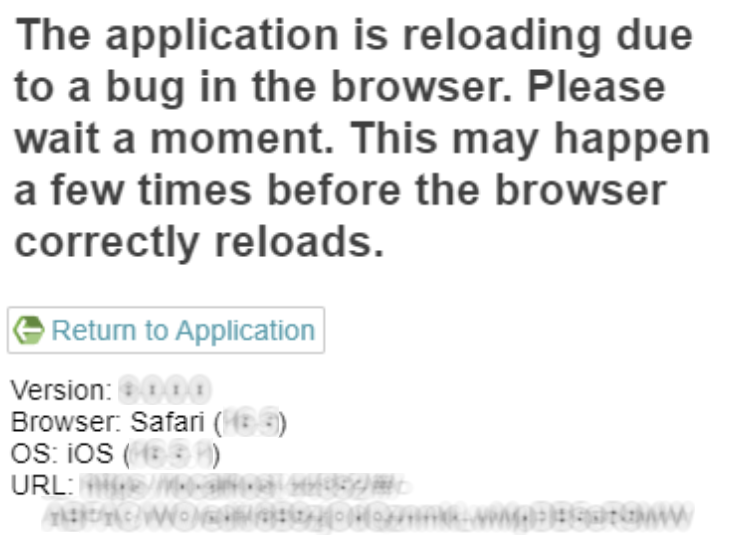
What’s happening here is we and Safari are waiting for the OS to finish up all it’s reorganizing of memory. Once we think it has had enough time to do that (it doesn’t tell us when it is done) we tell Safari to load the database manager and try again.
This often works.
Eventually though, there is just not enough memory, or the OS has decided that, for whatever reason it has, it is unwilling to let the database manager run. At that point, restarting the device, or sometimes just restarting Safari, is needed before it will start to work again.
All of this on our part, on Safari’s part and the OS’s part is complex code. For this specific situation, Chromium has got it worked out and doesn’t seem to have this problem – perhaps their database engine is the same as the UI, so this ‘shut down one but not the other’ bug doesn’t exist for them.
Now, if you are an Android or Chrome or Edge user. Don’t get smug! While this specific bug doesn’t happen, AFAIKT outside of the Apple family, when Chrome or Edge run out of memory – they also crash/hang/stop working. This is why we recommend that all devices be rebooted weekly, and for some users with devices that have very little memory compared to what they are being asked to use, they may reboot their devices daily.
So, while this is a very annoying bug that is very visible in the Apple ecosystem, this is not a condemnation of Apple, just a reality we, and you, have to deal with.