

 Maintenance Connection Everywhere (MCe) · EAM/CMMS manuals
WO, Edit
Edit Page
The WO Edit page gives you access to everything you are permitted to see and change on the WO. A person with the MCe/MCxLE WO Technician module has many fields that can be edited, a person with the MCxLE/MCe WO Manager module has access to more changes.
A 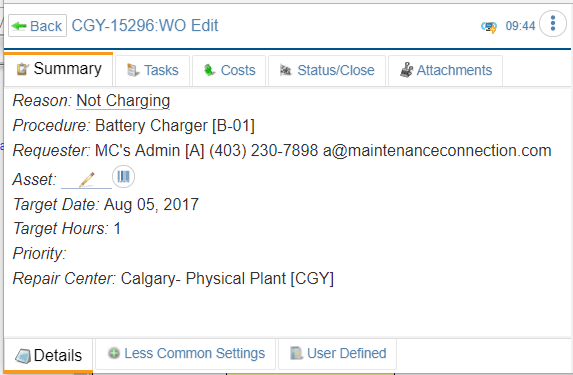 quick look shows that you can see various 'sections' of the work order by accessing (clicking on) the various tabs.
The Summary Tab (selected in the screen shot) has several bottom tabs that are visible. Other tabs showing are
- Tasks, which will give you access to the list of tasks and their details.
- Costs, which give you access to Labor, Parts and other costs
- Status/Close, used to see and update the status including adding labor reports (comments)
- Attachment Tab, documents from the WO as well as asset, photos and signatures.
- If you have an asset attached to the main part of the wo an extra tab will show up to give access to the Asset including work order history.