

 Maintenance Connection Everywhere (MCe) · EAM/CMMS manuals
All of these have extensive documentation, training courses and so on on the internet, so we aren't going to try to teach you any of these. Our documentation more focuses on the specifics of how to use within our system.
Most customers use our Professional services to do scripting, we work with them to define what they want, then we write it for them. We comment the code and write it to try to make it easy to edit
Different scripting languages:
JavaScript
Inside our Advanced reports you can type JavaScript for all sorts of purposes, getting data from an API, formatting, sending special codes to enhance the report.
There are several other places, the most common is in our Events and Actions. It's great for anything that is custom and doesn't make sense to be in the 'package' or that isn't in the package 'yet' and you need it 'now' (It is typically 1/10th the cost to have 'custom' code vs. general code that will work for everyone.
There are so many 1000's of places to find info on JavaScript, we don't have any advice on where to start. Search for intro to JavaScript and find one that fits the way you think and learn.
liquid templates
Used in places like the preferences for ID and Name, that let you create one or both from a 'template'. So you can create the ID from the name instead of having to type it in all the time. (If you do this, remove ID from the New UI once you have it working)
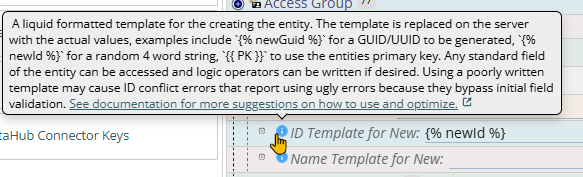
LiquidJS Template language (Liquid JavaScript)
SQL
Inside our Standard and Advanced reports you can type SQL to get data from the CMMS data.
SQL can be used in our Events and Actions to do routine changes to data. Maybe you want some complex assignment rule to be applied to each new Work Order of type xyz. SQL is great for that.
We have a SQL tool for advanced users to access and even change the data. Unlike a tool like SSMS (that your IT staff may know) we track EVERY command so there is audit history of changes made through the SQL tool. Almost always SQL that makes changes is written by our Professional Services, and then we give it to you to run.
Most of our SQL is either MS SQL or PostgreSQL, the two are very similar for most purposes. The mast common difference would be that MS SQL uses SELECT TOP (expression) [PERCENT] [WITH TIES] column_name FROM table_name ... to limit the number of rows, whereas PosgreSQL uses the SQL ANSI standard SELECT select_list FROM table_expression [ ORDER BY ... ] [ LIMIT { count | ALL } ] [ OFFSET start ] to limit the number of rows.
Visual Studio Code (VSC) is an excellent tool for SQL, so is 'poor man's sql': Poor Man's SQL
JSON
This is what is known as a 'key/value' storage system. It has {} around the whole thing, then inside it has keys in double quotes ""s and then a colon : then a value.
- When we export data it is often exported when possible into JSON data. This means it can be edited and often imported back in.
- So for example, if you are creating preferences for 16 access groups. It may be easier to create it for one, then export the preferences, tweak the access group in a tool like VSC or Notepad++ or even the venerable Notepad app, then import them.
- In our SQL tool you may run into data (such as the new and old data in our audit table) that is provided in JSON format, all on one line in the cell.
- In our Query defining tool, the query is stored in JSON format, all on one line
Handy tools:
A handy tool to have is a JSON pretty printer. If you don't have one you like, we usually use https://jsonformatter.org/json-pretty-print you can edit there, then at the top of each window there is a 'remove whitespace' which lets you bring it back to the 1 line format if you want or need.
If there is a lot that you want to read, but not edit, you might prefer their JSON beautifier https://codebeautify.org/jsonviewer which gives you a tree that lets you 'drill down' and 'collapse' to make the data easier to understand.
There are many other tools, both free and paid, that give different features for viewing and editing JSON.
Where to next:
From here you can explore the internet on all the above. You can look at our docs for making specific changes that you might want to make, or you can more generally explore any of the locations we have script as discussed above.