

 Maintenance Connection Everywhere (MCe) · EAM/CMMS manuals
Should I logout?
What is the purpose of logging out of a product like MCe?
First of all, it makes everything 'feel' right. But really, just like eMail on your phone, there is no normal reason to need to logout, you can stay logged in all the time if you want – and most people do just that.
This is largely because cell phones and most computers these days have the option to require a password after they go to sleep or turn off, you might have no reason to logout of MCxLE/MCe.
But for others, your phone turns on with just a swipe, and you may want to 'logout' of MCe/MCxLE to prevent it being used by children, others or if your phone is stolen or lost.
Set your pin or logout the first time you login.
Logging out will set your pin so that if you are logged out you can come back in with your pin, even when offline, instead of having to go online to log in.
How do I logout?
To logout, you need to be on a page that shows the Menu button.

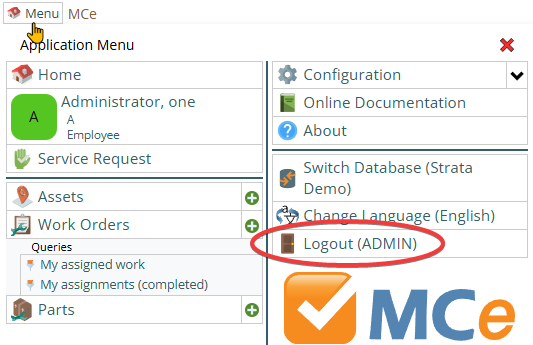
To logout, you click on the button marked logout.
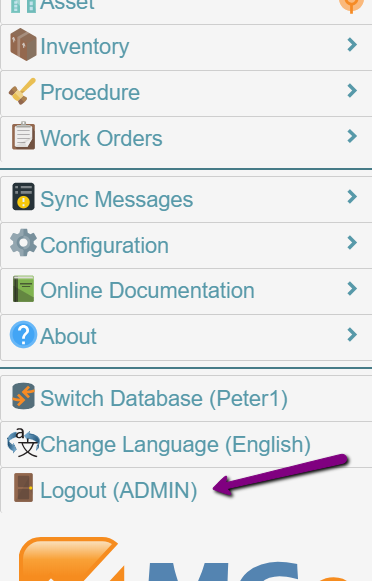
On a cell phone, as in the image above, you scroll down the menu to find it, a bit above the MCe logo.
On a wider screen, it will be on the last column, a bit above the MCe logo. The last column will be the 2nd or 3rd column of the menu depending on how wide your window is and which modules/tools you have access to.
When you chose Logout, if this is your first time to logout you will next be presented with 2 pin/password boxes.
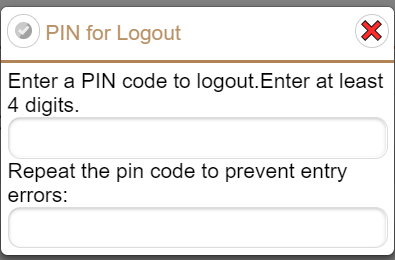
When the 2 PINs ae the same, the checkmark will become available to select. You can enter in very long passwords (pass phrases) if you wish.
Some browsers will ask if you want to save the password. If you let it save it … then when you click on your login button you will likely be logged in immediately – because the browser will fill in passwords that it saves.
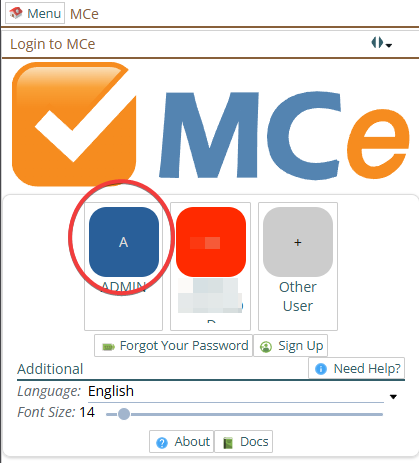
Why would you want to tell the browser to remember? If your cell phone or tablet or computer is locked with a password, then you may decide that is enough security. (Many people do and Chrome developers obviously think it is a good idea since they always ask until you give up and let Chrome save your password.)
When you click on your button, the following will show up (and then, if you told the browser to remember your password, it will quickly disappear.
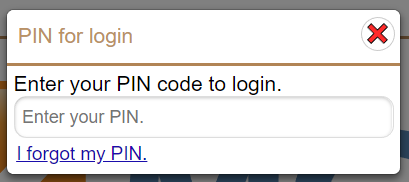
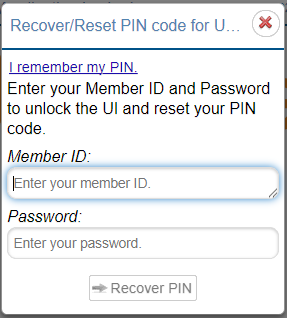
You must be online to recover/reset your PIN. Why? Because we never store passwords – we only store encrypted hashes of your password that are impossible to reverse and we always send passwords encrypted (one way hashed) so it is impossible for us to check your password without you being online.
Now that you have a PIN saved, when you click on logout you are immediately logged out.
What can I put in as my PIN?
While a PIN means 'Personal Identification NUMBER' we allow any characters that would normally be accepted for a password. So enter whatever you want.
If you are on a low security system (such as a cell phone with its own lock) and you are just trying to keep your kids out … pick an easy number, otherwise, avoid easy ones. In all cases we recommend you avoid ones like 1111, 2222 etc.., or 1234. Those are the 1st ones I would try if I wanted to get into your system.
We require a minimum of 4 digits.
Your PIN will be stored hashed and salted using encryption (not encoding) so no one can derive your PIN even if they find where we store the hashed value in your computer. Even if they find the code, we use a cryptographic algorithm so there is no known way with today's computers to crack it. Maybe in in 2030 it will be crackable, we'll see, but by then we will be using a more secure algorithm if needed.