

 Maintenance Connection Everywhere (MCe) · EAM/CMMS manuals
1. Overview
The shrink feature in Microsoft SQL Server is used to reduce the size of database data and log files by reclaiming unused space. This is typically done after large data deletions or archival operations.
2. Availability Across Versions
The shrink functionality has existed since early versions of SQL Server:
- SQL Server 7.0 (1998)
- SQL Server 2000
- SQL Server 2005 and later (all modern versions)
It remains available in all current SQL Server releases.
3. Types of Shrink Operations
3.1 Database Shrink
Shrinks the entire database.
DBCC SHRINKDATABASE (DatabaseName);3.2 File Shrink
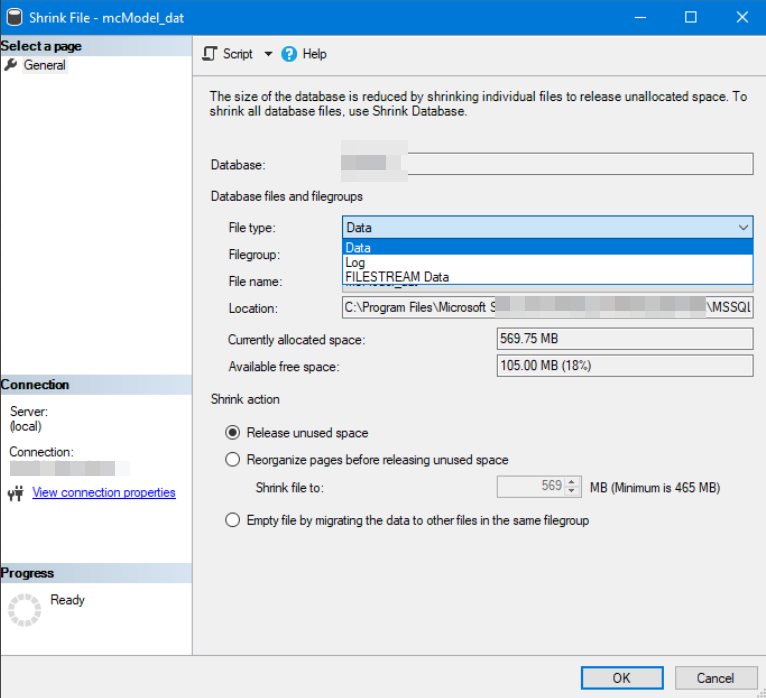
Shrinks a specific data or log file.
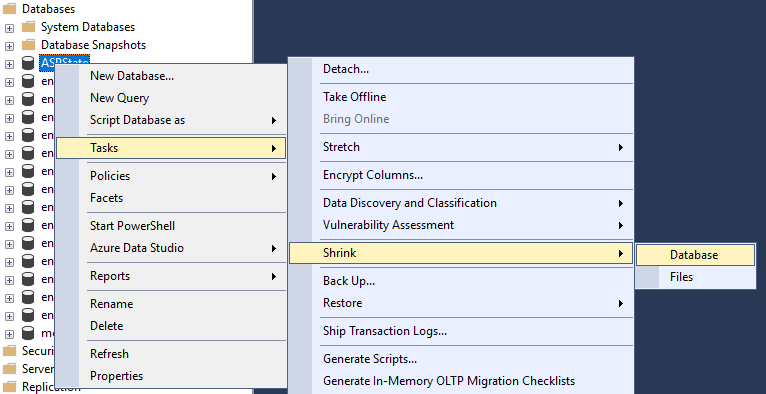
DBCC SHRINKFILE (LogicalFileName, TargetSize);3.3 GUI Method (SSMS)
- Right-click Database
- Tasks → Shrink → Database / Files
4. Official Microsoft Documentation
DBCC SHRINKDATABASE
https://learn.microsoft.com/en-us/sql/t-sql/database-console-commands/dbcc-shrinkdatabase-transact-…
DBCC SHRINKFILE
https://learn.microsoft.com/en-us/sql/t-sql/database-console-commands/dbcc-shrinkfile-transact-sql
Considerations for Shrinking Databases
https://learn.microsoft.com/en-us/sql/relational-databases/databases/shrink-a-database
5. How Shrink Works
- SQL Server moves allocated pages from the end of the file to free space at the beginning
- Once free space is consolidated, the file size is reduced
- This operation is resource-intensive and can impact performance
6. Advantages
- Frees unused disk space
- Useful after large data deletions
- Helps manage storage constraints
7. Disadvantages and Risks
- Causes index fragmentation
- Can significantly degrade performance
- Files may grow again after shrink (auto-growth)
- Generates additional I/O load
8. Best Practices (Microsoft Recommended)
- Do NOT use shrink as a routine maintenance task
- Use only after:
- Large data purge
- Archiving operations
- One-time cleanup
- Rebuild indexes after shrink to fix fragmentation
Example:
ALTER INDEX ALL ON TableName REBUILD;9. When to Use Shrink
Use shrink only in these scenarios:
- Emergency disk space recovery
- One-time large deletion
- Database size permanently reduced
10. When NOT to Use Shrink
Avoid shrink in:
- Daily or scheduled maintenance
- Performance tuning
- Regular operations
11. Summary
- Shrink feature is available since SQL Server 7.0
- It helps reclaim unused space but has performance drawbacks
- Should be used cautiously and only when necessary
- Always follow up with index maintenance
12. Conclusion
The SQL Server shrink feature is a powerful but potentially harmful operation if misused. Microsoft strongly recommends limiting its usage to exceptional scenarios and avoiding routine execution.