

 Maintenance Connection Everywhere (MCe) · EAM/CMMS manuals
A general description of how SSI/SSO works
Obviously, with so many 'Single' Sign on providers, there are a lot of 'details' that are different. But for most SSO providers, the high level points are the same.
When working with SSO, you start typically with an organization that wants its users to be able to log into several applications or apps without having to re-enter their login credentials (user id and password typically) over and over again all day.
That organization will have several applications or apps1 (we will call them all applications for simplicity.) These applications will do 'something useful' for the user. In our case this will be MRO, MCe and others, but typically a company will have many more software products that the are using.
The user, this will typically be an employee or contractor for the organization, but it may be a customer as well. This will be a human.
The Identity provider, a server where the user's id, credentials and possibly permissions are maintained. This, with most SSO providers will be outside of 'the organization.' For something like Active Directory, this will be done on a server in the organization, for ADFS and Azure AD, this will typically be done in 2 places, one will normally be in the organization, the other such as the Azure AD will be in other servers (Microsoft Azure servers for example). For Okta, Ping, Google, Facebook, Twitter etc.., as well as some Azure AD setups, it will be done entirely on servers outside the organization.
How it works:
User setup: This will be done at the Identity provider, sometimes such as with AD it may be done by an administrator, other times such as Facebook it will be done by the user.
User permissions setup: This will either be done by the organization (and administrator) at the identity provider administration and/or the application administration.
Security Setup: This will be done partly in the Application security system (e.g. LoginHub) and partly with the Identity provider and, especially with SSI, partly in the Application itself.
Application Login setup: This will be done normally in the Application security system (e.g. LoginHub) but may be partly or entirely done with the Identity server (for example Okta.)
Using an Application:
- The user connects to the Application (LoginHub in our example)
- The application asks the Identity provider if the user is authenticated
- If the user isn't authenticated, the application redirects the user to the Identity Provider to be authenticated.
- The user provides their authentication information (typically their id and password, but the specifics may vary.)
- The user is sent back to the Application (LoginHub) with an encrypted token that only the application can decrypt.
- If the users token says 'yes, the user is authenticated'
- In SSI, they will be passed back to the application and they will be put into the application with their appropriate permissions or set up as a new user requesting to be approved, or they will automatically be approved (for example if the organization allows service requestor permissions to automatically be granted.)
- In SSO, they will be passed back to the application with their current set of permissions. If they have no permissions provided by the Identity provider, then see 6 a) above.
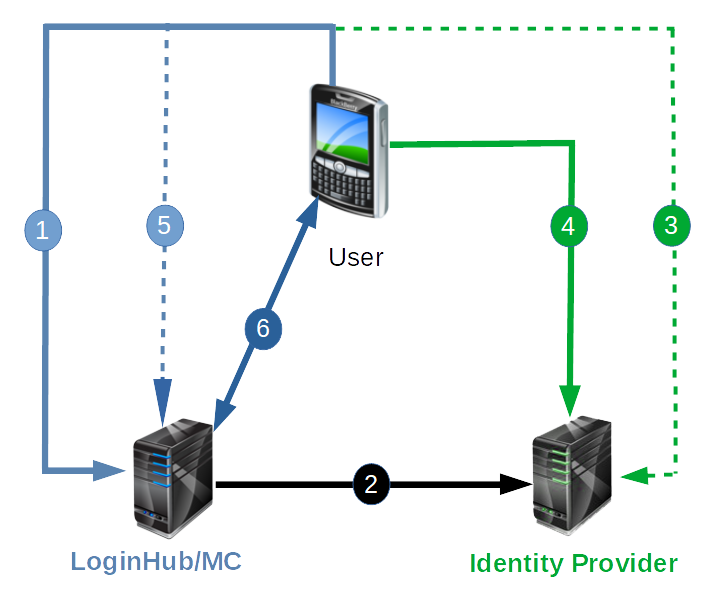
It is important to take note that the Application (LoginHub, MC, MCe etc..,) dose not in any way handle the 'who is this user' question. That is the responsibility of the Identity Provider. The application has no need, and no ability in this environment to know the user identification (password etc..,) information.
2026 update: Looking at the 'cell phone' image we used when we first created this document. It is amazing how long these security issues have been around. The image is back when we had a special purpose MCe for the original Blackberry
So now we have to the question – isn't this dangerous?
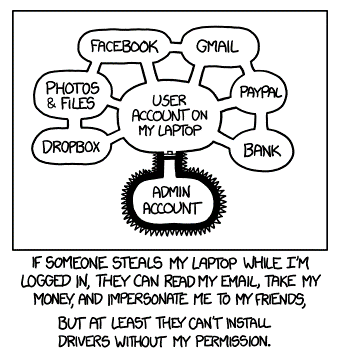
The most common argument against SSO is roughly this: Once someone hacks (or otherwise gets) into a user's account, they now have access to everything. Yike! That sounds serious.
Let's start by acknowledging: the statement is indeed technically true. Once a bad person gets access to the user's account, they indeed now have access to everything that SSI/SSO connects to. But that is jumping ahead, and to analyze the risk, we need to look at the whole picture, and that is what we are going to do.
So the first question is: Is the malicious person more likely to get access to those applications with SSO or without SSO.
Side note: There have, through the years, been a lot of talk about ideal passwords and password strategies. Some well meaning people came up with some complex rules that, if followed to the letter, will indeed reduce the security risks. But studies have found that very few people follow the rules, in fact, for most people, the more complex you make the rules, the more likely they are to find ways around the rules that end up with a much lower security situation than without the rules such as putting their password(s) on a yellow postit note.
A few years back, a French TV station was hacked. After the hacking, their security expert was interviewed on camera, and he explained that the systems weren't really hacked, what happened is that someone got the password to the towers and then simply logged in and did the damage. He was asked – how did they get the passwords? The security expert said he didn't know, but they were trying to figure that out. All the while, the camera was recording him … behind him were all sorts of applications listed with user id's and passwords on pieces of paper pasted on the wall – they were showing the world many of their applications and exactly how to log in – while telling their audience that they had no idea how someone 'stole' their passwords. Fortunately, a friendly viewer, after verifying it wasn't a joke (he successfully used the info to log in) called the station and told them how badly they had goofed. The station quickly changed all their passwords and undoubtedly wrote them down somewhere that they would be less likely to video and broadcast them to their audience.
The point is: If you make the rules hard enough, typical users will create a less secure environment, not a more secure one.
It is important when looking at questions like SSO to understand: HUMANS are involved, and humans are humans no matter how strict an 'organization' is. So login strategies that ignore the humanness of their users will end up less secure, not more.
I am going to make the claim; SSI/SSO will usually make login authentication safer, not less safe. Let me discuss some normal situations and how secure they are.
Situation 1:
The first, very common, is where a user uses the same passwords and/or other authentication for all of their corporate (or even corporate and personal) accounts.
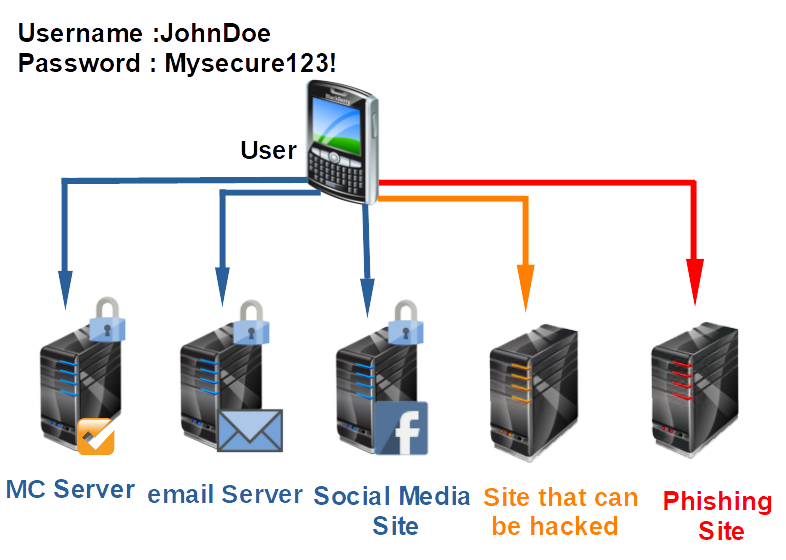
There is no worse situation than this. And yet it is extremely common unfortunately.
Most people (users) will assume that all the applications/web sites they connect to are 'secure'. But a little bit of web searching with your favorite search engine will quickly reveal that the opposite is the reality. You can safely assume that, unless you only connect to a handful of very secure sites, that sooner or later, your password WILL be leaked, not 'might be'.
Once the 'Site that can be hacked' has your password, or once you JUST ONCE login to a phishing2 site, the malicious person just needs to guess what other sites you have an account on. If they know your organization, then that will often be easy. Now they have access to everything they can find. And note, this is not something that has to be done by hand, this could be done by a set of computers that can take your credentials and attempt to log into 1000's of sites per minute, perhaps even 1000's of sites per second. That should give you great pause at how insecure this situation is and how serious the results can be.
Now, fortunately, most users have at least the concept that they should have a few different passwords for different types of sites. But in the news (TV) I have heard them say that once 'your password' is hacked, you should go to all the sites you use and change 'your password' periodically – note the natural assumption is still, 2021, that users have 'a password', 'their password' and they should change it periodically.
Situation 2:
Now, let's assume that all of your users are 'good' users, and they have different passwords for all their systems, and they have 'good' passwords on each system this is 'important', and let's assume that your users don't write their passwords down in any way that can be hacked, or viewed, or photographed, and they are very careful that none of their passwords are uploaded to a Cloud server (unless they are encrypted.)
Good news, if you meet all of those, you probably have the most secure option. Unfortunately, there are very few people who will follow through on this. Maybe a few security experts. But since you are going to do this in a secure way – how do you verify your users are following these requirements?
But you still very likely have a single point of failure: The email account. If that get's hacked, they can now, on almost every site, make a 'password reset' request, and they can get into your accounts.
I have a personal policy of looking away when someone enters their password, because I never want to be accused of breaking into someone's account. But I also know that 30 or so years ago, that it was fairly easy to see what someone's password is. I noticed (and you can listen to verify this is still true) that people tend to slow down when entering passwords – this means if someone is watching with the intent to steal your password, it is easy. Here is something else … someone can leave their cell phone in their pocket and have it video recording, they can then record you typing your password in, and they can watch it several times until they crack your password for that account.
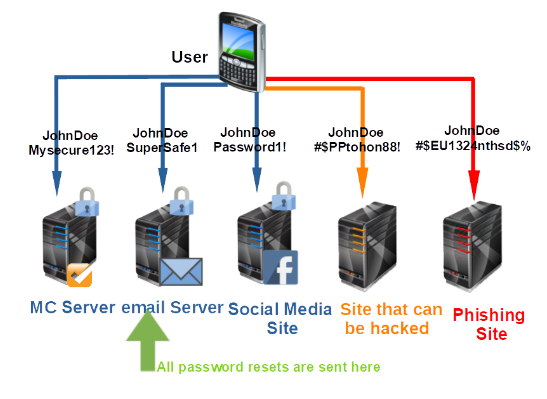
But this is more just a warning to be careful when entering passwords, especially for your weakest point – your email -
So why do I say that SSO can (will normally) be more secure
Why SSO can be more secure
When you implement SSO, all authentication processes and elements are handled by the identity provider. Many of these providers (e.g. Google, Yahoo!, AOL, Salesforce) are large and reputable organizations who have the means and motivation to establish really strong security. Even with all the security problems that Facebook faced in 2018 – they are much more secure than the vast majority of companies can be Thus, it would be extremely difficult for a cybercrook to acquire your login credentials from there.
SSO is better than Scenario #1 because even if the user attempts to connect to an insecure site or a rogue site, he won't be submitting his login credentials to them. Rather, he will actually be sending those credentials straight to the SSO identity provider. For as long as the user always makes sure he is logging into his identity provider, his login credentials will be safe.
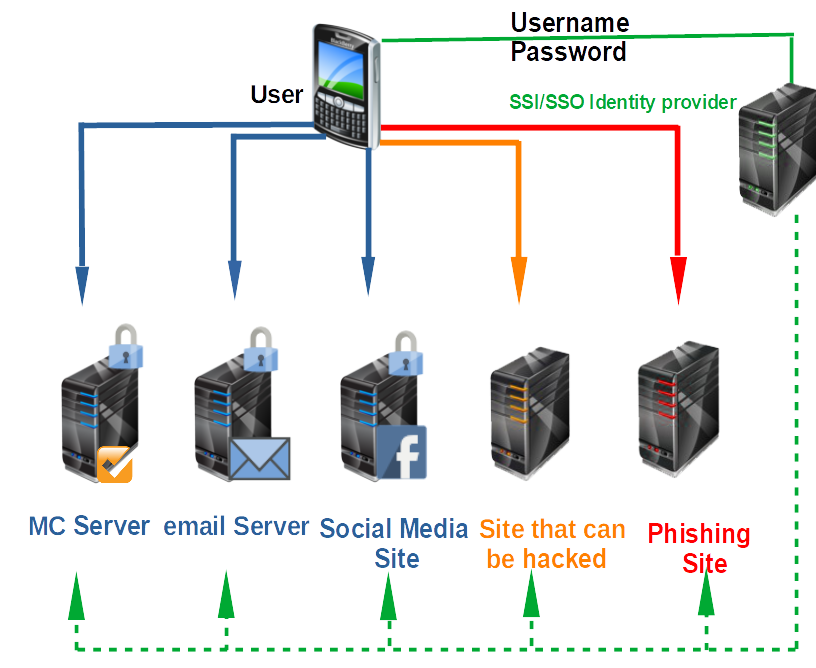
Scenario #2 is theoretically good. In fact, probably the best, especially if 1) the email service provider is really secure, 2) the email account is protected with a strong password, and 3) the user maintains a secret list of passwords. Sounds good?
Not really. In every security endeavor, you need to consider the human factor. Let's face it. Not all users are going to maintain a secret list of passwords.
There will always be users who would want an easier way. If they find a security policy too inconvenient (like having to use different passwords), they'll circumvent it. It always happens. SSO is better because it relies on a highly secure system that makes policies relatively easier to adhere to.
Note that I am saying if you implement in your Okta or AD or whatever, a set of complex rules like the user must have one upper, one lower, one number and one symbol, you will just encourage users to write their passwords down where they can be seen. Much better to require 12 or 15 digit passwords with no restrictions. It is amazing how many sites will tell a user that Password1! Is a 'very high security password' but "the man fell off the horse and broke his leg" is a low security password. In 2020, the Canadian Revenue Agency let me put in Password1! as my password – and declared it high security.
SSO allows users to remember just one set of login credentials. All they have to do is keep those credentials secret. If they're able to do that, the security of the system will hold.
Will some users still be insecure? Yes – but the point is that overall your security goes up with SSO on average, and it is more likely you can at least convince your users with access to sensitive data to use good security protocols, and however good they would have been with the other scenarios, they will be at least as good and likely much better with SSO.
By forcing users to use a 12 or 15 digit password/passphrase, you can virtually guarantee they aren't using the same one on any other server
- Because no other server makes them do that (so they won't)
- OR because they use long, different, passwords all the time, and so they are a person of concern.
SSO Login Best practices:
For the company
Require a LONG password, not a password with complex rules.
Train your users, especially those with access to sensitive data and controls
Make sure your providers of the application login are keeping their software up-to-date, be diligent at upgrading all of them as they issue upgrades, especially security upgrades. Note that if you use the default LoginHub support options, you will have your LoginHub updated within hours (usually minutes) of any security upgrades. Note also that LoginHub follows the best practices as stated at http://wiki.openid.net/w/page/12995200/OpenID%20Security%20Best%20Practices as well as other places and we are continually reading state of the art information to keep LoginHub as secure as possible, this comes first before features.
For the users
Encourage them to not write down their SSO password, unless they are writing them down in an encrypted password file or in their safety deposit box.
Insist that whatever password they are using for SSO, they never ever use that password or anything like it for any other password.
Encourage them to keep their account information (phone number, email etc..,) up to date
Teach them how to verify that the login page is a valid one – take your providers (AD, Okta, Ping etc..,) and show them how to verify the important parts of the URL so they don't think that "login.microsoft.com.myphishingsite.com" is the Microsoft login page.
Make sure the password is being entered in on an HTTPS page (browsers are making it harder and harder to NOT do this fortunately.)
When using a shared computer, make sure the users get in the very strong habit of logging out before leaving the computer.
When using a computer on a desk, when leaving even for a few minutes to go to the water cooler for example, make sure they put it in a state that requires entering something like a pin to wake it up.
https://www.explainxkcd.com/wiki/index.php/1200:_Authorization
Footnotes
-
1: The concept of 'apps' was made popular by Apple. The idea, according to Steve Jobs was to have small apps with as few features as possible. In theory, they do one thing and hopefully do it well. In the Apple world, Steve Jobs was famous for saying that if he didn't need a feature, no one needed that feature. So Apple Apps were scaled down to just the features that Jobs wanted. Android and Windows 'Universal Apps' copied the concept as well. While some 'apps' are very powerful and flexible such as one the author uses to remote control a large sound board, I think it is fair to say that well over 99.9% of apps have very few features and very few options and their UI is very simplistic at the sacrifice of user flexibility and usability. ↩
-
2: A phishing site is a site that tries to look legitimate, and tries to get you to login or create an account, thereby giving them your id and password. ↩