

 Maintenance Connection Everywhere (MCe) · EAM/CMMS manuals
TL;DR:
Reboot your i*OS device every day or two, here is Apple’s instructions for how:
Restart your iPhone:https://support.apple.com/en-ca/HT201559
Restart your iPad:https://support.apple.com/en-ca/HT210631
When you run into an error that tells you to reboot the app/browser or OS, either follow the above or you can try first:
Quit and reopen an app on iPhone:https://support.apple.com/en-ca/guide/iphone/iph83bfec492/ios
When Apple breaks the above links in a site we will update them as soon as we are aware. So … if you find the above don’t work, please let us know and we’ll update them.
More Details:
We’ll start with the how. For those that want to know the why, read on below.
iOS and iPadOS
Restarting Safari on an iOS device is just a tiny bit convoluted process, here is how we do it circa 2023:
Step 1, Close Safari:
To close the app, first hit the Home button twice in quick succession (or, on iPhone X or newer, swipe up from the bottom of the screen and pause) to bring up the App Switcher. You'll see smaller windows of all your currently running apps. Swipe left or right to find Safari. Once you've found it, swipe up on Safari's window to close the app.
Step 2, Restart Safari:
Simply find the Safari icon on your home screen and tap on it to reopen the app.
If problems persist, or it’s just been too long since you restarted your iPhone or iPad:
Should you continue to experience issues, a full restart of your iPhone or iPad might be necessary:
Restart your iPhone or iPad: Press and hold either volume button and the side button until the power off slider appears on the screen. Drag the slider to turn off your device. Then, after your device turns off, press and hold the side button again until you see the Apple logo. For older devices with a physical home button, hold the top or side button instead.
The more memory you have, and the fewer applications you run, the longer you can go between restarts. Some people can go months between, others need to reboot their iPhone every few days. Even without our company, our users have this variation, one user with an iPad Pro with maximum memory has gone a year before he needed to reboot the device. But eventually, even the biggest with the lowest use, need to reboot.
Safari
Restarting Safari on a Mac is also fairly simple. Here are the steps to do so:
Step 1, Close Safari:
To close the application, click on "Safari" in the menu bar at the top of your screen and then click on "Quit Safari." Alternatively, you can use the keyboard shortcut Command + Q while Safari is active.
Step 2, Restart Safari:
After closing the application, you can restart it by clicking on the Safari icon in your Dock. If you don't have Safari in your Dock, you can also find it in the Applications folder and click on it to open it.
Step 3: take remove extensions or reboot
If you're having issues with Safari, you may want to try removing or disabling extensions, as these are common sources of problems. After that you might need to update your software or restart your computer.
Also, if Safari isn't responding or won't quit, you can force quit the application by clicking on the Apple menu in the upper-left corner of the screen, then selecting "Force Quit..." from the dropdown menu. You can then select Safari from the list and click "Force Quit." This should only be used as a last resort, as it may result in loss of any unsaved data.
Depending on how heavily you use your Mac, you may find you have so much memory you don’t need to reboot it very often.
How to proactively ‘solve’ the problem:
Reboot your device periodically. Here are the Apple Instructions for rebooting your iPhonehttps://support.apple.com/en-ca/HT201559How often is very hard to recommend. Once a day or every other day an excellent starting point. But let’s say you see the crash message starting 4 or 5 days after you reboot your device, it probably means you should reboot your device every 2 or 3 days. If you go 2 months before you see it, well, monthly might be fine for you.
If you see it happen more than once a day, you probably have a device that just has too little memory for what you are trying to use it for, an upgrade (more memory, not necessarily a ‘newer’ device) is worth considering, or at least considering when you next upgrade. Indeed, if you need to reboot more than once a week, you should probably get more memory on your next device.
Why? I was told never reboot my Apple, that’s a Windows/Linux thing.
Because all software has bugs. As of 2023.07, Apple has had a pair of bugs that work against us.
The first is that it has one or more memory leaks in products including Safari eventually use up all the memory in your device, the less memory, the quicker this happens of course. When that happens, Safari and/or the OS has to do something to free up memory. Unfortunately, the algorithm Apple uses doesn’t seem to understand that the database engine in Safari is part of Safari. They have tried many times to fix this bug since it was first reported in 2019. Sometimes making things better, sometimes making things worse (The “fixes” in 2023 are in the category of making it worse.)
If you are looking at your screen when the bug first occurs, you will see the following error for several seconds:
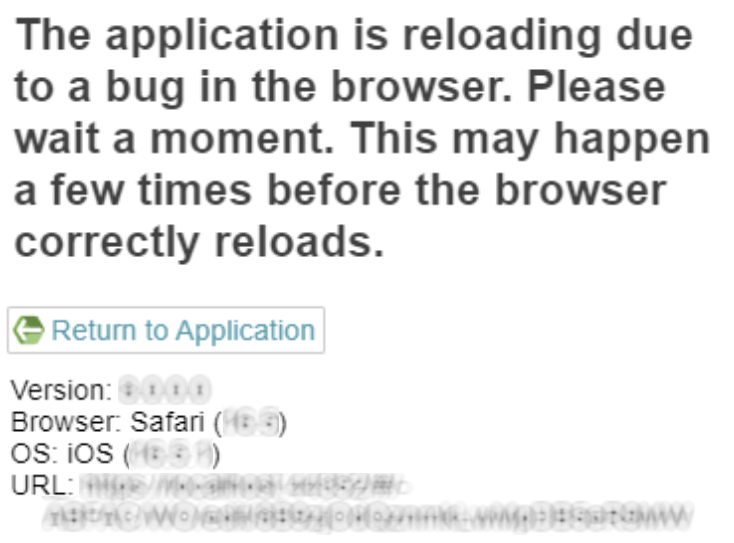
We have to wait several seconds, otherwise the initial problem isn’t cleared up, and our work-a-round won’t work. What is happening in the background, is Apple is shutting down things that are using memory, and it appears, at least in 2023, that the algorithm they use for this doesn’t realize that the database engine used by Safari is needed by Safari, it things they are unrelated, and shuts it down, causing Safari to choke and not know what to do. It’s like if you suddenly lost one of your legs and you don’t know where it is.
What we do behind the scenes for you is wait a few seconds to let Apple finish up it’s memory juggling, then we politely tell it “Heh! We need that database engine to store our data, please give it back.” And by that time, it has freed up enough memory that it is willing to give it back to us.
But eventually too much memory is used up, either by Safari or by other programs, and our polite asking no longer works. iOS tells Safari “NO! You can’t have your database engine, there isn’t enough memory I’m willing to give you for that”.
At that point, many things are likely to start having problems, but even if it is only Safari with applications that use Safari’s database – the solutions are to wait a VERY long time, to shut a lot of things done, but really, at this point, the only reasonable thing to do, if at all possible, is to reboot the device so it can start with a clean slate.
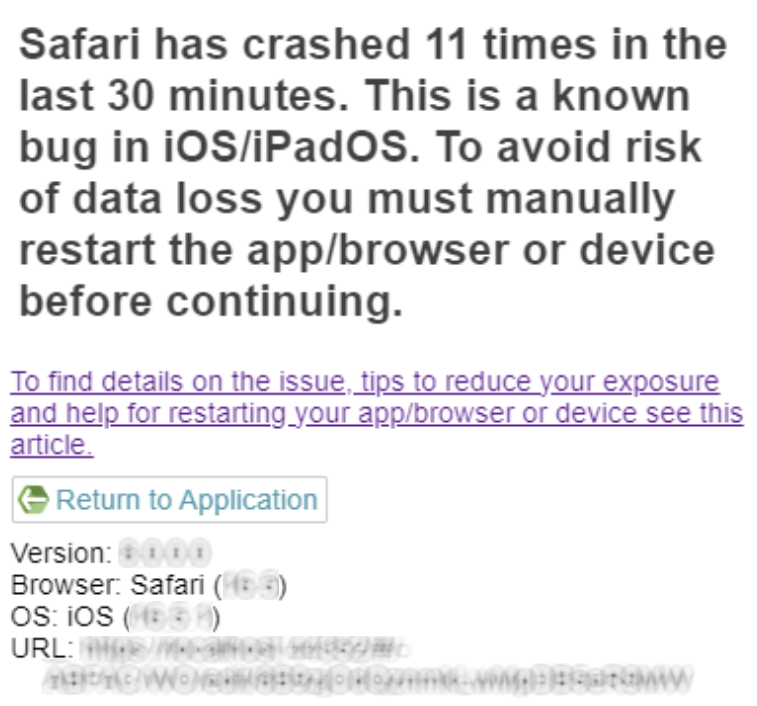
When we see too many crashes in too short of a time, you get the following message:
What’s a memory leak?
A memory leak is where a program allocates a space for memory, perhaps puts something in it, then fails to release it when done with it. This can be because it ‘forgot’ about it, or because I just doesn’t properly keep track of when it can/should release it. In some cases it is because it decides that it (that program) is so important that all other programs should allow it to use as much memory as it wants.
Browsers are terrible at using up more and more memory over time, often with no benefit. (In 2022, Microsoft famously, among professional developers anyway, made some major changes to Chromium – the engine that runs Chrome and Edge and others) to get rid of many of Chromium’s memory leaks. Chrome and Edge benefited greatly from that.
Unfortunately, Apple has a disincentive to fix problems in Safari – they don’t make money from it like they do from their App store! How much that is to blame for Safari always being behind the other browsers is subject to much conjecture. But it may also simply be that Apple only has one set of developers, whereas Chromium has many, including Google and Microsoft.
But regardless, it is a fact that, though tools like C# and Java have gotten really good at getting rid of many memory leaks compared to C++ and C, they still can’t fix every mistake developers do. So we will likely always have to content with memory leaks. And that means, from time to time, programs have to be restarted, and computers have to rebooted – even if Apple marketing tries to say otherwise.