

 Maintenance Connection Everywhere (MCe) · EAM/CMMS manuals
Good passwords, Bad passwords. Circa 2020.
In 1985 I was trying to explain to a group of people the concept of a good password. There were 4 people in the class (it was a custom class they were paying for.) I told them back then some of the ideas of making sure they had good passwords. They laughed saying they had good passwords. So I asked each of the 4 of them a bunch of questions, then I sat down at the computer and for 3 of the 4 of them, I broke into their computer with less than 10 guesses. The 4th I did not succeed in guessing his password, he had a good password (he made the mistake of TELLING me his password after I failed … so hopefully he chose another good one after.)
TV shows make it seem like anyone with a MIT master's degree can sit down at your computer and guess your password in a minute or less. My experience (no I don't have an MIT degree of any level, but I do have a Business degree from the #2 ranked business university in Canada) is that it isn't nearly as easy to guess most people's passwords that way as it was in 1985. But it is still sadly, reasonably easy for evil people to do so using various methods today (2017) through the use of computers that can guess tens of 1000's of passwords a second.
Simple rules for good passwords/password strategies
Rules
Rule #1: Use a good login method like loginHub, not a clear text password system like MC's default or a encoded (easy to decode) as per MC's 'encrypted' two way passwords.
Rule #2: Don't use a password that you are going to have to write down on a yellow sticky note to remember. BUT it is a GREAT idea to have a locked password file with very long, hard to remember, but easy to type and easy to copy passwords.
Rule #3: Use a password that follows this pattern "this is my password phrase" or "word.anotherword" or "wordanotherword" or "word_anotherword". How do you choose between space, period, nothing or _? It partly depends on how poorly written the system is you are leaving the password (do they ALLOW spaces) and what is convenient to you. Be aware – every hacker knows these separators, so the choice of the separator makes virtually zero increase in the security of your password – pick what is easiest for you to remember.
Rule #4: If you are required to use an upper case character – make the 1st character uppercase (so it is easy to remember and you aren't tempted to write it down) and don't worry, hackers already know that EVERYONE capitalizes the first character. Note: This is why companies that require a capital letter make it clear they have no idea about real security. Passwords are created by humans hence of course they are going to capitalize the 1st character when forced.
Rule #5: If you are required to use symbols, use something like a . or _ as in rule #2 or make your password one longer by adding ! to it – just don't consider these to be making your password stronger – they don't (lot's of technical reasons – just trust me.)
Rule #6: if you are required to use numbers, pick a rule such as: Always use the number 3 at the end of the rest of the password. (So it is easy for you to remember and you won't be tempted to write it down. BTW, I use 1! At the end of ones that have these silly rules – but I don't consider them part of the password security, they are just tagged on to the end to meet the silly rules of the company that thinks they are increasing security by having these rules. There is a lot of research done by several organizations such as NIST and Microsoft that show statistically rules 4, 5 and 6 actually DECREASE the difficulty of cracking most people's passwords, so in systems like our PowerPack Password Security PpPs we don't allow these rules as per the NIST requirements.)
Oh, and being 'smart' by substituting 0 for O or 1 for L etc.., don't increase the security of your password because every password cracker already tries those substitutions, so they make ZERO increases to security. People who don't add 1! to the end invariably substitute numbers for letters to make it easy to remember their passwords, every hacker knows all the 'obvious' ones and their code already tries them so neither using them nor not using them makes no difference to how quickly they crack your password. I guess if you use 1 as the substitute for o and 0 as the substitute for L ... maybe that will SLIGHTLY slow them down.
Rule #6: Use unique passwords for all your high security (sites where it will cost you money if you are hacked) and for all the sites that really don't matter if you get hacked, use a common password, perhaps change it every couple of years.
Rule 6A: Don't use a pattern that 'makes sense' for your high security passwords. So if you login to ebay, don't make your password high.securitity.e and then for paypal use high.security.p – if hackers crack ONE of your passwords on one site, they will see the pattern and try it on others.
Rule #7: Assume that all passwords stored under today's highest security, will be easily cracked using Quantum computers in 2027. (The rules today won't apply to passwords in 10 years.)
Rule #8: If you have enough characters before them DO follow a pattern for sites that require you to change your password periodically but don't let you copy your last x passwords. This way you won't be tempted to write it down, just start at 1 at the end and go up to 9, then start over. (Why is this different from rule 7? Because this is for ONE site not multiple. If they crack THIS site it won't let them crack your other sites.)
All 3 sides of good passwords
There are three very important sides of good passwords:
- That the person receiving (HTTPS) and storing (True Encryption not encoding) your password should do so in a secure way. (OK, so this is two things)
- That the person receiving your password should allow you to use good passwords and good password policies.
- That your password be 'secure' enough. Remember: There is no such thing as 'totally' secure.
Let's start with transmitting your password.
In this day and age there is no excuse to transmit your password via HTTP. It should only be transmitted by HTTPS. If you want more on this – see our whitepaper on HTTPS. Indeed, our company hasn't supported anything on HTTP since 2016.
Even better, ideally only a personally salted hash of your password would be sent. (MCe and LoginHub pass a personally salted hash only, with the single exception of when you setup your password or change it – note as soon as MRO supports storing only a personally salted hash, we will stop even those cases.)
Now let's discuss storing your password. Doesn't help users, but helps administrators.
The first rule of a good password storage is to never store the password, only store an encrypted hash of the password. 1 While an encoded hash is twice as good as a plain text hash, an encrypted hash is 1000 times better.
The second rule of a good password storage is to never store a hash of the password but rather a hash of a salted version of the hash. 2 A salted hash (if you follow the 3rd rule below) is another 100 to 1000 times better than a normal hashed password. If you don't know what a 'salted hash' is - you shouldn't be handling security!
The third rule of a good password storage is, wherever possible, to never store a salted hash using a common hash, rather use a unique hash for every password. 3 So a 'personally' salted hash.
You should be allowed good passwords
This is one where a lot of people are going to argue with me. But for 99% of use cases – they are wrong.
The best rule currently is:
For things that need security, require passwords over a certain length – say 50 characters, but for things that only need casual security – allow so called terrible passwords.
You should NOT force your users to use special characters – like symbols and upper case characters (don't shoot me – read and understand WHY I'm correct and your gut response is patently wrong. The simple answer is: Humans are human not computers and not security experts.)
You should be very careful if you are going to enforce rules like 'change your password every 6 months'.
Of course, if you are the Government of Alberta (or many other governments) you will ignore the knowledge of the industry and reality and create a set of complex rules that will result in passwords on yellow postits and result in easy to crack – despite what they appear – passwords. I have to access my Government of Alberta account once or twice a year, they require I change it every 6 months. I've seen Foster parents with yellow postit notes with their current password - and guess who is the biggest security risk? Yes - the children in the home that can read those yellow posit notes.
How are passwords 'hacked'?
To understand, there are several ways in my experience that passwords are 'hacked':
You show someone your password (such as on a yellow postit)
There was an extremely funny episode, in 2015, where a (the major) French TV station was saying that someone had hacked into some of their broadcast stations and taken over the stations. The reporter, a self proclaimed security 'expert' at the station explained they were pretty sure that somehow the hackers had gotten access to the passwords, but they didn't know how. What made this so funny is, for the 5 minute episode, behind him were a couple dozen notes that had many of their high security passwords written down on them, and the camera man didn't keep the camera still, so over the period of 5 minutes, every one of the passwords – and the systems they were for – were clearly revealed to their entire audience. And good news, most of the passwords were what some governments think are very good passwords like !@<tto#TT123SOK – which, because they were so good, they forced them to be written down on yellow postit notes so they could be broadcast all around the world for anyone to see!
 (A screen shot from the security expert report)
Fortunately a viewer phoned in an hour later to let them know that the whole world now knows their passwords and they changed them before more damage was done.
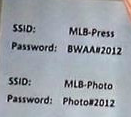
A lesser example was in 2012 when an interviewer caught the wifi SSID's and passwords in the published article, the password was "Photo#2012". (No they didn't realize it at the time) Note the use of so called GOOD quality passwords, especially the 2nd one: Mixed case, a # sign and some numbers. 4 The good news is .. (and I am being sarcastic here) if the rule is that passwords have to be changed once a year – how many seconds will it take for you to figure out NEXT year's password. I'll bet 2013's password was either Photo#2012 (because no one changed it) or Photo#2013. And they stated their internal network didn't need HTTPS because it was 'secure'.
Another one I've seen, mentioned above. In the province of Alberta, there is training for Foster Parents. The web site for that training required complex passwords (the rules as of 2015 are something like: at least one upper case, at least one lower case, at least one number, at least one symbol) and they force you to change it every 6 months and you can't reuse the last several passwords you used.
All you can do on this site is register for courses, unregister and see which courses you have taken. Nothing else! No financial transactions, nothing else.
Typically you go to the site TWICE a year (beginning of each semester) oh wait … you have to change your password every 6 months! That means the password typically is only good for ONE login.
Apparently the person designing this system thinks they are holding the keys to some nuclear weapons. Basically either the programmer thinks of themselves as more important than they are or some government bureaucrat took time off from visiting his favorite porn sites and read some outdated random ivory tower article that ignores human nature on good passwords and forced their programmer to follow it. (Sorry for my sarcasm.)
So here is what I have noticed (I was also a foster parent until we adopted 4 children) … almost EVERY foster parent I have visited who is in 'that' training stage posts their password either on a bulletin board above the household computer or on a bulletin board at the front door! Why? Because who can remember such a complex password when they will only use it ONCE and then have to change it when they next log in in 6 months!
And here's the kicker … the biggest security risk is … foster children in the home that can read and see the password.
An online bank I used early in the 'online bank' days used to have such a complex one for their accounts as well. Fortunately they had a 1-800 number where you could get your password reset. Each time I called in the friendly operator gave me tips to remember it, and each time I cheerfully said, 'Thank you, but your password requirements are so difficult to remember I would have to write it down on a yellow postit above my computer and that would be very unsafe, it is much safer for me to just call your 1-800 number each time I need to login, and you give me a brand new password.' And while they were doing it they apologized for how long it took and I cheerfully said 'No problem, I have you on speaker phone so I'm doing other work so it doesn't matter how long it takes for you to reset my password'. Then, when they gave me the password, they would patiently sit on line until I confirmed I had successfully logged in 'OK, yes I seem to be logged in and everything seems to be working fine' (I would delay answering a bit longer than necessary – ostensibly to make sure I was logged in and able to do everything I needed – I WANTED them to get frustrated and complain to their boss.), and I would end with something like 'thank you so very much <name of representative>, I'll call you next week, I shouldn't need to log in again before then' I never actually got the same representative as far as I know. But apparently I wasn't the only one who used their 1-800 number this way because, after about 3 months of this, they introduced a sane password strategy. Update: sadly, in 2019, they went back to those rules.
So when IS it OK to have complex passwords and force them to be changed regularly?
When you have staff:
- That you are willing to execute (literally) if they ever write the password down and
- That are good at memorizing long complex nonsensical strings of information and/or they enjoy having you pay them for the inordinate length of time it takes for them to memorize it. (Make sure they BURN the paper they used while memorizing it.)
So outside of military, and a few specialized places, you don't want them. Indeed – in EVERY one of these cases, you should NOT be using passwords, you should be using live eye retina scanning.
Someone guesses your password
I don't remember the exact details about the way I used to crack people's passwords, but depending on how many attempts I want to make it goes something like this:
Guess their child's name, their pet's name, something they talk about a lot (like their favorite car)
If you want to automate it, there are several lists of the 1000 most common passwords. These lists come from sources such as leaked databases of passwords. The #1 password, still, in this day and age is 'password'. The next 5 are 123456 12345678 (for sites requiring 6 and 8 characters respectively) 1234 qwerty and 12345
If you do nothing else – check this list and see if any of your high security passwords are on this list.
As a side note: Guess how hard it will be to figure out my new password if I'm forced to change my password every 6 months. My password right now is 'StupidAlbertaGovernmentPassword2017a!'
Note: I really don't care if you hack into that web site … but my actual password is different than the above – just so you don't inconvenience me.
Someone finds your password, then tries to use it on other web sites
You've heard in the news there are lots of web databases that are 'cracked' to get passwords. If someone were to get a copy of your password from one of those sites … how many other sites could they use the same password for to gain access? Do you use your MC password anywhere else – so they can now break into your MC account?
No security system can protect you against this. But YOU can by not reusing passwords to important systems.
Someone tries the 1000 most common passwords
Such a simple strategy if the system allow unlimited login attempts. We have a second password document that discussed this in more detail. Read more here.
Here's the modern way to guess your password with only ONE guess: Someone gets a list of your hashed passwords, and then compares the hash of the 1000 or so most common passwords against it.
Bruce force login attempts (above) are no longer the common way, the common way would be to get/steal the list of hashed passwords, then hash the 1000 common ones, then see if any match – then only try ONE time!
Someone cracks your password
This is the hard way. With short passwords it is doable, brute force. The longer your password, the harder it is. In the early 2000's a password length of 10 was considered acceptable. But with advancement in computers, 12 or 15 is (2017) now a more reasonable minimum length. Update 2020: 20 is now the 'crackable in 1 hour' with current computer technology. I use 50 character passwords now for all my high security that all long passwords, 52 characters if they force me to add 1! To the end.
Why do I distinguish between high security and low security passwords?
Unless you use a tool so that you have a different password for EVERY place you log in, you likely will only be able to remember about 20 passwords, maybe less, and even then – if you are like me, you have 2 to 300 sites that really you don't care if someone hacks into – you can just create a new account or grab back and change the password to your existing one.
So what to do?
Read the rules at the beginning again.
Make sure your important sites use HTTPS.
Use a secure login like loginHub with Active Directory or Azure AD for any systems you control that are important security risks.
Don't impose stupid rules on your users (to encourage them to write their password on a yellow postit.)
DO impose password minimum lengths on secure sites. Right now (2017), 12-15 characters seems reasonable, though the NIST says 8 is enough. 2020: the minimum safe is now 20 characters due to advances in GPU processors and algorithms, by 2025 I expect 25 will be needed. Personally I use 50 which should be good until at least 2030.
If you WANT to impose rules on the password content, consider these ones, they can be implemented in Active Directory, they are not user hostile (though most won't help make the passwords more secure, and some might encourage users to write down their password). If you are a user, consider putting these requirements on yourself for all important passwords including your Maintenance Connection password.
- Make the minimum password length 20, recommend to your users that they use a sentence password.
- Don't allow more than 4 consecutive characters such as defgh or 45678
- Don't allow more than 3 duplicate characters in a row7777 (Personally, I'd prefer that users be allowed to enter this in, than to be forced to enter row2653 and then have them write it down on a post-it.)
- Don't allow more than say 5 characters in a row from the userid/loginid to be part of the password
- Check against the 1000 common passwords to make sure none of them are being used
- Put something in that successively slows down repeated attempts to remember a password. But this is actually more just an irritant to users since most cracks are done with either a small number of guesses or by having the database in hand with hashed passwords. So this isn't all that helpful, though it will stop your kids usually.
These seem to me to be sane rules that are not too oppressive to the user, so the user is less likely to write their password down for others to find. But all except the first and last ones go against NIST rules based on actual research about the damage they cause in terms of worse passwords.
And here's a real nasty trick. If a thief knows one of the sites the user is likely to go to, they emulate that page on the return, then as they type in passwords, tell them they entered the wrong password. You can likely collect 3 or 4 passwords the user uses on various sites before they give up in frustration and they can quickly use them to log in to some of your accounts. Chances are the user won't notice that, while they normally get redirected automatically to HTTPS, your page is actually just an HTTP page despite browsers trying otherwise.
Footnotes
-
1: Before salting was common, attackers used to generate so called Rainbow tables. Rainbow tables are (at a very basic level) essentially a database of hashed passwords. You look the hash up in the database and if there's a match, you have the original password. They were computationally intensive to generate, but once created were incredibly quick to use. MRO has an option to enCODE your password. Encoding is not encrypting, we can decode over 1 million encoded passwords a SECOND on modern computers. So while it may look secure in the database, it is merely inconvenient – it keeps the honest people out. This is why we recommend LoginHub. ↩
-
2: Salting makes this far harder; because the generated hash is based on both your password and the salt, the attacker would need to generate Rainbow tables for your specific salt. ↩
-
3: You really should use a different salt per user so that the attacker would need to generate different Rainbow Tables for every user. This makes it so that the effort isn't worth it most of the time. Sure it may be worth it if you are the prime minister or president of a country, or your password has the keys to Fort Knox. ↩
-
4: If you think – they are just wifi passwords, who cares? Consider THIS extremely EASY attack that I could set up in less than an hour with a laptop and wifi router and tomato software: This information is useful even outside the range of these WAPs. They could impersonate this network anywhere now with the SSID and the key, and anytime a person who has ever joined this network comes in range of the hackers impersonated WAP, they will be joined, typically without their knowledge! or if it is with their knowledge, without so much as a 2nd thought. Then they start their regular surf routine, not knowing there is now a rogue gateway intercepting all their traffic. By extension, this means that when you are on a public WiFi such as Starbucks – never ever enter your password unless you are on a HTTPS link – because a hacker could easily set up this to syphon off your passwords! ↩