

 Maintenance Connection Everywhere (MCe) · EAM/CMMS manuals
License FAQ
What should I buy?
Obviously the answer to this varies depending on your specific situation. But let me answer this very generically with a solution that we think will work best for a lot of our customers:
- Buy a small number (perhaps only 1) of the more expensive concurrent wo technician licenses for people like managers and those that just want to occasionally 'look' at the software and/or make a few quick changes.
- Buy 1 named wo technician license for each of your work order technicians.
- Buy 1 named advanced report features license
I have a newer MC system with Named licenses system, can I buy MCe Concurrent licenses?
Yes, our named, enterprise and concurrent licenses are compatible with MC's new named licenses.
For those wondering why the question: Accruent's MC requires either all concurrent or all named licenses. Since about 2015 named where the only options. Only grandfathered customers are permitted concurrent and if you 'upgrade' to named, you don't ever get to go back.
I have an older MC system with legacy Concurrent licenses system, can I buy MCe Named licenses?
Yes, our named, enterprise and concurrent licenses have always been compatible with MC concurrent licenses.
I have 250 concurrent MCe licenses, but I have 3 people I'd prefer to have named licenses for.
No problem, all our licenses are compatible with each other and, as above, with any license option for MC. Just make sure you set up the permissions correctly. The most likely issue here is that if all 250 concurrent users and one or more of the 3 special people all have the same access group, then you can't use access group to assign the rights to use either of these licenses because the 3 people will end up consuming TWO licenses – the named and the concurrent. But it's easy - just put the 3 special people in the exception for the concurrent license, and then give them access by name to the named.
I installed a new license but no one has access to it.
After you install a license, you need to go to the License manager and define who is allowed access to it.
I gave someone access to a license but they don't seem to have it
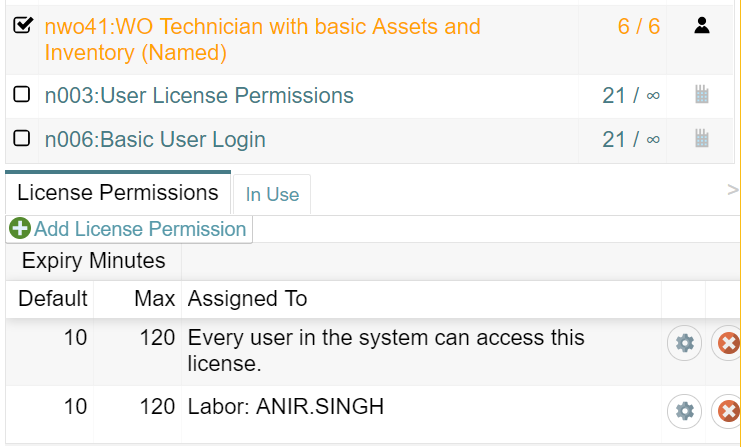
Named Licenses: Are they all assigned to other people as in the image below already?

If so you need to purchase more licenses or, if one person has left, based on the terms of your license, talk to support about having the license transferred to the new person.
Concurrent Licenses: Are they all in use by other users?
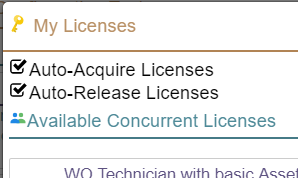
You can most easily check this from the 'My Licenses' in the 'Configuration' portion of the application.
Can I use named licenses for shift work?
Named licenses are sold to you 'per person', obviously – yes, you can buy 3 named licenses for the 3 shifts, but when people ask they really mean can they buy ONE license for 2 or 3 people to share. And no, that is what the concurrent licenses are for.
Can I use one concurrent license for 2 people at the same time, even just for a few minutes?
No. Only 1 person can use each concurrent license at a time.
Can I use one concurrent license on 6 devices?
Yes, but only one device at a time. This is a NORMAL way of using concurrent licenses since obviously you won't be working on 6 devices at the same time.
If we have 5 devices that 40 people share, will 5 concurrent licenses work?
Yes, this is a NORMAL use case.
Can I use one concurrent license on 2 browsers on the same device?
Yes, but only one browser at a time, otherwise you will consume 2 licenses while you are using them.
Can I use named licenses on multiple shared devices?
This is the situation where for example in a shop you have 5 computers that 50 people share and they just want to grab whichever of the 5 is currently available. Named licenses do not work conveniently in this environment. They have a limit of 2 browsers/devices per named licenses – so like a cell phone and a laptop. For this situation you need to be using concurrent licenses not named licenses.
Our users are 'hogging' concurrent licenses, we keep running out – what to do?
I'm guessing you aren't looking for the answer 'buy more'! So … teach them to log out. Our standard logout is easy to use, because the device has a second level of security, all they have to do is type in their pin and, if they left the defaults on, we will try to grab a license when the need it. When they 'log out' if they are connected to the internet, we (by default) auto-release their concurrent licenses.
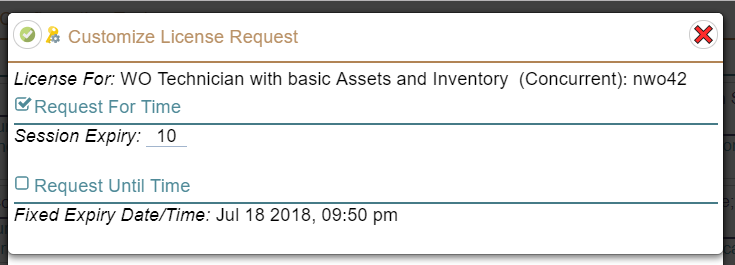
If the problem is that your network is not reliable and/or your users go out of internet range for hours, you have our reservation time set to a long time, then depending on your environment you have a few options. As above, if the users can access the internet when they are done – have them log out. If your users can't but they know when they will be finished – you could have them set the 'Request Until Time' instead of using the 'Request For Time'. (Found in the 'gear' when they grab a concurrent license.)
Of course, if you have some users that need a license for more than half of the time, you likely would be better buying named licenses for those individuals and not having 'just' concurrent licenses.
License Tricks
Overview
These 'tricks' are primarily for Concurrent licenses. Concurrent licenses mean that different people in your organization, but only one person per concurrent license at a time. Concurrent licenses are ideal for shift workers and people that only use the system a few minutes a day.
Enterprise licenses have no restrictions on who can have them, for how long or how many people at a time, so you just need 'the' Enterprise license you need.
- Note Enterprise licenses are for one database, one physical location unless otherwise agreed in writing.
Named licenses. These are licenses to a specific person. We allow you to, at no charge, move a license periodically (once or twice a year) as people leave your department or organization and someone else replaces them. But Named licenses cannot be used to go back and forth between several people. If people are offline for long periods of time and need licenses while they are 'out', then named licenses are usually the best option.
I've heard it is a good idea to deny 'delete' access to all but a few users but that there is a 'trick'?
The trick is that even the users that have the rights to Delete should not have that right 'normally', so you would create special users, and perhaps give them names/ID's like 'RayDelete' where in this case, Ray would sign in using the RayDelete login – and then have delete permissions. You do this by making most users not have access to delete actions, and then on the RayDelete account, giving the minimum other access to allow the RayDelete account to delete everything that user is allowed to delete. Of course, this means you need concurrent or enterprise licenses because Ray and RayDelete are two different 'names'. This works best with concurrent licenses.
I have an enterprise license, but I only want certain people to access it
Just like every license, you can specify who has access. The fact that 'legally' you can let everyone have access to it does not mean you have to let everyone have access to it.
I have an enterprise license, but some people I want to have restrictions to only 'partially use it. Note this question also applies to named and concurrent.
You go into the settings for that group of people for that license and you turn off the features that you want that group to not have access to. Note, if the user fits into more than one of the groups for licenses you defined, they will receive all the rights from all the groups. So, if you turn edit off in one of the groups they meet, but have it on in a second one they meet the requirements of, they will have edit permissions.
I want one users in an access group to have edit rights, but everyone else in that access group should only have view.
This is a specific example of the question above. To do this, you would turn OFF edit rights for the permissions on that access group, and you would create a second right just for that one person and give them edit rights.
So to do that, in the case below,
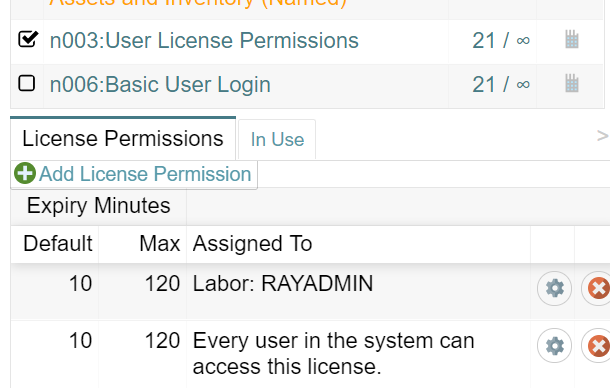
I went to the RAYADMIN row and set these settings:
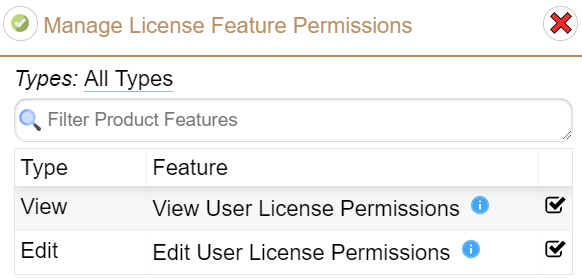
I went into the 'Every user in the system' settings by clicking on the gear icon and set these settings:
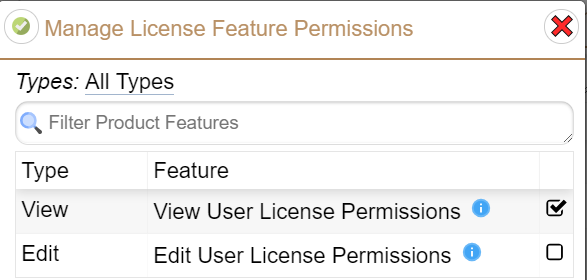
Now, only Ray Admin has access to edit the license permissions but everyone else can still view them.
2 groups (departments) of users, 1 has 20 licenses of type x, the other 5. We don't share.
The solution below makes sure that the one with 5 or the one with 20 won't use up some of the licenses of the other group making them unable to do their work.
- Make sure your support technician issues you 2 licenses. (This can be changed after at our normal support rates, should take half an hour or less normally.
- Use the license permissions to assign 1 license in a way that that the 1st group gets their 20, and another permission (or set of permissions) that the 2nd group get their 5. This means you can't use accessgroups to assign permission if the 2 groups of users belong to the same access group, but under normal setup – this should not be a problem.
I have 2 users that, at all times, one of them must have access to one of the 48 concurrent licenses of type x that we bought
This is really the same as the previous question. Have your support technician issue you 2 licenses, one with 47 and the other with 1. Now assign the 1 license to the 2 special users and the 47 remaining ones assigned to everyone else. The 2 will only conflict if they both try to use 'theirs' at the same time.
I have 1 user that, at all times, must have access to a specific license
There is no good strategy with concurrent because you would have to make sure you purchase more than you will ever use, a better strategy therefore is: purchase a named license for that person. Note: technically there is no difficulty, the 'problem' is that concurrent licenses cost more than named, so if essentially you want it dedicated to a specific user, named licenses are the way to go.
2 groups of users, 1 pays for 20 x licenses, the other has 5. We share.
This may be a case where you know 'on average' one group will use 20 (or 80% of the use and 'on average' one will use 5 or 20%) and it is more of a budgeting thing than wanting to restrict use. It may even be that the 2 groups are in different timezones or different shifts so they are unlikely to peak at the same time.
Option 1: Make sure your support technical issues you 1 license for all 25.
Option 2: Create 2 permissions for each of the 2 licenses you have.
Note: If you have 2 licenses, one for 20 concurrent and one for 5, and you let all your users have access to both – then they will consume 2 licenses. So that is not a good strategy.
I had 2 groups of users in 2 departments. One department does not want to see costs the other department needs costs on WO's, but we share the licenses.
Set up 2 permissions, one for each department. For one, permission we turn the costs tab off, for the other we leave the costs tab showing. This is really a specific example of the FAQ "but some people I want to have restrictions to only 'partially use it."
I had 20 licenses, I got 5 more for the same group of people.
If the new users are in a new access group and if your support technician issues you a second license (or third or fourth) you simply set them up to be assigned with the same permissions as your previous ones. But generally, you will want to ask your support technician to issue (update) for you one license of 25 instead.
My default/max for timeouts changed, but my expire minutes didn't.
These are set when you first get the license or when you login whichever is last and it is based on the values that were set the last time they sync'd before doing the above step. Normally these do not change often except when a system is 'new' and you are learning what values makes sense. To get the new values, Sync, Logout, enter your pin and come back in.
I am going to be going away from an internet connection for an hour, I need a 'concurrent assets' license.
Make sure you have the licenses you need before you go, and make sure you have them reserved for enough time.
My server is not visible and I'm going to be away from the internet for a (very long time) but I need a concurrent license for 1 hour in the middle of that time.
Make sure you have the licenses you need before you go, and make sure you have them for enough time. And yes, this means if you are gone for a month you will be tying up that license for the entire time. If you do this on a regular basis, you should consider getting a 'named'. If you are able periodically, perhaps every morning, go to your local Timmies or Starbucks etc.., then you really aren't the case being discussed here and you can follow the normal, easier suggestions above.
My server IS currently visible and I'm going to be away from the internet for a (very long time) but I need a concurrent license for 1 hour in the middle of that time.
Similar to the above, make sure you have the licenses you need before you go, and make sure you have them for enough time. If you do this on a regular basis, you should consider getting a 'named' license or, and this is practical in much of the world: arrange to temporarily have access to the internet/server shortly before you need the license so you can acquire the license for a few hours at that time. Remember that you can use your cell phone as a wireless hotspot.
We understand that what you might be hoping for is that you can 'book' a concurrently license for a block of time, but we have no capabilities in our licensing to support that, in part because it means we would have to randomly kick someone off when your booked time slot occurs and that would just be annoying for eveyone.
I have 2 licenses one person can have, but I don't want them having both at the same time.
For most users, Auto-Acquiring licenses makes sense, but if you have a user that sometimes needs a 'high powered' concurrent licenses and sometimes only needs a 'lower powered and cheaper' concurrent licenses, then you would turn OFF the Auto-Acquire and they would pick their licenses through the 'My Licenses' on the Configuration page.
I have shift workers, any tricks?
The biggest one is, instead of using the normal Session Expiry, they should set the 'Request Until Time' instead of using the 'Request For Time'. The 'Request For Time' is asking how many minutes.
Other:
Someone went on vacation and they have tied up a license for the whole time.
You should go in and cancel their rights to all the licenses When the device next tries to talk to the server it will be told its session has expired. But note: This is NOT a good idea if they have unsaved changes – their session along with any changes will be lost.
Someone lost their device/it was stolen/it was dropped and smashed and they have tied up a license for a long time.
You should go in and cancel their rights to all the licenses. If it is found or if the thief tries to use it, the changes will all be 'lost', it will not be allowed to send changes to the server. So if it was just recently lost, you will have to decide whether to give the user time to find it (if they have unsaved changes) or not.
Someone lost their device/it was stolen/it was dropped and smashed but they don't have any licenses.
You should go in and cancel their rights to all the licenses. If it is found or if the thief tries to use it, the changes will all be 'lost', it will not be allowed to send changes to the server. So if it was just recently lost, you will have to decide whether to give the user time to find it (if they have unsaved changes) or not.