

 Maintenance Connection Everywhere (MCe) · EAM/CMMS manuals
I completed my WO
but it isn't completed
Reasons that could happen:
- You're not connected to the internet, In which case the sync icon will be yellow, saying your changes haven't been saved to the server. This one isn't very likely since we try hard to save changes as soon as possible. It is more likely if you've manually disconnected.
- The other person is not connected to the internet, or not long enough to have picked up the changes you DID save to the server.
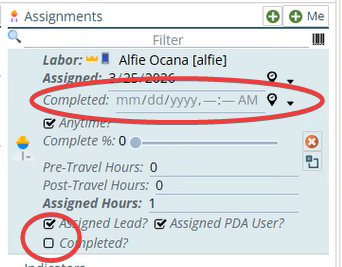
- You didn't complete the WO - you completed the ASSIGNMENT only. This is a common one. Some companies turn off the ability to set complete on assignments especially if they typically have only one assignee per work order, but others like it especially if they frequently have multiple assignees and they finish at different points - last one out, close the work order.
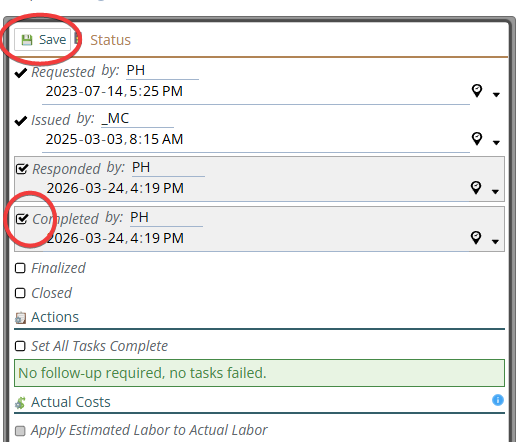
- You didn't complete the WO - you were in the dialog that lets you, but you didn't hit the 'save' button on the dialog
- Rules can cause problems if the rule is changing something that directly or indirectly blocks the 'complete' status. So you could have a rule you've (you company not personally) that is causing issues - this is a very common one, rules are hard to write well to handle every contingency. This would not ever be fixed by any software upgrade!
- if you are running with an older server version and a newer iOS app, see release notes. The iOS app typically only works with recent versions. App users, due to the way app upgrades work MUST be within a couple releases. Unfortunately, Apple gives no option to have different versions of the app at the same time, so you should always get the version when your server upgrades and then not upgrade again until your server updates again. (Turn off updates). Note that all our SaaS servers upgrade in lockstep, so this is not a problem. Your IT can pick up the latest MCe at any time with the code they were given (it almost never changes) and as long as your SMA is paid up, they can upgrade and run with the latest. It only takes a few minutes per upgrade with MCe and while occasionally there are problems, they are very rare.
- The Android Play store app has the same conditions as iOS because Google play store put the same restrictions on us.
If not one of those:
- To diagnose it, we would need more info - starting with relevant screen shots from your device and then maybe the other person's.
- There are no known bugs affecting correctness of the sync in many years and this is some of our most tested code by virtue of the fact that everyone uses it every few seconds when working, so waiting for an upgrade will almost never result in 'a fix'. Check the items above or let us know because:
- If there IS a bug - we would consider that serious and try to fix it very quickly. Our track record is typically 1 hour from diagnosis to fix published for that kind of bug - we don't get many, and we treat them high priority. (Publish for the web is that quick, publish for Apple/Android takes another 4-36 hours for them to make our published version live.)