Maintenance Connection Everywhere (MCe) · EAM/CMMS manuals
This bug has been fixed in MC 2025, but really it is a bug that never mattered!
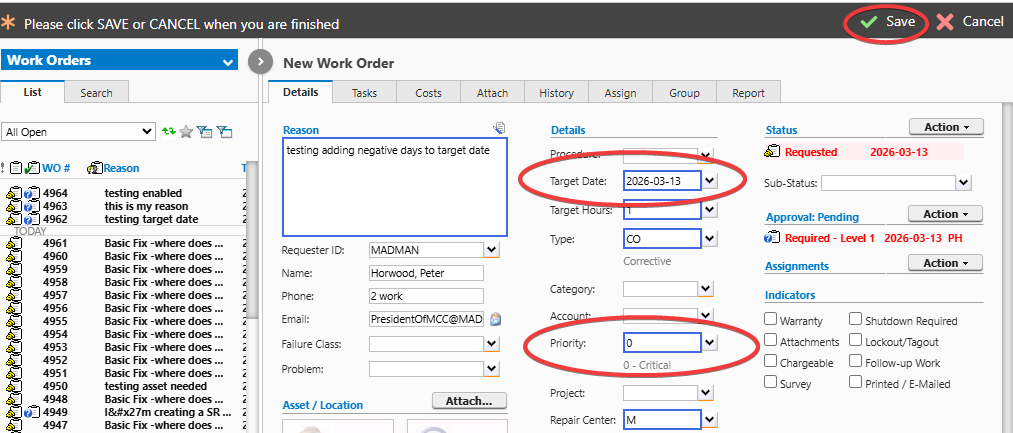
With older versions, it has been reported that there is a bug where if you have that feature turned on it is adding the days to the initial requested date. But really, the bug is irrelevant given the following:
- In MC 2025, if you have the feature turned on, it is adding days to the requested date.
- In earlier versions, if you have the feature turned on, it is adding days to the target date.
- Either way, if you have that feature turned on, the value you put in Target Date will be changed.
So no matter what, if you edit the requested date before you save your 'new' work order, if this feature is turned on, the requested date will be changed, the target date you entered will be overridden, it just turns out that the older version did it a bit differently.
Some customers will consider it a bug in MC 2025 because they were used to calculating what date to enter to get the actual date they wanted. But that would be a hack around a bug, not a feature, and so we don't consider that a bug
Option 1:. turn off priority manager so it won't add anything after you save your 'new' work order and you can freely set the target date to the date you want it to set. Option 2. keep the priority manager turned on and set to + 5 days (or however many you want), then before you save your 'new' work order do not change the target date and just let the priority setting apply the +5 days so it adds the number of days you set. If you want a different number of days than +5 on a specific work order wait until you hit 'save' on the new work order. This feature ONLY happens when you initially hit save.
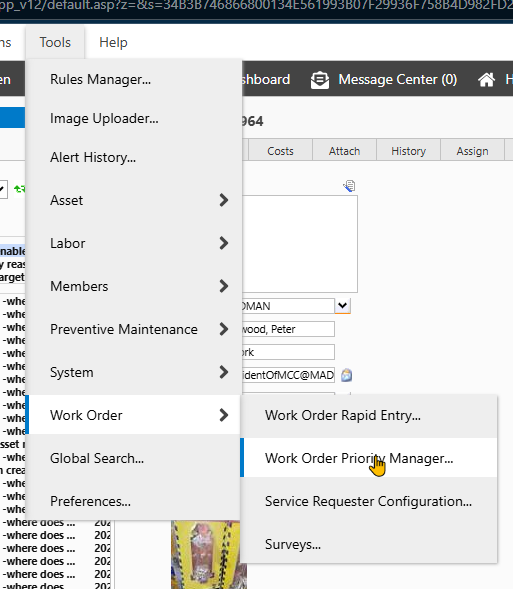
The following screen (at least MC 8.9 - MC 2025) says "Request Date" but actually it is "Target Date". What it does is on a WO CREATE only, if you have Enable Priority Actions it adds the noted days to the TARGET date not the "Request Date" as the UI says.
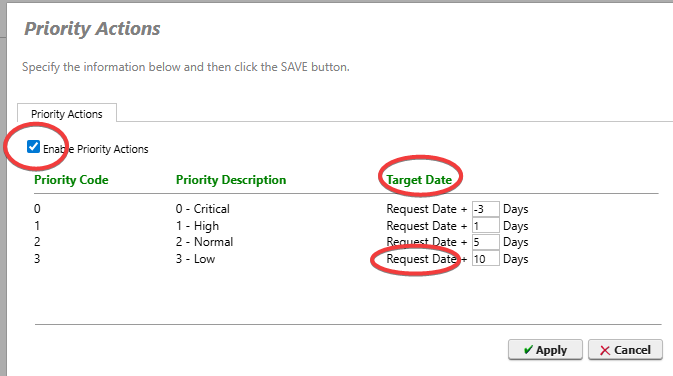
Side note: if you put a negative number for the number of days, it will be ignored - and set to 'today'