

 Maintenance Connection Everywhere (MCe) · EAM/CMMS manuals
There is a lot of thought and design that has gone into the offline/online/slow/flakey connections. The team that produces MCe started working with these types of issues back in the 1980's (really.)
This document gives some insight into how MCe works in some specific circumstances and some things you can do to optimize your experience.
There are some important words/definitions that you should probably understand before reading this document. They are in an appendix at the end. If this is your first time reading this document, please drop down now and read the terminology appendix to learn a bit about what the words 'slow' and 'flakey' and 'latency' mean as we are using the in here, then come back and read the rest.
Can't I just have everything right now?
The very nature of Slow and Flakey Internet means that no, you can't, and for most of our medium sized and larger customers, despite increases in speed of devices, internet connection and storage space, it is still not practical to have everything on and up to date on your local device 1 .
But MCe do an awful lot for you to 'guess' what you need and to try to get you what you need 'before' you need it, or 'as soon as possible from now' if we don't have it yet. It is important to understand that you can't have everything every time you want it.
With most software, such as MRO and Express, every time you ask for some data, your request goes through the internet to the server, then the data is returned. When you have an internet connection and you don't have data – MCe do exactly the same thing. So there is no penalty (and most of the time lots of benefits) for using a high end offline solution like MCe.
Bonus! It is better and faster when online than online software.
Due to latency, a side bonus is that offline software, done correctly, is almost always faster than software that requires a constant connection – because the offline system has the data on your device before you need it. It also means that with very few exceptions, when it isn't faster, it also isn't slower – it goes and gets the same data that it needs.
Is it ever slower than online software?
The initial load of the software is typically slightly slower. For example, on one test system with a slow internet, starting up MC for the first time took about 45 seconds. Doing the same initial start with MCe took about 55 seconds. This is because MCe loads more data initially.
On higher speed systems there is still an initial delay that is longer because of 'latency', but obviously it is much smaller .
Why is it so slow to upload a new image, but it comes down so quick?
Most internet connections have a 'download' speed that is 10 to 20x faster than their upload speed. This means if it takes 2 minutes to upload an image to a server, it might only take 6 to 12 seconds to download it. (or 30 seconds up and 1 or 2 seconds to come down.) Also, while we optimize as much as we can before uploading files, a server has more ability to 'optimize' a file for downloading than typically is available on the client machine so this can make a small increase in the time it takes to upload a file.
BUT … compared to products like MC Express and MRO, we DO do some major optimization of images for WO's, WO Tasks, Assets and so on. By default, we scale the image significantly. (But we allow you to scale in up or down to exactly what you want.) If you make an image ½ the size, it takes ¼ the time (on average) to upload/download due to it being a two dimensional object. So an 8 second upload now becomes a 2 second upload.
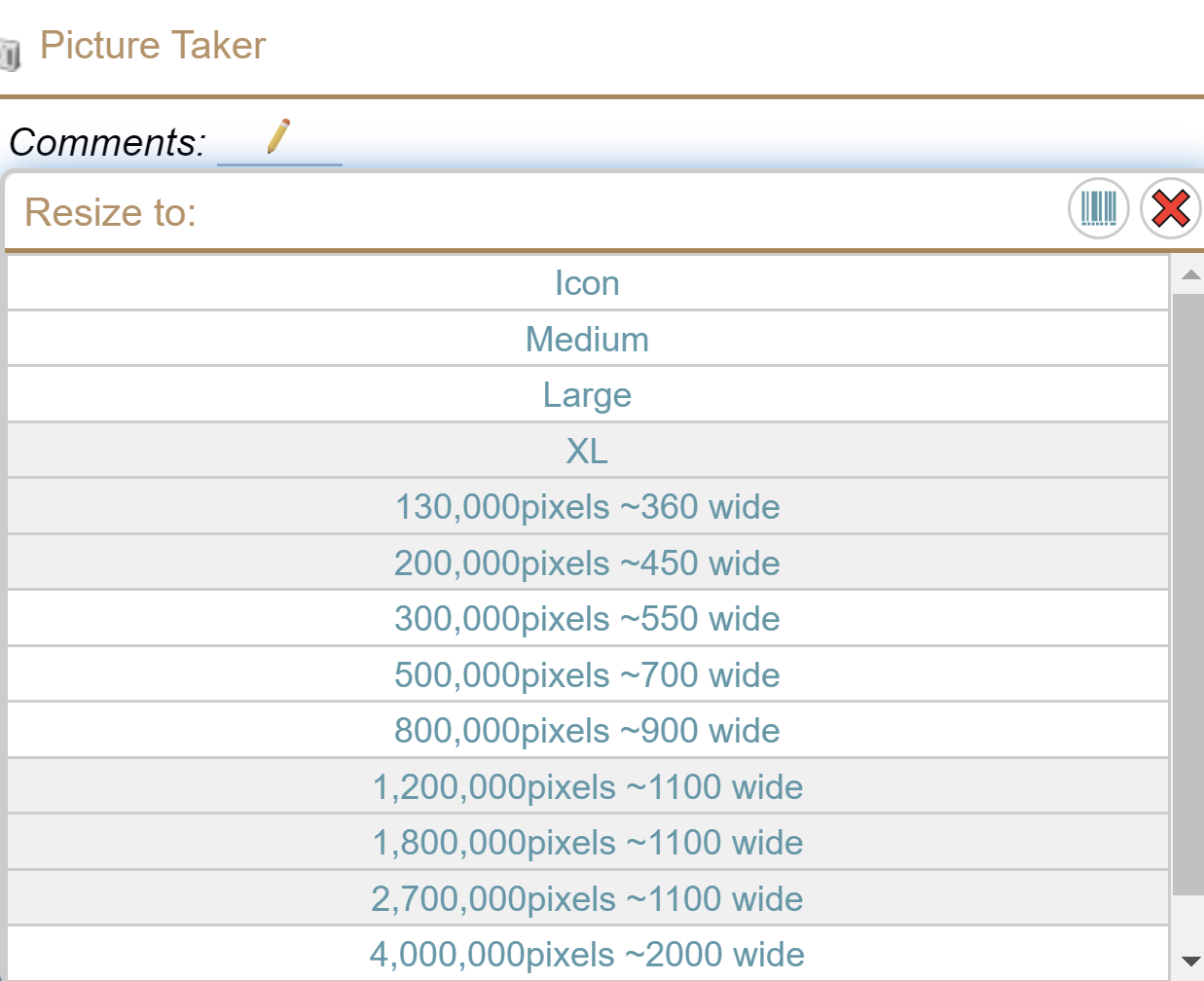
But if you upload a jpg as a document, that we upload as is.
What do you put on my device automatically, so it's there when I need it?
We allow 'you' to pick what you want to have offline. For example, if you go into edit an asset, we save it offline for you for a few hours. That means, if you come back to it anytime in the next few hours, whether you are on or offline, it is already on your device – no latency, no worries about speed or quality of your connection. Each time you go in to look at it, the amount of time it is keep is 'bumped up'. This is based on 4 decades of experience and various studies that have shown that – if you look at something, you are more likely to look at it again in the near future than you are to look at something else.
We allow define some default data to put on your device:
- If you have a WO module you likely are receiving all 'your open' WO's on your device – they are there automatically. No latency, so slow/poor quality internet to worry about once they are on your device.
- We typically give you the first 3 levels of assets in your tree on your device so that you can drill down with zero latency. Then, see directly below, more can be defined to be on your device.
You (technically an admin person in your company) can define what will go on your device:
An admin person in your company, or your support personnel at a small hourly fee can define what data you want on your device. Perhaps you are a manager and you always want to have 'WO's that are overdue' on your device so you can evaluate them while on the train on the way home for the next day.
What is in my list (of WO's etc..,)
The first concept to understand is, you have some data on your device (offline) and, if you have a connection, you may be accessing some data from your server (online.)
Anything offline we can show you immediately. Anything online, like MRO, we have to wait to get it. We do somethings about the speed 2 but we do a lot to deal with the latency, slow and flakey connections.
Now, take a deep breath, and let me explain how we show you lists of data. You initially decide (either by leaving it at the defaults, or because your system has it preconfigured, or because you changed it) which data (the major filter) to show such as 'all offline wo's' or 'my open wo's' etc.., and which rows to show (the text filter) where you only want WO's 3 with 'RED' in them.
- First we look at what you have offline – because we can give you that list immediately.
- Then, if you are online, we call to the server to see if there are any differences there. (New rows, rows that have changed so no longer are in the list.
- Any rows that came from the server that have changes 'locally' that have not been saved to the server, we trust the 'local' data for deciding whether to show them.
- Any duplicate rows (most will be duplicate) we ignore
- Any rows that are not changed on the client but are not in the new rows from the server are no longer shown.
We run into one interesting issue and that is that, for performance on large data sets, a particular challenge. Consider that you have asked for 'all wo's sorted alphabetically by reason'.
In general, we think that you should not be looking at sets of data with more than about 50 or 500 rows because it just doesn't make sense to be scrolling down through that many rows. But we want it to 'work' for you if you decide to do that.
So you might have, offline, 50 work orders, but you have asked to see a list of 75,000 WO's. The 50 you have offline let's assume are randomly spaced out through the 75,000.
We get a 'bunch' of data, then when you scroll down we get a 'bunch more' data, and we keep doing that as you scroll down. (Most software does that, it makes no sense to repeatedly download 10's of thousands of rows on-the-fly even on a high speed reliable connection.)
If you have offline 500, then the problem will be more obvious.
The simple solution is, filter your results so you are getting a smaller number of rows both from the offline and the online.
The issue is made more complicated when you have a flakey internet connection because we have to keep going back and forth between 'what you have offline' and 'what we can get online'. To make this work as smooth as possible, we do a lot of magic behind the scenes. But if you regularly experience an internet connection that goes in and out frequently, you are often better to make sure you have offline everything you need to work on (see section above) and then manually disconnect so we stop trying to go to the server for the data you want.
On things like the Asset tree, as you click around you could end up with a lot of gears spinning showing you we are working to get your data. So we take 2 approaches:
- If you are on-line (you've got a green connection) we show you where we are working – they shouldn't spin for very long.
- If you are offline – either because you are manually disconnected or because you have a flakey internet or because you are a long way from a connection, we just show you your offline data, but fear not, behind the scenes we are watching – and as soon as you get a connection we'll try to get you any data you asked for!
Terminology
Good vs. Slow internet:
This is actually not a 'verses'. You can have, in order of preference usually:
- you can have a Good connection that is fast (this is the one we all want all the time)
- a Good connection that is slow,
- you can have a Flakey connection that is fast
- you can have a Flakey connection that is slow (this is the one we all get frustrated with the most if we ever have to live with it.)
See the definitions for slow and flakey below, but in general, you want a good connection and if you have a lot of data you want to sync, you want a good and fast connection. The position of #2 and #3 above can flip depending on how severe and how fast/slow you are talking and what you are trying to do, but positions 1 and 4 are pretty clear as the best and the worst.
Slow internet:
The definition of 'slow' keeps increasing year after year and varies greatly around the world.
What was 'blazing fast – the best you could get' in the USA in 2000 would be considered 'fairly slow' in the USA in 2017.
What is 'blazing fast – best you can get' in Australia in 2017 would be considered 'rural slow speeds' in the Canada or the USA in 2017.
https://www.troyhunt.com/ive-just-launched-pwned-passwords-version-2/
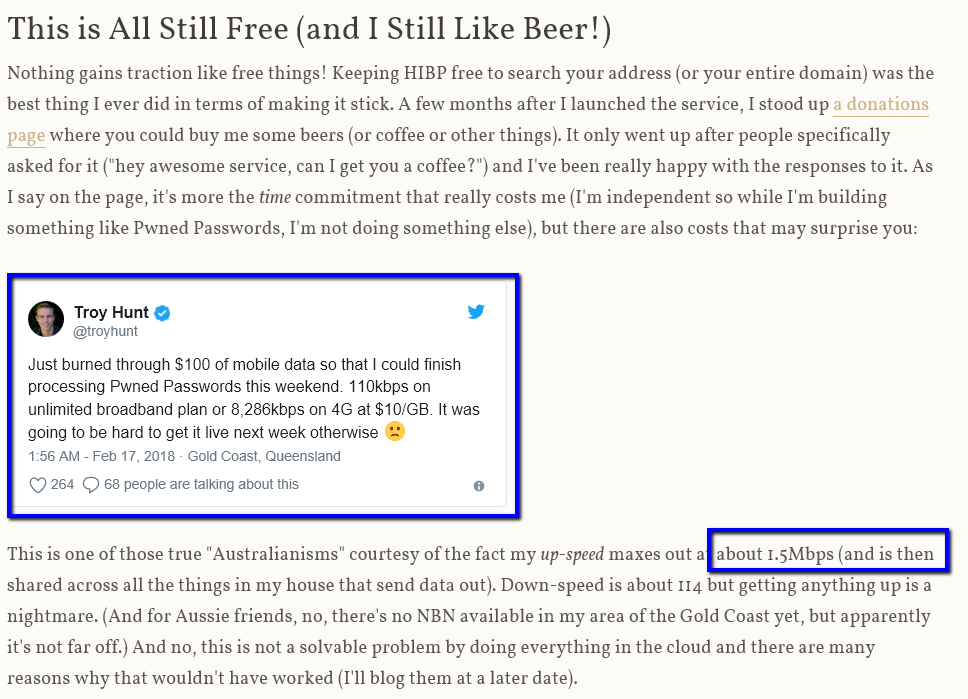
The author of this manual lives and works 6 miles from the closest WiFi tower in rural Canada and most people consider his connection to be terrible for Canada.
Another developer on our team lives in 'a big city' in Canada and officially gets 150up/150 down, but in testing he usually gets 160-180 routinely gets 200 down, yes that means his tested speed is faster than the speed his carrier claims. Note this is over 100x's faster than a good connection in Australia in 2017 and 50x's faster than a 'good rural' connection.
Normal speed in India in 2017 is Fast in Rural Canada in 2017 and Slow in the USA in 2017.
For the majority of people in the world in 2017, being able to live stream a Netflix movie without long frequent pauses would be considered blazing fast. In the USA, being able to live stream less than 3 movies at a time would be considered very slow.
Flakey internet:
This one is even harder to describe, but most people know what it is!
Corruption:
One case is where you have a 'good' connection (5 bars on a cell phone) but the conversation is garbled. For data, this may mean that the same data needs to be sent a dozen times before it gets through 'clean'. Being behind concrete with rebar, the signal going through metal 4 (mostly reflected, foil backed insulation is terrible for this), near a corrugated metal wall (multiple reflections), the signal going through water (reflections and absorption) such as an aquarium or boiler 5 . Antenna on the cell or WiFi tower you use in a 'lower cost for the provider' position. Network cables running in parallel too far with 110 or 220v power. Metal/Concrete floors (often the concrete is poured on corrugated metal – the concrete absorbs some of the signal, the rebar distorts it, and the corrugated base really causes signals to reflect in multiple paths causing corruption. There are of course many other possible causes, this is just a sample to explain the concept.
Disconnect:
Another case is where you get and lose frequently. This can happen if the weather is bad (moisture especially) and you are using WiFi from an outdoor tower. This can happen if you are driving. Electrical interference. Too many people using the same connection. You are walking around between rooms on in a warehouse and things, especially metal or water, get in between you and your internet connection. Lots of other reasons for this as well.
When you are on a phone and you ask someone to repeat what they said – you are usually reacting to a 'flakey' internet. Other times, as a human, there is so much extra info that you can guess from context what the person is saying. But tools like MRO and MCe have to get things across perfectly, so they keep trying until they get it.
Combined with a slow connection, having to send data over and over until it gets through correctly can make things very slow or impossible.
Latency
A $4 word that means 'the time it takes from when you ask for something until you get the response back '. In a practical sense, for software such as MC/MCe we define latency as 'the delay a human notices from the time they ask to do something to the time they can continue'. You've seen it on the internet even if you have a blazing fast connection: You click on a button, and 10 seconds later you get a response back, and the response is just a tiny amount of data. You didn't have a 'slow' connection or a 'flakey' connection – you had latency.
The internet 'decides' how to route signals, normally it makes good guesses. But the author of this document more than once has 'traced' the route and found that it went from one computer in a room in Canada, to Seattle Washington, then back to another computer 8 feet away from the first computer, going through 30 other junctions on the way. That caused a several second 'latency' for everything.
You see this when you select a WO or click on an Asset Location to open it in MRO or Save changes, there is a delay (small on the best connections, very high on slow, high latency, flakey connections). That delay is called 'latency'. Some of it comes from the time to talk to the SQL server to get the data, some is the delay between the server and your device that is running MRO.
MCe can't get rid of all of the latency issues. If we don't have the WO or Asset children list, or you are trying to save, MCe will have the same latency delay as MRO. But if we have the WO on Asset children list, then we have no latency (based on our practical definition of latency above.)
For example when you take a picture, instead of sending Gigabytes of data to the server and then the server can make the image smaller, we trim the size down before we send it. In a recent test on a 1.5Mbps connection, we were able to send over 100 images to a remote server in less than 2 seconds with MCe, while MRO took, on the same connection, 9 seconds to send ONE image to the remote server. Both sets of images were taken with the same device (A cell phone) and both with MCe set up to return larger images than our default settings. The problem is that the cell phone was retuning a huge picture to upload – a big enough image that you could create a will sized print from it in great quality if you wanted. In the case of MCe, we trimmed it down to literally 1/1000th the size – still big enough to print a good quality 4x6 print.
We also return different levels of information for different purposes, so for example, on a list we only return limited info, but when you go into a WO or Asset etc.., we then bring back lots of info.
Footnotes
-
1: For some of our smaller customers, the continued advances in performance means that, if you have a high enough internet connection quality and speed on a regular basis, then yes, you can have everything. But for most of our customers, this is not practical – too much data. ↩
-
2: We do do some things about the speed. ↩
-
3: Technically, in ones like assets – because they are tree structure, we look for any assets that have RED in them and show them and show their parents. ↩
-
4: This is why, when you put your cell phone on your dash you get better reception and better GPS signal – the signal is going through the glass instead of trying to go through metal, or going through the glass and then reflecting off metal to get to your phone. ↩
-
5: If you will permit a little bit of humor … the reason your cell phone doesn't work at the bottom of a swimming pool or hot tub likely has nothing to do the water interfering with the signal and everything to do with your cell phone not being waterproof! But being serious, if you have a waterproof cell phone, you will see often that you may have a perfect signal 2" above the water, but a foot under the water the connection is flakey. In this case, yes, it is the water that is interrupting the WiFi or Cell signal. How far under the water you go – inches or feet – before you lose a good connection depends on how strong the signal is and therefore how much water it can go through. ↩