

 Maintenance Connection Everywhere (MCe) · EAM/CMMS manuals
Note Modern MCe 12.1 and higher has a fix that works around the Safari bug
Bug in Safari
This is caused by a known bug in Safari (iOS, iPadOS, Mac) that likely still exists in current versions of Safari. Version 12.1 of MCe came up with a full (we believe) way around the bug.
This SPECIFIC way of reporting was removed around version 10.1 see Known Safari bug - Database Connection Lost
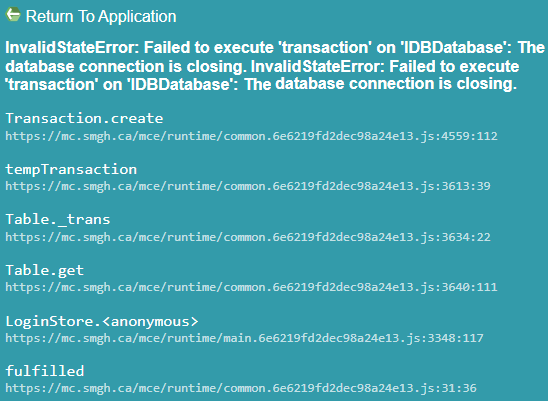
The 'InvalidStateError:Failed to execute 'transaction' on '<your database>: The database connection is closing.' will be repeated, as below
Partial MCe workaround version 10.1
We did a partial fix in 10.1 that made the frequency far less often, see the link above for more info.
Full work around in 12.1
If you are getting this with a version greater than 12.1.5 please inform support@MaintenanceConnection.ca
Workarounds prior to 12.1
Install newer MCe
This is the obvious 'full' solution for most customers
Temporary fix until you install a newer MCe
If you are getting this with a version lower than 12.1 the immediate fix is to fully restart the browser: use a 5 finger drag on the home screen to get to the app picker, then swipe the browser or MCe device app up off the screen. Other times you swipe it up - it won't change anything, it just temporarily hides it.