

 Maintenance Connection Everywhere (MCe) · EAM/CMMS manuals
A reminder that changes to the UI config are not covered under SMA, they are covered under Professional Services which you may have bought a block of hours (lower price typically) or may be pay-as-you-go. Fortunately there are tools (exporting the preferences to view, importing them to 'fix up' mistakes) to lower the cost when you do make a mistake.

Our formatting language, based on "Liquid"
We have several places where the preferences are complex. Places where we allow you to programmatically define how something should look or act.
We start you off with a very good option that, for most people will be all they want. But when you need or want to change them – we provide high power to you. (Prior to 2021, all of these things were hard coded and you had NO ability to adjust them.) This good example is done up fairly sophisticated on purpose to also show you practical things you might want to do or change.
We provide professional services (at a cost per hour) to help you edit this or create it entirely for you, and we understand that it can be very confusing. However – we do provide full documentation and tools if you want to do it yourself.
Our formatting has conditions, things like if/then/else, loops, case statements and much more, setting. Editing and using variables, access as variables to anything we think would be useful to you in the context (contact us if you want more!)
We also give you filters to edit the data in an amazing wealth of ways. You can do math on numbers, you can do string manipulation, array management, date functions and more.
We parse directly so it is safe rendering with whitelist – no eval or 'new Function' used. If you are familiar with Jekll, Github or Shopify templates you'll be comfortable with ours.
An example, using the Display format for locations
The example is how you want to have an address displayed. (Asset Location) Our default, for example, does not show the latitude or longitude. But you could have those included if you wanted.
In the upper left quadrant, is the current syntax. This will usually be what we provided you by default. This is what you are changing.
IN the upper right quadrant the results of the parameters against the rules of the format are shown. So in our example below the address shows up as 2 lines. Note that we expect you to normally edit
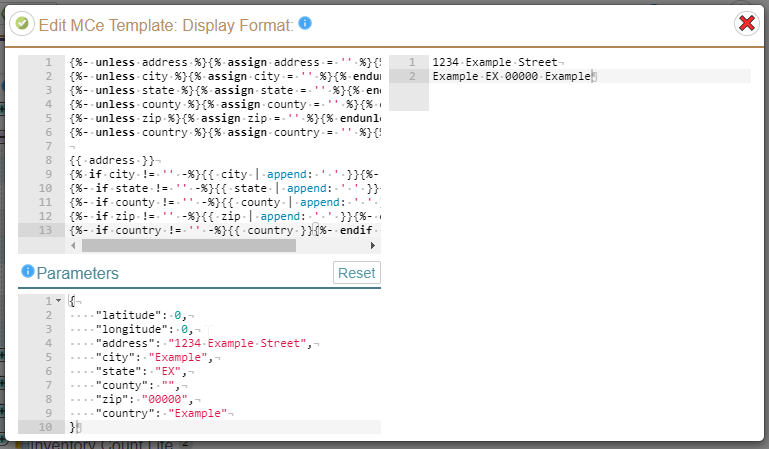
In the lower left quadrant (or middle on a narrow screen), we document 'by example' every value you have access to for the particular tool. You can also change the data in it to create test cases for your format.
If you make a mistake, while it may not be easy to understand, we give you all the info we can about your error.
As this is all based on Liquidjs, along with the Parameters above, their documentation gives you all the details of what you can do with our tooling. People with a programming bent will find it easy to understand and work with, so if you want to do this yourself, we recommend you find someone in your company that is comfortable with programming.
In most cases, you are likely to like it exactly as we provided, or with a few tweaks. Our examples are often 'full' examples, giving you a very complex example, a good default, so you can then just edit by moving things around and/or adding a few extra characters or adding or removing a line break.
Looking at a few of our examples should give you a lot of understanding, if you have a programming mindset, of what you can do. For example, in the example above, we use the "unless" syntax. This basically is saying – unless the field exists … assign it a value. If you are used to programming languages, this is the same, but simpler, than saying: "if not exists (field) then field = '' " (if the field does not exist, assign it a default blank value.)
If you make a mistake in syntax or naming of fields, you will get an error message that may or may not be clear. If you are making changes, you can always go back to the default and start over. If you get an error you can't figure out – copy what you have to a tool like notepad, set it back to the default, then look again at what you saved in notepad.
The following links are to the Liquidjs documentation. They are links to the two places we think will be of the most help to you.
When you look at the documentation below, if it says it was added before version 9.37 then we believe we have included include it exactly as they document it.
Tags: https://liquidjs.com/tags/overview.html
Filters: https://liquidjs.com/filters/overview.html
The other sections of their documentation don't apply. We provide you with our playground that lets you work with the variables we provide you with for each format, there is no API. But we believe we have implemented all the tags and filters from liquid as of their 9.37 version. We might not be perfect in the filters – but if you find something that doesn't work to spec, let us know and we'll see what we can do.
Special for emails:
{% layout '_layout' %}
Links to the "Email Layout Wrapper" email