

 Maintenance Connection Everywhere (MCe) · EAM/CMMS manuals
We provide barcodes in several places to provide several functions. This can be confusing if you ONLY think about barcodes as 'adding a part' for example.
- Add an asset to a work order, scanning the barcode from the asset you are standing next to
- Add an assignee to a work order, scanning the barcode on their id badge
- Add a part, scanning the barcode on their bin or scanning the UPC code on the package
Consider the following where the different users have barcodes on their ID, and you are trying to assign a person that is standing right next to you. The same example works for picking a part in a stock room.
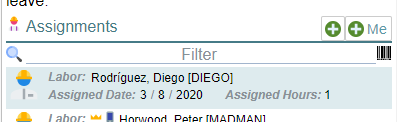
If you look on the screen you immediately see a barcode. If the list is empty, the barcode button is greyed out (not available.) You click on it … why doesn't it add the labor as an assignment?
Because it is there to filter the list, not to pick.
Instead, you want to "add" an assignment. If you have a barcode reader such as a Honeywell CT-60 device, you click in the row and pull the trigger to read the barcode.
If you use the software barcode reader it is the same number of steps but instead you click on the labor picker button then click on the barcode reader.
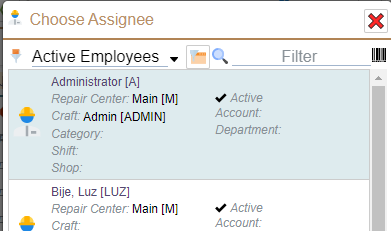
NOW the barcode button will let you scan their id to pick them. (Filter down to 'just' that one.)
Note there are two ways to fill the barcode out for that, especially 2D barcodes like QR
- You have just a string in it (one of the data types QR codes accept, but also a small number of 1D bar codes), the string typically will be the ID.
- You have a URL style QR code (the one most people think about when talking about QR codes, indeed, most people think that is the only thing a QR code can do.) 'well known' URL that, among other things, contains the ID. We read the ID out and ignore the URL part when picking.