

 Maintenance Connection Everywhere (MCe) · EAM/CMMS manuals
The Help 'About' page shows lots of juicy information about your system. Some is useful for everyone, some in informational about who we are, some is legally required to be 'somewhere' in our system, and some is used for debugging when you have problems.
Below is an image that shows part of the page. Yours will be similar, the number of columns will depend on how wide your device or browser window is.
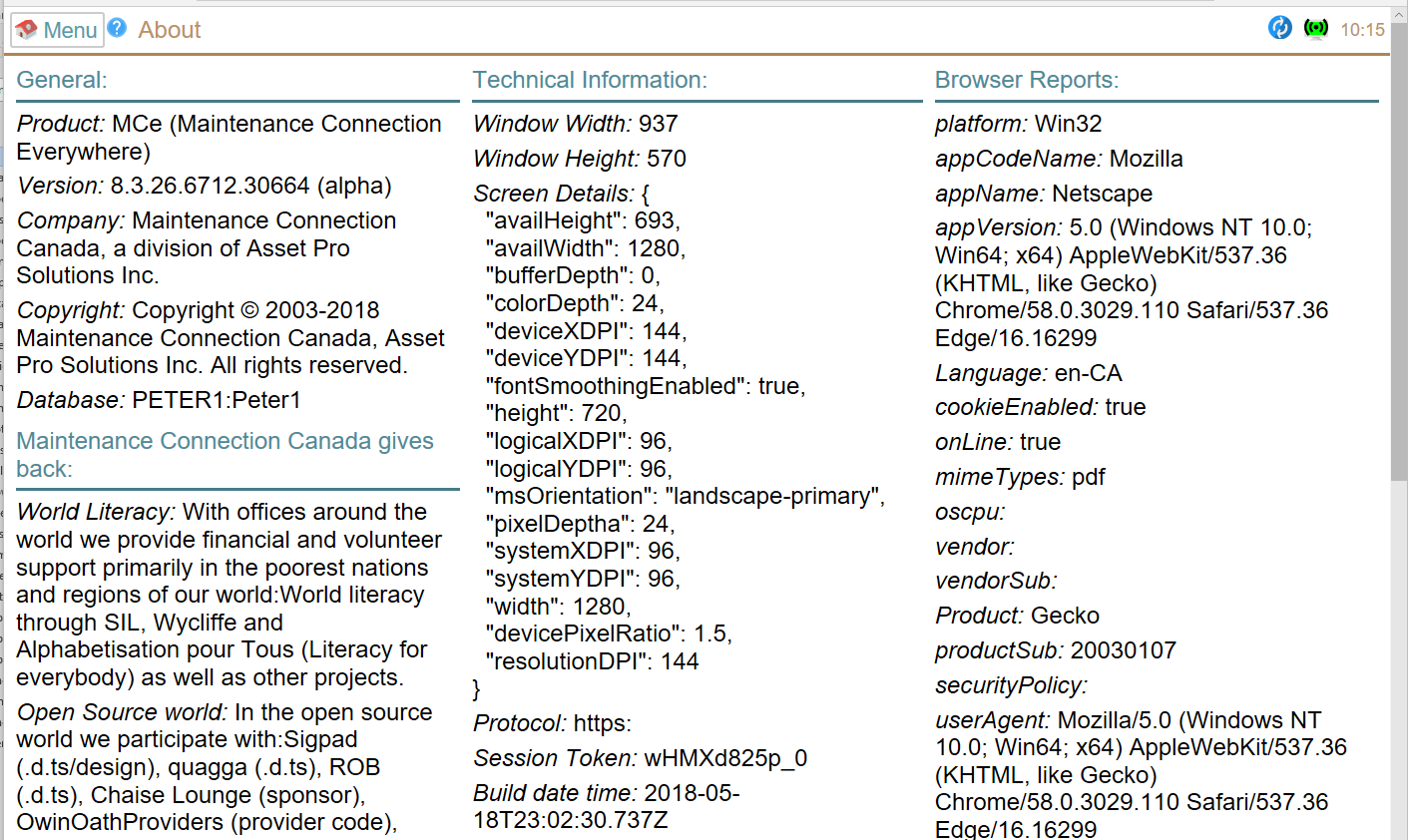
General
Product
This will be usually MCe, it is the product or the product 'family'. In older versions you might have seen MCe Technician or MCe WO Technician or MCe-PalmPilot etc..,
Version
The version you are currently running. Most of the time when asking support questions you should give at least the 1st three portions of this so they know what you are running on. So in the screen shot you would say version 8.0.774. It never hurts to give the whole string 8.0.774.6425.42887 so if you are copy/pasting – go ahead and copy the whole version.
Modules
For years, the only version you would have seen in the help about was 'WO-Technician' (or in some previous versions we said the module was 'WO-Tech' or 'Technician'. In even older versions it didn't say anything there. If you have licensed more than one module, or you have a different module, you will see the module(s) you have access to listed there.
Company
Legal notice of our company. (Maintenance Connection Canada is a registered trade name/DBA (Doing Business As name). Maintenance Connection Canada is a division of Asset Pro Solutions Inc. Checks/Cheques and contracts can be made out to either Maintenance Connection Canada or Asset Pro Solutions Inc.
Copyright
The obligatory copyright notice.
Database
The MRO database you are currently connected to.
Maintenance Connection Canada gives back
For over 40 years, the owners of Maintenance Connection Canada have been heavily involved in volunteer work, donations, trips around the world to the poorest locations – even sleeping on garbage dumps and mud huts with dirt floors.
When Maintenance Connection started to run their 'Maintenance Connection gives back' they asked us to launch our works under 'Maintenance Connection Canada gives back' and we were happy to do so, and we continue to to this day.
We, and some of our staff, but we don't require this of any staff, gives back in many ways ranging from 'charitable' services and organizations, sitting on government, church and other boards, volunteering locally and around the world. The aforementioned has come to literally over 200 hours per person per year, decade after decade, between the owners of Maintenance Connection Canada, and our staff also do hundreds of hours as well.
In addition, we, and you, benefit from open source projects, and so we financially as well as by writing and submitting free code, 'give back' to that community as well, sometimes in small ways, sometimes in large contributions, sometimes cash donations and sometimes (to the huge shock of the owners of those projects) by paying to have a specific feature added.
Technical Information
Window Width
The width of the browser window when you came into this page. (On a tablet or cell phone, try rotating the screen and coming back in)
Window Height
The height of the browser window when you came into this page. (On a tablet or cell phone, try rotating the screen and coming back in)
Protocol
This should always say HTTPS. If not you are running in an unsupported (which means support related to problems due to protocol is on an hourly basis) and it means you are likely missing some features (and the browsers are promising to take away more and more features for those not using HTTPS.
Session Token
A cryptic key by which we connect your session/device to the server. It is used to keep track of what data you have to expedite sync'ing. Normally you don't need to know this, but when debugging problems, it is sometimes useful.
Build date time
Again, this is mostly for debugging purposes. If you care, the time is in either MDT or MST depending on the time of year.
Browser Lang(uage)
This is the language that the browser claims it is running in.
Libraries
These are commercial or open source libraries we incorporate into our system. This list varies from version to version. If you want to know which libraries we are currently contributing to in the open source world, about one third on this list in any given period are recipients of our contributions.
Many of these libraries require we acknowledge them in specific ways (usually by giving the name and the license under which we are licensing them.)
Credits
Our team members who help in a technical or testing way to get you this product. Testers (dedicated and part time), developers, designers, coders.
Trademarks
More legal stuff.
Browser Reports
These are the values that your browser reports.
These generally are the most useless values because browser manufacturers want to make sure we don't write code that says things like:
- If such and such a browser, disable this feature or
- If such and such a browser, enable this feature.
So they all want to look like all the other browsers for enabling features and like none of the other browser for disabling features. This is why, in the screen shot below, the browser I used claims to be Mozilla (Firefox) webkit(Safari), Chrome, Netscape. (For what it's worth … it is actually the Chrome browser, not any of the others despite the appCodeName being Mozilla and the appName being Netscape. Actually, almost every modern, perhaps every modern, browser claims it is Netscape – even though that product died many years ago.
Platform
While the browser reports Win32, the browser that said this is actually running on a Win64 'platform'.
appCodeName
Most say Mozilla
appName
Most say Netscape
appVersion
This yields some guesses, as long as we keep upgrading our detection algorithm.
Language
In this case, even though the computer is running in 'en-Canada' the browser claims US English. It is fairly common around the world to find en-US even though that is not the language in use.
mimeTypes
These are what the browser recognizes and will automatically display files of these types. Pdf is fairly common among browsers which is a major reason why we distribute our manuals in PDF instead of other formats like docx
Vendor
Useful for determining exactly what browser you are running on
userAgent
Like appVersion, this can be useful.