

 Maintenance Connection Everywhere (MCe) · EAM/CMMS manuals
This document looks at how to create and test/debug a URL for Direct Entry.
The Direct Entry is a way for you to use a URL to take a user directly to an Asset or WO or other object.
- By emailing someone a URL, this might be an automatic process that calls our API to create a WO, then emails someone to tell them to process the WO further or execute the WO
- By having a QR code URL on a piece of equipment or a room, for being able to go directly to that WO by scanning in the QR code.
- Use one of the tinyurl services or your own, to keep track of a match between a tiny url and the full Direct Entry URL, this way you can put much smaller QR codes on your equipment/rooms, and then do the same as above. You will want to use a service that lets you edit the destination URL later, so that when servers change etc.., you can make a bulk change and the redirector redirects to the new URL
- By generating a QR code URL using the generator in MCe, then emailing it to someone to scan to go to it on their cell phone.
Constructing the URL:
The 1st part is your path to MCe, you will NOT use the https://localhost:44352 value that we have above, that was for one of our internal test servers..
Then a hard string of "/.well-known/api/viewer/v1/", so yes, the /.well-known/ subdirectory is a hardcoded value, defined by RFC 5785 RFC 8615 It is increasingly common for Web-based protocols such as our use here. The "api/viewer" is because it is using our API (not the one you have to pay for to use) and it is the viewer function. The "v1" is so we can make breaking changes with a "v2" without breaking you – so you have some flexibility deciding when to upgrade when we do something that is incompatible but adds more functionality, we do that so your code continues to run and you can later upgrade your code to be compatible with the v2 standard.
For the examples below, you never type the <>'s … they are there to show you that you have to replace the <whatever> with a real value, not the "<whatever>"
Note:For the Direct Entry feature, When using GUIDs, they must be entered In their 36 character format with dashes such as this example: 030d62c0-1c2b-4073-bc8e-a80808deaa5f
If you are using IDs, see the appendix on IDs before implementing.
For the database : db() you can use any one of the following, the example above is using a syncguid:
- syncguid, asset(<theGUID>) or asset(syncguid=<theGUID>)
- id asset(<theID>) or asset(id=<theID>)
- connectionkey
You then have to specify a module, in the example above we use Asset which we suspect will be the most commonly used along with WO (Work order). The modules are not case sensitive. The user must have access (license) to the module for the direct entry to get to the requested location. The complete list of values as of December 2022 is:
- Account
- Asset
- Category
- Classification-Asset & Inventory
- Contract
- Contact
- Craft
- Department
- Failure
- Holiday
- ICLite
- Part
- PM
- Problem
- Procedure
- Project
- PurchaseOrder
- RepairCenter
- Report
- Shift
- Shop
- Solution
- Specification
- Stockroom
- Tasks
- Tool
- Toolroom
- Training
- User
- WO
- Zone
If you encounter an unlisted module in your user interface, feel free to test the intuitive value(s) to see if they function as desired. If successful, please inform our support team so we can update our list accordingly. In case the intuitive value(s) do not work, don't hesitate to reach out to our support team for assistance in determining the correct value.
For the Module object value (so THE asset or THE work order you want) you can use any one of the following, the example above is using a ID
- syncguid, asset(<theGUID>) or asset(syncguid=<theGUID>)
- id asset(<theID>) or asset(id=<theID>)
- pk asset(pk=<thePK>)
So let's consider a real example:
We have a URL that looks like this:
https://dev.maintenanceconnection.ca/mce/#/-PETERHOME/ and other stuff after that
And we want to access the asset with at II of "Madden house-Grounds"
The database is entPeterHome with connection key of PeterHome
So we first create the custom part:
/.well-known/api/viewer/v1/db(entPeterHome)/asset(Madden house-Grounds)/
Then we take the base part of the URL:
https://dev.maintenanceconnection.ca/mce
Note that we strip everything from the # on off of the URL. In our case we have a subdomain dev and a subdirectory in IIS "mce". You may have one or both or neither, and you may have a deeper path – this is a setup decision, what is relevant for this document is that you find the # and strip it and everything to right of it off of the URL to obtain the base URL.
And we attach the base on the custom parts of the URL together to form the following:
https://dev.maintenanceconnection.ca/mce/.well-known/api/viewer/v1/db(connectionkey=PeterHome)/asset(Madden house-Grounds)/
There are many mistakes you could in theory make while crafting the URL. Some will give you 404 errors, some will give you one of our 'grinding gears' errors, for example, below I used the wrong db connection key, there is no db with that key.
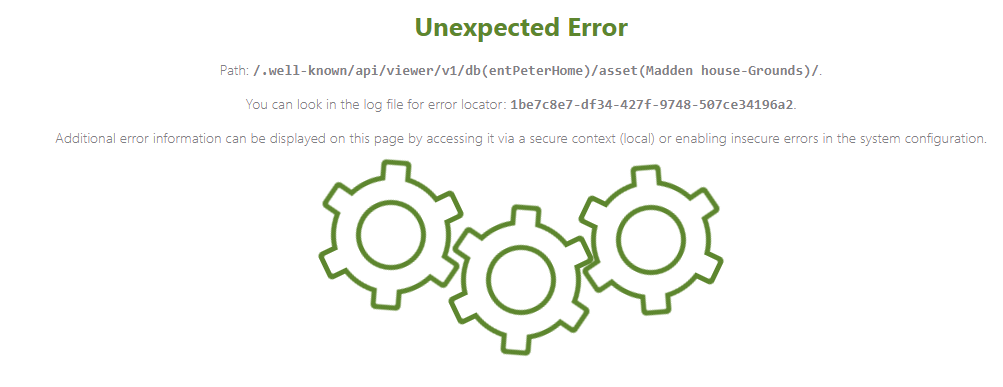
Checking the log, as it suggests shows me:
Requested database does not exist '(id, System.String: entPeterHome)'")
So the gears are grinding because I didn't provide a valid database, so it has no where to go
So why don't we show you the error? Why do we send you to the log? Because you aren't logged in at this point, so you are not in a secure position to receive errors and you don't want to tell a bad actor the error message so they know how to fix it and more successfully attack you. Hence … we give you the info so that you, the developer level person can relatively easily go and find the error without telling bad actors the information.
Common mistakes that can result in the 'grinding gears' error:
- the wrong database key/id
- a misspelled module
- you entered a value for an object, like a WO, that doesn't exist in the database
- you have some of the characters in the string missing or in the wrong place so we can parse what it is you want
Other errors not in the log we are unable to directly help you For example, 500 and 400 (e.g. 404) errors mean you aren't even getting to our software so our software can't give you an error on screen or in the log. For those, check spelling, check the format – missing /? Double //'s? Missing ()'s?and _ where you meant to put a -? Missing the . in front off well-known?
In testing, I purposely spelled one of our website domains wrong, and the Brave browser told me:
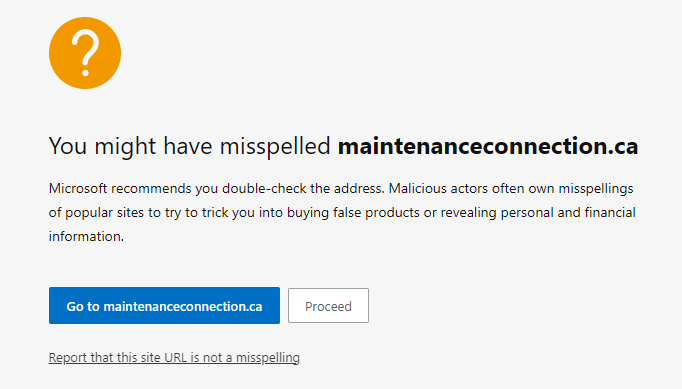
Essentially, because Edge knew our web site to be what it calls a 'popular' site, it saw the slight misspelling (I left out one of the n's) and suggested it could be a misspelling by me or it could be a malicious actor.
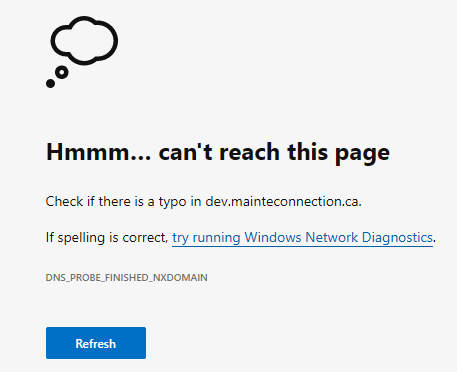
If your web site isn't deemed 'popular', the error you will get may instead look like this:
Appendix: IDs
If your IDs contain any characters that are not allowed in a URL, you may need to encode them, depending on the exact way you are giving the user the access of the URL. This has nothing to do with MCe, but everything to do with how you get the URL to the user and how they use it to get to the MCe page.
A URL consists of a restricted set of characters from the US-ASCII character set, which includes digits (0-9), letters (A-Z, a-z), and a few special characters ("-",".","_","~").
ASCII control characters (e.g., backspace, vertical tab, horizontal tab, line feed) and unsafe characters such as space, , <, >, {, }, and any non-ASCII character are not permitted to be directly included in URLs.
Additionally, some characters possess special meanings within URLs and are known as reserved characters. Examples of reserved characters include %, ?, /, #, single and double quote (" and ') and the colon :. Any data sent via a URL, whether in a query string or path segment, must exclude these characters.
To transmit data containing disallowed characters within a URL, we use URL encoding. This method converts reserved, unsafe, and non-ASCII characters into a universally recognized format for web browsers and servers. First, the character is transformed into one or more bytes, and each byte is then represented by two hexadecimal digits preceded by a percent sign (%) – (e.g., %hh). The percent sign serves as an escape character.
URL encoding is also referred to as percent encoding due to its utilization of the percent sign (%) as an escape character.
Most modern programing languages come with a URL encoder that knows how to do this for you. It is ALWAYS safe to encode them before coming to MCe, so you may just to decide to do it.
But if you don't have any of the 'problem' characters in your IDs, you may decide to just ignore this.
The one special one to consider is the space character. If you EVER have spaces in your IDs and you decide not to encode, test to make sure that works for you in your process, space is often handled in a special way that lets you get away with not encoding it. Again, when it comes to MCe, if you get that far, then whether it is a space or a %20, we will handle it properly, so this is a question of your processes before you get to MCe, not an 'MCe issue'.
On the other hand, this also tells you if you have characters like / in your IDs, then simply testing a space in an ID does not tell you if your processes will work. The best would be for you to test all the special characters that you ever plan to use to make sure they are working either way you decide to go.
If your programming language doesn't come with a URL encoder and you manually need to do it, you can find the codes on the internet easily for all the ones you might need. However, here are the most common ones you will likely need:
- Space: %20
- Backslash "/": %2F
- Plus "+": %2B
- Ampersand "&": %26
- Percent "%": %25
- Question mark "?": %3F
- Open and close parethesis (open and close brackets) "()": %28 and %29 respectively
- Dollar sign "$": %25
- Double quote ": %22
- Single quote ': %27
Note that using PK or GUID does not need any encoding because they can never have characters that could cause a problem. IDs typically are values that come from another system however, and so IDs are allowed to have a much wider range of characters, that if used, might require encoding depending on the other software you are using.