

 Maintenance Connection Everywhere (MCe) · EAM/CMMS manuals
Warning:
If you do this, any usnyc'd changes will be permanently lost
If you do this, any licenses you have assigned to this browser/device will not be released.
The effect of the licenses not being released depends on a few factors, most significant the type of license:
- Enterprise, no real effect, just some database queries or reports may cause inaccurate info
- Named, you will be locked out of that license until the license is released. See licensing docs for more/up to date information, for example, in 8.4 we gave the (temporary) ability where a session of a named license can be reused by another device if it has been inactive for about 48 hours.
- Concurrent, that copy of the license will be blocked until it times out. If you had it out for 10 minutes, then no real problem. But if you had it set to be reserved for you for a long time, this can be inconvenient.
We therefore STRONLY recommend that MCe users do a 'retire device' before trying doing a clear browser cache and we ask you to never use the clear browser cache without discussing with our support first.
Note: These instructions do NOT apply to Non-MCe products.
Why?
There are times when clearing the browser is the easiest way to deal with something. Usually you will be instructed by support personnel to do this, and this file will tell you how to.
The App Cache are 'the programs'. This will 'force' the computer (the mobile device) to get the latest copies of the software that is on your server.
The Database files are 'your data'. This is not the SERVER copy, this is the local copy on your device.
- This means any un-sync'd changes will be lost forever
- This means that if base tables (lookup tables etc..,) have changed on the server, you will get new copies.
How?
PLEASE HAVE THE USER RETIRE DEVICE LOGOUT BEFORE DOING ANY OF THE FOLLOWING. Otherwise, if they have any named licenses, those licenses will still locked to the device and will require manually fixing at the server side
If they can't retire device logout, have them use the advanced configuration in MCe first and delete all their data. It *also* tries to free up the license before wiping the data.
The specific look at feel will change from version to version of each browser, and since some update weekly, there is no way this file will be always up to date. But most of the time, these should be close enough to make it easy to find how to do it in the version you have. We try to, about once a year, check whether these are still close enough to be useful. Or if we notice that a browser changed radically (as Chrome did for example in late 2015) we update it.
Anything on these screen shots not specifically discussed is not relevant.
You can ignore all the browsers that are not yours of course.
We recommend using the table of contents tools or the Navigation pane when looking at this document so you can click to your browser easily.
Supported Browsers
Edge
Edge has unfortunately followed the 'less options is better' model of thinking. So be careful when trying to do this for other sites, because you might wipe out MCe/MCxLE ! And if trying to clear MCe/MCxLE note that you will do the same to every other site you have data or applications for in Edge.
Click the more (…) button, then select Settings
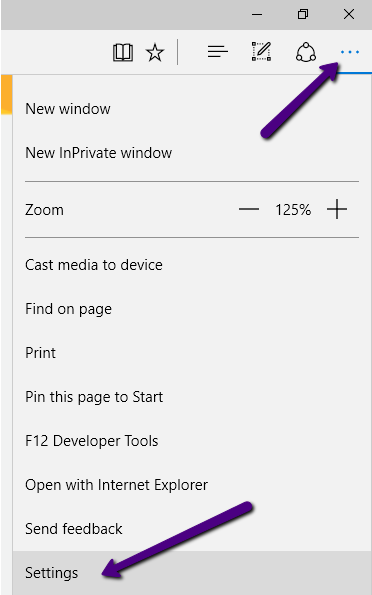
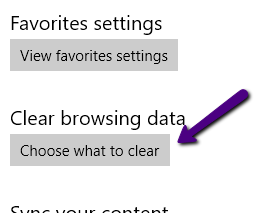
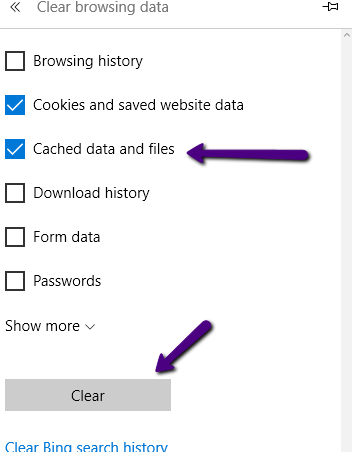 Make sure Cached data and files is selected, then press Clear.
Safari
We have not found an easy way to do this with iOS. The only way we have found is to set up the developer console on a Mac, connect the iOS device to the Mac, then use the developer tools on the Mac to clean it.
The method has changed from version to version and is fairly complicated for a non-technical user (pretty easy for a tech savy user) so we rely on you doing an internet search for the then current way to do this.
Chrome on Mac
We know of no way to do this.
Chrome on Windows
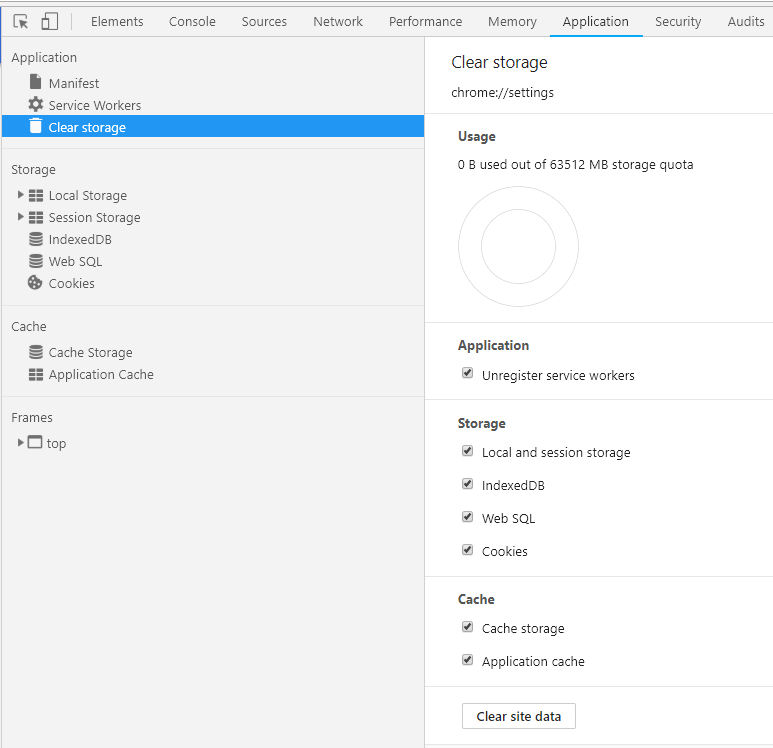
F12
Application=
Clear Storage
Clear Site Data (see image below)
Unsupported Browsers
IE 11- we do not support this browser anymore
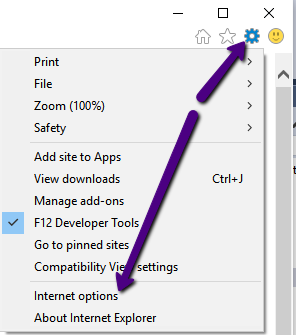
Open up the gear menu. Select Internet options
Choose Settings Button. Choose Caches and databases tab. Choose the server who's caches and database you want to delete
WARNING: NOTE THAT IE is not letting you choose between the data and app cache – both will be deleted.
Then click the Delete button.
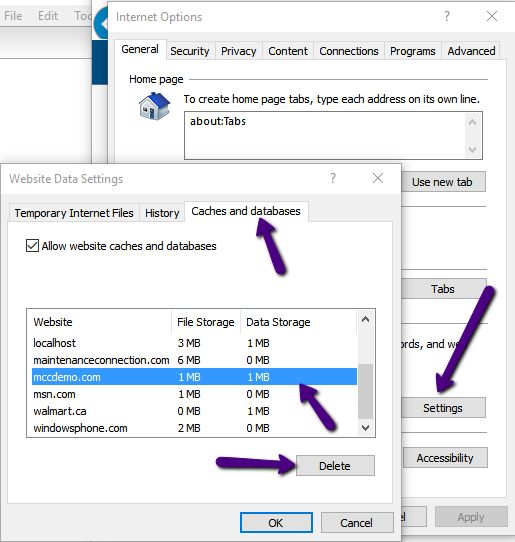
Click OK as needed to get back to the normal browser experience. Hit F5 or the refresh button to get a new copy of the application.