

 Maintenance Connection Everywhere (MCe) · EAM/CMMS manuals
Understanding the setup. This document is under development.
Terms:
Terms around people:
External Logins: SSO user is 'an external Login', that links to the User, and then the USR links us to the Labor (or multiple labors, 1 per database).
Labor: This is a resource, like an Asset, like a Zone, like an account. Something that can have actions associated with it. (Stored is stored in the Ent database)
Login ID: this is a User of the system. See User.
Member: this is a User of the system. See User.
Member ID: the value of the User in the User table. See User
User: this is a person who can log into and access the CMMS system directly, someone who can log in. The system can have more than one databases that a given user can log into. The User is stored in the Reg database in a table "user"). Accruent uses 'User' and 'Member' interchangeably, leaning towards 'Member' more often in the UI, equal in the documentation and 'User' behind the scenes. A User will have a Labor record for each database they have access to.
SSO User: this is a User account, one specifically that is managed in an Identity Provider such as Azure, Active Directory, Auth0, Ping, Google etc..,
Terms around Database
Reg/Registration database: This is the database that keeps track of all the entity (business/CMMS) databases. It contains no CMMS/EAM data, it is all about who can log in and what databases are there. For a given customer it will point at one or more 'ent' (entity) databases. The record for the User sits here as well as links to the Labor.
Ent/Entity database: This is the database that contains all your CMMS/EAM data. If you have a test or training or other NFP (Not for Production) database, you might have 2 or more of these. But at a minimum, you'll have one. The Labor record sits here.
Database: a collection of data that is kept together.
Common confusion/clarification:
A User and Labor are often thought to be the same thing. Because, well, in real life, they are often envisioned as 'the same'. But a labor doesn't need a user - you can have 100's of labors that can't log in. It can help if you think about 'User' as "the part that lets a labor log in"
A User can't do anything useful until they are mapped to a Labor.
When you sign up a 'new' user, you'll have a User record, you'll have a pair of records pointing at the database you asked for, but Sign up won't create until you are approved. But in an Identity Provider/SSO environment, signing up creates a 'not SSO user', so if a match is made it will be converted to a SSO User (your password will be wiped out in MC of course, you will use the SSO process)
User can't log in until User without creating a Labor record in an ent database.
A User can be mapped to one and only one Labor per ent database.
A User can be mapped to one Labor in each ent database. The Labor record they are mapped to in one ent database may look completely different to the Labor record they are mapped to in a different ent database.
A labor is useful even when not mapped to a User.
How are they mapped? This is technical and normally can be ignored
In the Reg database:
User table record. User_Container table record, User_Container_Resource table record.
For each User there usually 1 to many records in the user_container. It is hard to create a user with 0, you can end up there by removing all the database(s) they belong to. If you do, there are several bugs in Accruent MC around a User record that has zero databases they are connected to.
For each User there should be 1 to many User Container records
For each User Container record there is exactly 1 User Container Resource record (No we don't know why User_Container record and User_Container_Resource are split into 2, probably for some planned future feature.)
External Logins are stored, these are just used by Identity providers.
In the ent database
In the Labor table, 2 columns: UserGUID, MemberID
- UserGUID in the Labor table maps back to the User table in the Reg database
- MemberID maps back to the User table in the Reg database
With LoginHub/Identity provider/SSO:
One often recommended option you have is the ability to create the labor record before the user logs in.
You would do this if you want:
- Control over exact ID
- Assign work before their first log in
- Because you have been using the Labor record and now, the person represented by the Labor records wants to log in.
LoginHub will use that user (if set up correctly), but will still create the User record if:
Step 1: Attempt migrate, if migrate is enabled
Step 2: If above fails, create new User, and if needed, new Labor
.
If you don't care about those, you can just let LoginHub create the Labor record
This shows option for migration to automatically match from old provider to new provider using email in registration database.
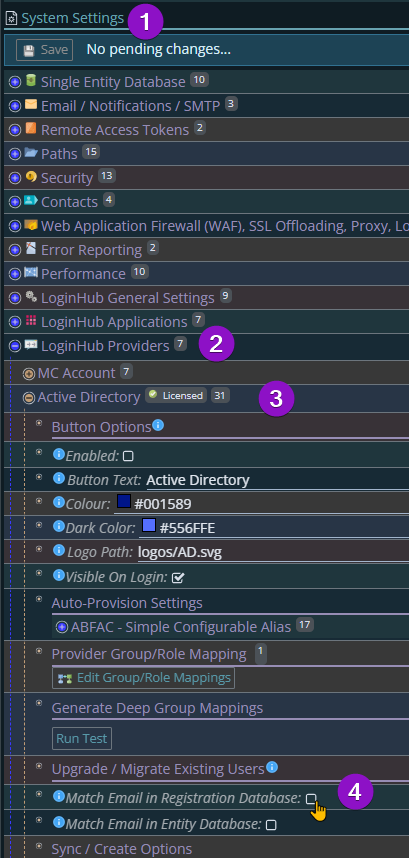
Match on Registration Database is used to 'migrate' existing User. Useful when you are switching from one SSO to another or merging 2 SSO's
Match on Entity database is for NEW Users, who might already have a Labor record.
--
Moving from one Identity Provider to another (one SSO provider to another)
Going from Active to Entra for example. The unique Id, UPN looks like an email address and may in many cases 'be' an email address and goes to a SID.
Microsoft can provide a UPN to SID. If you went from one Identity Provider to another - you will have a map of old to new to use.
You can convert before the migrate using the above. This is especially important if email address are changing. If you do this after the migration and you didn't have the email mapping on or the email addresses changed - you will have a 'mess' to clean up, because some Users will have a new Labor record with changes attached to that new Labor record.
If your setup caused LoginHub to create a new Labor (and new User), how we map the user back
Major headache, see separate doc.
LoginHub user connection scenarios:
How do we determine 'new user' vs 'existing user' if Match Email in Reg Db is turned off. OR maybe the answer is irrelevant to that. Is there some 'link' in External users table to something the Identity provider sends us?
How do we know which database the user has access to if they are new?
How does the 'these are your x databases' fit in to each of the below scenarios?
All of these are: A user logs in. We know they are new because <reason>
A user logs in, there is no User with matching Email, 2 or more Labor records with the same email address.
If 'Match Email in Entity Database' is true:
On logon, the User is told they can't be created because 2 or more Labor records have the same email address <email>, please contact <contact> and give them this message. (Ideally this message will with notifications, be notified to whoever is supposed to get these notifications)
-- need to discuss with Cam
New User, same email as one or more existing Users
On logon, if 'Match Email in Registration Database' user is told they can't log on because 2 or more User records have the same email address <email>, please contact <contact> and give them this message. (Ideally this message will with notifications, be notified to whoever is supposed to get these notifications)
-- need to discuss with Cam
New User, 1 Labor with same email address
A new User record is created. It is connected to the Labor record with the same email.
New User, 0 Labor with same email address
A new User record is created. A new Labor record is created.
A user logs in, they already exist. By definition, they are not a new user.
This one is simple. They are matched:
Step 1: from the Identity Provider/SSO service to a record in the "External users" table to a User,
Step 2: and then from that User to the Labor record(s) (one per database the user has a connection to.)
The user is logged in, asked questions like which application and ent database, depending on what is available to them.
But I know the person isn't new...
BUT you might say "But they were in our old SSO Identity Provider ... I know they aren't new". That's OK. They have a Labor record, and all their work is tied to the Labor record, but from the new Identity Provider, they are a different USER. See above.