

 Maintenance Connection Everywhere (MCe) · EAM/CMMS manuals
Why an error like this with almost no information?
LoginHub setup sometimes has obscure error messages. Why? Because it's a security system, and leaking info about bad setup is not allowed - you let hackers hack much more easily. And Entra, Ping, AD, Auth0 etc.., for your safety (but not for your convenience) don't return detailed errors.
One of the most obscure looking errors in LoginHub is the "Error, Sorry, there was an error". Fairly common when doing initial setup on a machine.
Is this error being seen on a new setup?
On a new setup: at least 9 times out of 10 this is because the secret was entered incorrectly.
So setting LoginHub up, or any security system, requires a lot of care, and messages of errors often won't be clear - on purpose. We provide detailed step by step instructions ... take your time, read and then follow them, this is not a place to rush.
Is this error on a system that has been running with recent changes?
On an existing setup that was working at least 99 times out of 100 it is because you let your secret expire and didn't update it.
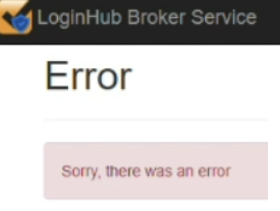
It means "we tried to have the identity provider Entra etc.., log you in and it didn't work. We didn't get an error other than more or less 'there was an error' so that is all the information we have.
It can happen from your computer to the LoginHub server (dup licenses, invalid URLs for example) It can happen server to id provider, or on the way back.
Start by assuming it is a problem with the secret
Expired tokens. That case typically happens on the trip BACK from logging in using the remote service. If your secret key has expired, the identity provider, especially Entra, will allow login, but not function. Don't shoot the messenger!
If you get this error. Go back and get create a new secret, even if you are 100% you put the secret in correctly. It is so often the mistake that even if you really are the 1st 'other' reason we encounter ... this is probably it. Getting a secret is a one time operation and you should not store it anywhere except where it is absolutely necessary - in LoginHub in this case.
Once you fix the secrete key, depending on how you have Entra set up to sync with it's various parts, it may be up to a day (Indeed, one customer on purpose has it set to "Friday at 2pm") before the change goes through the whole system. Most report that it takes less than 3 hours.
By far the most common cause of this error
The most common mistake - copying the secret ID instead of the secret. You need to copy the secret value not the secret ID.
If what you are copying looks like a GUID/UUID: c9fad520-a7c6-4942-9959-e0713df3c191 it is almost guaranteed you copied the Secret ID not the Secret value. Noting that circa 2026.03 Microsoft just has 'value' as the column header for the important part of the secret, and 'secret id' for the part that has absolutely no value for LoginHub. Don't shoot the messenger, we don't know why they don't have the word 'secret' with 'value' but they do have it with the ID when the ID has no value for anyone. They also place the secret VALUE to the left of the ID, further making so you are more likely to copy the wrong thing.
Now look into other causes:
Copying random text accidentally
We had one where the customer was 100% certain they had copied the correct text, we asked them to paste into a text editor so we could see... it showed something similar to: "0 certificate, 2 secret" (data changed to avoid embarrassment) at which point the customer immediately understood that they had copied the wrong text. (likely had the secret highlighted on one screen, but the copy command copied something highlighted on a different window)
Accessing LoginHub broker from a non-registered URL
Attempt to access the LoginHub Broker from a non-registered URL. A license allows 1 and only 1 domain/url to be associated. So if you use it from http and https, or localhost + a domain, or 2 different domains, 1 of those will throw the error since it is not allowed and it cannot give a good error since the non-official isn't known so effectively the error is "unknown" use.
Other possible causes:
OK, so if you are now sure you have the correct Secret Value. You can look at these possibilities:
- Same license on 2 servers
- Tenant or ID value wrong.
- Excessive data. In cases like SAML2 you can customize how much data to return, if you exceed about 8k (800)+/-) characters you'll overflow the cookies and blow up the process
- Incomplete data. In cases like SAML2 you can return only certain fields. If you forget to include the fields we specify, it'll die because the minimum required amount of data is not present.
- Many other 'details'. Sorry, but basically 'look at everything else' is the only real answer.
Again, the error is obscure because Entra/AD/Octa/Pin/Auth0/google etc.., refuse to give more us/you info until you are logged in for security reasons.