

 Maintenance Connection Everywhere (MCe) · EAM/CMMS manuals
Overview:
While this program can be run from a smart screen, you are highly advised to only run it from a computer that has a mouse and easy, accurate (no extra spaces at beginning or end) copy/paste tools such as a Windows laptop, desktop, Mac or desktop Linux machine.
Be aware that changes here will change the defaults, if you have changed the queries for specific users or more broad, they will override any changes you make here.
Changes in preferences will override changes in the queries
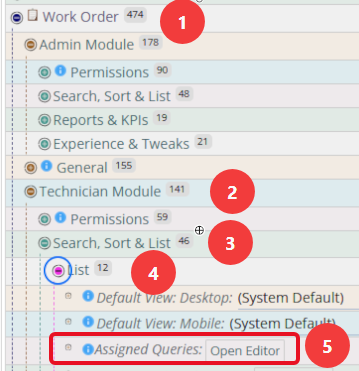
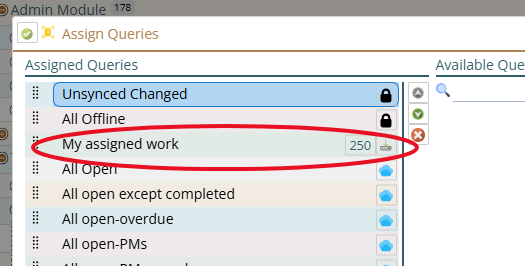
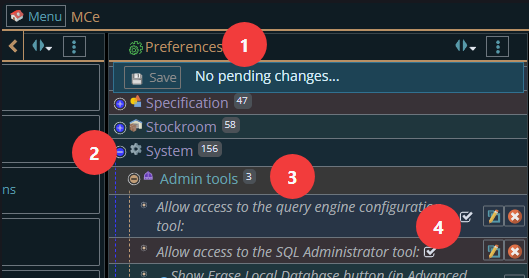
In preferences the following shows one of the Assigned Queries (for WO) that you might have changed. Noting that WO is the one most customers change.
Getting to Preferences
Getting to Access Manager
The Access manager requires that you have rights to the "Access Manager" license. YOU decide what permissions it needs, not us, that is discussed elsewhere.) The Access Manager is on the Configuration page
Start by clicking on the main menu button on the left panel, top left portion.
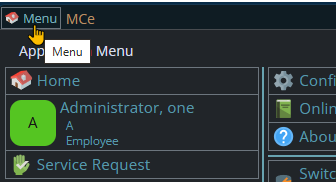
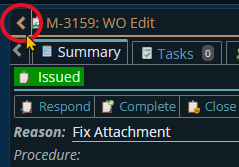
If the menu button isn't visible, you are likely on a screen too narrow to see everything, press on the left pointing gold button to take you so you can see the menu button.
Variation 1: What you have access to
Depending on the size of your screen, what products your company has purchased and what rights you have been granted, the choices in the menu will vary.
Variation 2: How wide your window is
The menu will show up as 1, 2 or 3 columns depending on how wide your screen is.
If you are on a cell phone, and some smaller tablets in portrait mode or a narrow window on a laptop or desktop, you'll see the menu as one column that you scroll through using your finger or the scroll wheel or the scroll bar depending on your device, browser and whether you have a touch screen or not.
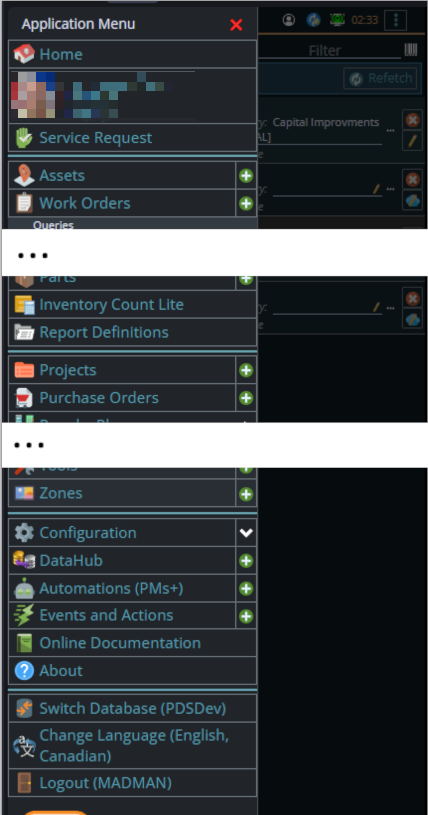
A bit wider, some cell phones in landscape, some tablets in portrait, most tablets in landscape and 'somewhat' wider laptop/desktop, will show it as 2 columns wide, with the middle column available on the left by scrolling down
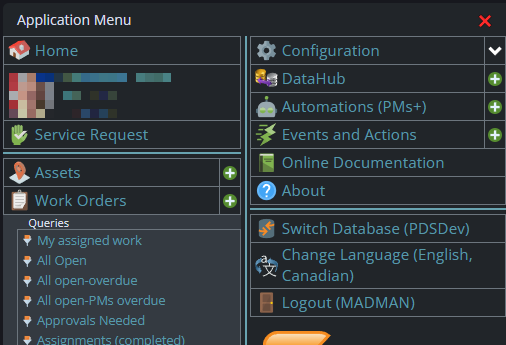
And wider screens, some landscape tablets, and wider windows on a laptop or desktop show it as 3 columns. If you have all the dropdown sections expanded, it may still require vertical scrolling to see all the choices depending on the height of your device or window.
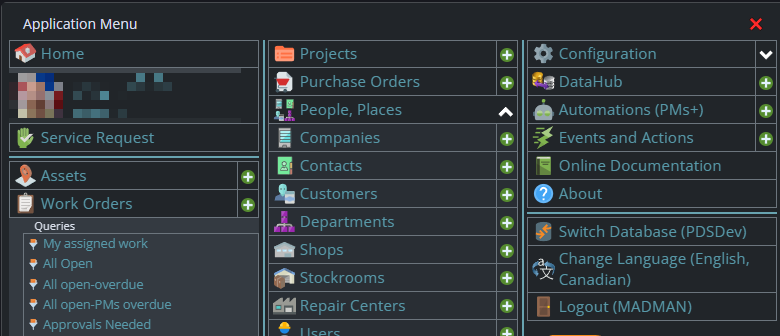
Once the menu is up, the exact location of the configuration button depends on how wide your window is and how many options you have access to. On most it will be at the top of the 2nd or 3rd column of the menu but on a cell phone or narrow window, it will be down partway in the first column.
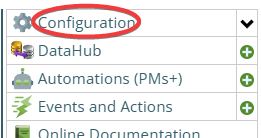
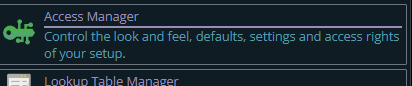
Then from there you choose the Access Manager, or what we call the funny green key
You can also click on the right hand V button in the main menu (if you don't already have it open), noting if you do it this way, you can directly pick the Access Manager tool that you want to go into.
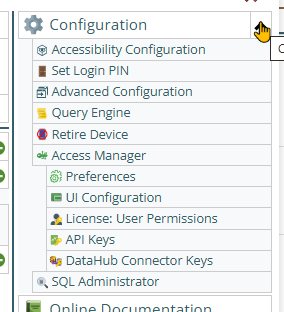
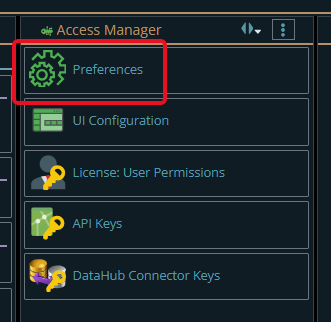
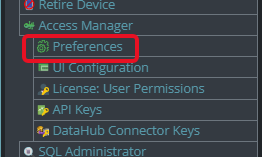
Now press the Preferences button
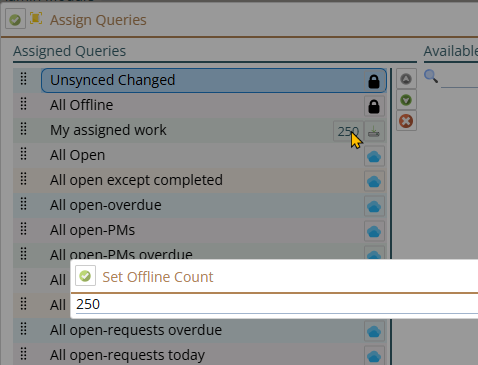
Details:
Getting to Query Engine Configuration
The Access manager requires that you have rights to the "Access Manager" license. YOU decide what permissions it needs, not us, that is discussed elsewhere.) The Access Manager is on the Configuration page
Start by clicking on the main menu button on the left panel, top left portion.
If the menu button isn't visible, you are likely on a screen too narrow to see everything, press on the left pointing gold button to take you so you can see the menu button.
Variation 1: What you have access to
Depending on the size of your screen, what products your company has purchased and what rights you have been granted, the choices in the menu will vary.
Variation 2: How wide your window is
The menu will show up as 1, 2 or 3 columns depending on how wide your screen is.
If you are on a cell phone, and some smaller tablets in portrait mode or a narrow window on a laptop or desktop, you'll see the menu as one column that you scroll through using your finger or the scroll wheel or the scroll bar depending on your device, browser and whether you have a touch screen or not.
A bit wider, some cell phones in landscape, some tablets in portrait, most tablets in landscape and 'somewhat' wider laptop/desktop, will show it as 2 columns wide, with the middle column available on the left by scrolling down
And wider screens, some landscape tablets, and wider windows on a laptop or desktop show it as 3 columns. If you have all the dropdown sections expanded, it may still require vertical scrolling to see all the choices depending on the height of your device or window.
Once the menu is up, the exact location of the configuration button depends on how wide your window is and how many options you have access to. On most it will be at the top of the 2nd or 3rd column of the menu but on a cell phone or narrow window, it will be down partway in the first column.
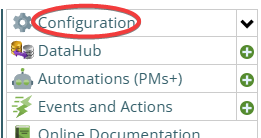
Then from there you choose the Query Engine (configuration) button
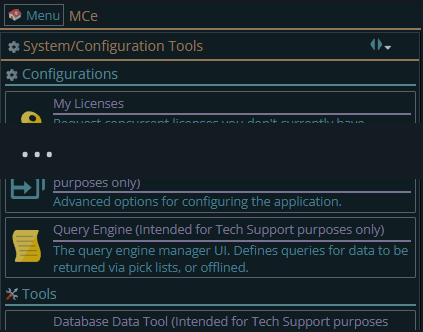
You can also click on the right hand V button in the main menu (if you don't already have it open), noting if you do it this way, you can directly pick the Access Manager tool that you want to go into.
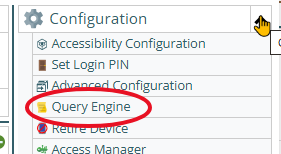
If it isn't in the list, you have been denied access. Administrators can turn it on in the Access Manager, System
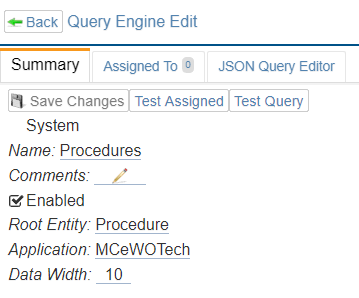
System
This is a flag that cannot be changed in the program. It is more to remind you, if System is checked, then it is extremely dangerous to change it. Yes there are times it needs to be changed while waiting for an upgrade. But normally you should not change ones that are system queries.
Name:
Anything you want to remind you. EXCEPT SYSTEM ONES – do not change system ones unless instructed by support.
Comments:
You can change these freely, but system ones will have it changed back automatically at times.
Enabled:
If unchecked, it will NOT participate in the sync.
Root Entity:
Enter it exactly, including upper case/lower case as you are given it. (Copy/Paste recommended). Values include:
- Asset
Note that you will have to enter this a SECOND time in the JSON Query Editor tab.
Application:
Enter it exactly, including upper case/lower case as you are given it. (Copy/Paste recommended)
Data Width:
Enter it exactly as you are given it. Changing 50 to 51 does not make it 2% 'better' – it breaks it!
Assigned To:
T 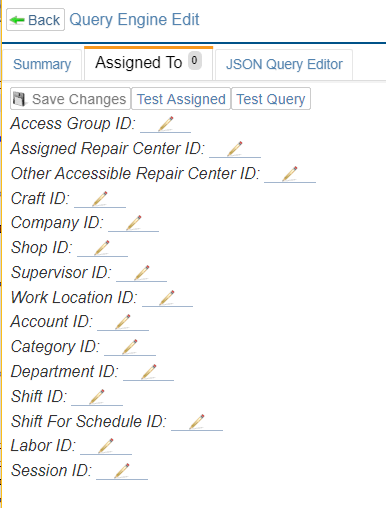 his decides who gets it.
In general, each you pick restricts it FURTHER. So if you enter an access group, then only THAT access group will get it. If you then add a Shop ID then only that shop id will get it, and so on. So in many cases you will only want to pick one. For example, if you enter a Labor ID or Session ID, then none of the others can help.
If you enter a combo that does not exist, then no one will get this. For example if LaborID Peter is in access group Managers, and you enter access group Technicians with Labor ID Peter – then there will be no one who matches your requirements.
There are exceptions, The 'other accessible repair center ID' and 'assigned repair center id' can be filled in with the same values, in this case it means that if they have that repair center they will get this query.
JSON Query Editor
This is where you decide WHICH rows get included.
Notice it starts and ends with 's (If you are familiar with JSON syntax, we use a loosened rules JSON, in particular, after each value you can have an extra comma "," at the end of a list.)
Between values in a list of values, you need a comma.
In some, such as the where value, you can provide an array. [{value1}, {value2}, {value3}]
There is a lot of info on the internet about JSON, so the only other comment I'll make is, except inside strings, you can have all the white space (spaces, tabs, newlines) that you want.
Sample 1:
{
"version": 1,
"rootEntity": "WorkOrder",
"LimitTo": 10,
"where": [
{ "autoRelation": "Assignments", "field": "LaborPK", "compare": "equal", "sessionValue": "laborPK" }, /* The next two are anded */
{ "autoRelation": "WorkOrderAssignStatuses", "field": "LaborPK", "compare": "equal", "sessionValue": "laborPK"},
{ "autoRelation": "WorkOrderAssignStatuses", "field": "Completed", "compare": "equal", "value": false},
{ "field": "Status", "compare": "equal", "value": "ISSUED" },
{ "field": "Complete", "compare": "equal", "value": null }
]
}
Sample 2:
{
"version": 1,
"rootEntity": "Asset",
"joins": [
{ "fromEntity": "Asset", "fromField": "PK", "toEntity": "WorkOrderTask", "toField": "AssetPK" },
{ "fromEntity": "WorkOrderTask", "fromField": "WOPK", "toEntity": "WorkOrder", "toField": "PK" },
{ "fromEntity": "WorkOrder", "fromField": "PK", "toEntity": "WorkOrderAssign", "toField": "WOPK" }
],

"where": [
{ "manualRelation": "WorkOrderAssign", "field": "LaborPK", "compare": "equal", "sessionValue": "laborPK" },
{ "manualRelation": "WorkOrder", "field": "Status", "compare": "equal", "value": "ISSUED" },
{ "manualRelation": "WorkOrder", "field": "Complete", "compare": "equal", "value": null }
]
}
version
You NEED a version, and currently the only version allowed is 1
Do NOT change it to 1.1 as YOU make changes. This is telling us how we should interpret it, so the version numbers are determined by our code, not by you.
rootEntity
This should be the same as on the summary page
joins:
Joins give access to manual Relations
where
This section can get confusing quickly. We are adding 'sample' where clauses to an appendix to help 'by example'.
For starters, it is an ARRAY of, by default, ANDED values (so each restricts it further.)
The order you SPECIFY these values does NOT matter -but for readability, you should consider doing them in the order shown, because that will make sense if you read it
Concatenate:
- r
- and (Default is and)
- andNot1- rNot
The concatenation always goes FIRST (before) and it goes BEFORE the Open Brackets, if any. For this reason, we recommend that you specify this first, but the order you declare won't change the fact that this will be 'first'.
If it is the 1st where clause, the and and or will be ignored but the 'not' part of the andNot and orNot will be honored.
OpenBrackets: 0 to n
Used to cause precedence, because
a and (b or c) and d
will give very different results than would
(a and b) or (c and d)
Or
(((a and b) or c) and d)
Some people ask: What order will it be if I don't specify brackets?
Our answer is: You should never rely on precedence, it may be different depending on sql server settings for example. (Some parts of the world say 'left to right if no brackets' others say 'right to left', some people argue there is 'only one correct way' but that is a very field and location specific attitude, and with the use of brackets it doesn't matter.)
But if you want ... the second is the way our testing has shown that all current versions (circa 2018) evaluate them.
If ALL your concatenators are AND or all your concatenators are OR – then order precedence doesn't matter. But if you have one or more AND's and one or more OR's then you should specify the brackets to make sure you get the results you want no matter how a sq administrator changes the database defaults.
Autorelation
An autoRelation is looking at values in 'other tables' to decide whether to return the row.
For technical people: It looks up the correct INNER (and only inner) join to use, and it looks up the fields to do the join – it builds the inner join for you. For example Asset at time of writing has two autorelations to the apsAssetParentage table, one (AssetParentage) joins based on AssetPK in both tables and another (AssetParentChildren) AssetPK to AssetParentPK.
Basically, autorelations are relations that we already understand 'on your behalf'.
Autorelation
Followed by the auto relation name. You need to get this value from support. Values include:
- "Assignments"
- "WorkOrderAssignStatuses"
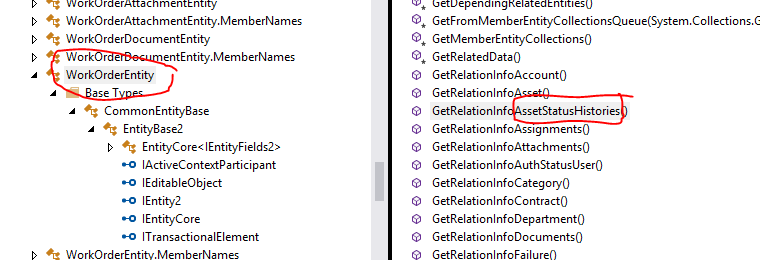
Notes for technical people, you get this list of values from …
View, Object Browser, APS.MCDatabase.Entity, APS.MCDatabase.Entity.EntityClassess
Click on the entity
Manualrelation
You put in the name of the entity, and then within the join you express the relationship.
Field
Note to programmer – look them up, don't guess.
Compare
The different types of compare include:
- Equal
- LessEqual
- LessThan
- GreaterEqual
- GreaterThan
- NotEqual
- Like (uses SQL LIKE rules – this can be very slow)
- StartsWith
- EndWith
- Contains
- In (an array of 0 or more)
- NotIn (an array of 0 or more)
- Between (an array of exactly 2 values)
"value" or "valueDate" or "sessionValue" or "csValue" (SQL server side)/"jsValue" (Client side)
Value can be Null, a string value, a numeric value or a date value
- Null
- "a string value"
- 234
"valueDate"
- For dates, we PLAN to handle it using a string following the ISO-8601 standard YYYY-MM-DDTHH:mm:ss.sssZ
sessionValue is a limited specific list: In each of the following, the first JSON value is the value you enter as the sessionValue, the second value documents what the value is/how it is calculated.
- { "laborPK", labor.PK },
- { "laborID", labor.ID },
- { "accessGroupPK", labor.AccessGroupPK },
- { "accessGroupID", labor.AccessGroupID },
- { "repairCenter_minePK", labor.RepairCenterPK },
- { "repairCenter_mineID", labor.RepairCenterID },
- { "repairCenters_allAccessiblePK", new[] { labor.RepairCenterPK ?? 0 }.Union(accessibleRepairCenters.Select(f=>f.RepairCenterPK)).ToArray() },
- { "repairCenters_allAccessibleID", new[] { labor.RepairCenterID ?? "" }.Union(accessibleRepairCenters.Select(f=>f.RepairCenterID)).ToArray() },
- { "repairCenters_allAccessibleExceptMinePK", accessibleRepairCenters.Select(f=>f.RepairCenterPK).ToArray() },
- { "repairCenter_allAccessibleExceptMineID", accessibleRepairCenters.Select(f=>f.RepairCenterID).ToArray() },
- { "craftPK", labor.CraftPK },
- { "craftID", labor.CraftID },
- { "companyPK", labor.CompanyPK },
- { "companyID", labor.CompanyID },
- { "shopPK", labor.ShopPK },
- { "shopID", labor.ShopID },
- { "supervisorPK", labor.SupervisorPK },
- { "supervisorID", labor.SupervisorID },
- { "workLocationPK", labor.WorkLocationPK },
- { "workLocationID", labor.WorkLocationID },
- { "accountPK", labor.AccountPK },
- { "accountID", labor.AccountID },
- { "categoryPK", labor.CategoryPK },
- { "categoryID", labor.CategoryID },
- { "departmentPK", labor.DepartmentPK },
- { "departmentID", labor.DepartmentID },
- { "shiftPK", labor.ShiftPK },
- { "shiftID", labor.ShiftID },
- { "shiftForSchedulePK", labor.ShiftForSchedulePK },
- { "shiftForScheduleID", labor.ShiftForScheduleID },
- { "assets\_rootPK", rootAssets.Select(f => f.AssetPK).ToArray() },
- { "assets\_rootID", rootAssets.Select(f => f.AssetID).ToArray() },
csValue & jsValue are used to get things like 'last 6 weeks'. Note: they must be REGISTERED by a programmer before it can be used. This is mostly for future enhancement not fully implemented at this time. But as soon as we need it we can look at adding it.
Field
A field is looking at values in this table to decide whether to return the row
"field": "fieldname"
The fieldname _ is _case sensitive. A programmer can look it up.
"compare":
See above for comparators
"value": or "sessionValue":
See above for values
CloseBrackets: 0 to n
This obviously will go at the end of the clause
OfflineQuery
The property names (indexColumn vs indexcolumn vs IndexColumn etc..,) are case insensitive. But in general, you should follow the casing in this document because most things inside them will be case sensitive due to things we can't easily make case insensitive.
IndexColumn
Compare
Value
SessionValue
Where
LimitTo this does not and will never work, even though it might appears to
OrderBy
This lets you specify the order of the rows to return (this may be important when specifying a limitTo, for example, you may want to order by priority and then return the top 10.
Pass an array of orderby's \{"field":"fieldname", "direction":"asc or desc"} direction defaults to asc
UseProjection
We are not sure how this will work exactly. We will document it once we have a couple good examples of use.
ScalerType
How the response comes back. Either as a set of data or as a count of how many records. We have no place this can be used currently by the QueryEngine.
Default: Normal Query
Alternatives: Count & CountBig
PageNo
I can't think of ANY reason to use this currently. But …
1 based (page 1, 2, 3 not 0, 1 2.)
0 is the default and means 'don't use page number'
PageSize must be specified with pageNo.
PageSize
0 and less is not a page size
1 and greater is a page size.
PageNo must be specified with PageSize
Distinct or ALL
We are considering sometime in the future adding this flag. We have no use case for it currently. We currently always do 'all'."field":
Appendix Sample clauses we've used, because examples are often better!
Limit the # of procedures:
This is more of a 'test' one, we don't see setting a limit like this to be a practical way, at least not when ordered by ID.
{"version":1,
"rootEntity":"Procedure",
"LimitTo":"50",
"OrderBy":[{"field":"ID"}]
}
Our standard "All assets assigned to WO's"
{
"version": 1,
"rootEntity": "Asset",
"where": [
{ "autoRelation": "WorkOrders.Assignments", "field": "LaborPK", "compare": "equal", "sessionValue": "laborPK" },
{ "autoRelation": "WorkOrders", "field": "Status", "compare": "equal", "value": "ISSUED" },
{ "autoRelation": "WorkOrders", "field": "Complete", "compare": "equal", "value": null }
]
}
A bit more complicated, our standard "All assets assigned to WO tasks"
{
"version": 1,
"rootEntity": "Asset",
"joins": [
{ "fromEntity": "Asset", "fromField": "PK", "toEntity": "WorkOrderTask", "toField": "AssetPK" },
{ "fromEntity": "WorkOrderTask", "fromField": "WOPK", "toEntity": "WorkOrder", "toField": "PK" },
{ "fromEntity": "WorkOrder", "fromField": "PK", "toEntity": "WorkOrderAssign", "toField": "WOPK" }
],
"where": [
{ "manualRelation": "WorkOrderAssign", "field": "LaborPK", "compare": "equal", "sessionValue": "laborPK" },
{ "manualRelation": "WorkOrder", "field": "Status", "compare": "equal", "value": "ISSUED" },
{ "manualRelation": "WorkOrder", "field": "Complete", "compare": "equal", "value": null }
]
}
How we get 'your' work orders:
{
"version": 1,
"rootEntity": "WorkOrder",
"where": [
{ "autoRelation": "Assignments", "field": "LaborPK", "compare": "equal", "sessionValue": "laborPK" }, /* The next two are anded */
{ "autoRelation": "WorkOrderAssignStatuses", "field": "LaborPK", "compare": "equal", "sessionValue": "laborPK"},
{ "autoRelation": "WorkOrderAssignStatuses", "field": "Completed", "compare": "equal", "value": false},
{ "field": "Status", "compare": "equal", "value": "ISSUED" },
{ "field": "Complete", "compare": "equal", "value": null }
],
}
Only give me parts that have a value in a UDF field
"where": [
{ "field": "UDFChar1", "compare": "EQUAL", "value": "XYZ" }
],
Only give me list-employees that belong to a specific repair center
"where": [
{ "field": "RepairCenterID", "compare": "EQUAL", "value":"RepairCentre1", }
],
Only give me list-employees that belong to my accessible repair centers
"where": [
{ "field": "RepairCenterPK", "compare": "In", "sessionValue": "repairCenters_allAccessiblePK" }
]
Footnotes
-
1: andNot and orNot existed in 8.2, in 8.3 they now can be used for '1st queries' ↩