

 Maintenance Connection Everywhere (MCe) · EAM/CMMS manuals
This is a great list to read:
- When you first start using MCe
- A week or two after you have been using MCe
- A month or two after
If you have others that confused you as a new user or as an upgraded user, please pass it on to us to consider adding here and/or in other documentation. Send it to support@maintenanceconnection.ca with a subject like "FAQ suggestion".
Why is the criteria greyed out on the <package> list page? (e.g. WO list page)
The Criteria only work with ONLINE queries, queries where we are getting data live from the server. It is used to filter the list that we are asking the server to give us so that it won't take so long for the server to return values to you.
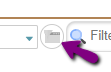
So when you have selected one of the 'OFFLINE' queries, it is greyed out.
I closed my WO and sync'd but it is still in my 'offline' WO's
This one tends to surprise users.
We cache different sets of data for different periods of time. In general, every time you edit something (be it a work order or an asset or a part) we save it on your device for a minimum of 4 hours.
This means that if you 'complete' a wo, then in the 'all offline' list of wo's, it will still be there for at least 4 hours.
If you don't want to see the ones you completed, switch to the technician default (your company may have changed the default) Assigned WOs list.
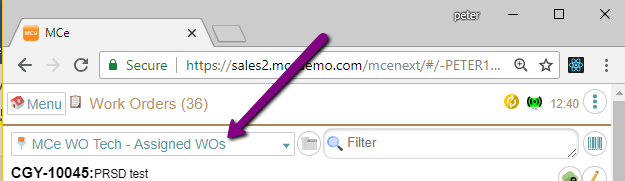
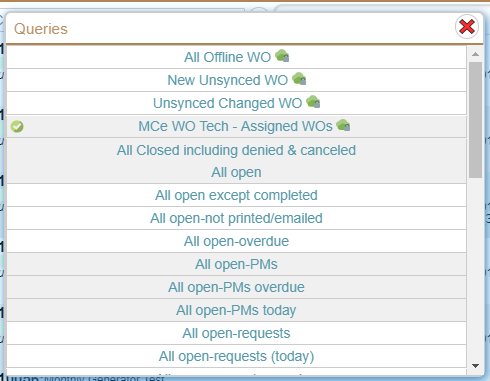
While you are at it, if you have a version that allows, check out all the new lists you can use. Note that the 1st 3 are looking only at the data on your computer (cell phone, tablet), all the rest will talk to the server to get the list updated. If there are too many or too few ... your administrators can change this list.
I got a sync message (error in my data), does this mean that none of my other changes to other WO's etc.., were saved?
No, we save every row of data we can, the only ones we don't save are the ones with errors in the data – the ones that have sync messages. So now, if you have one that has a problem – perhaps you entered a bad part #, it doesn't block the rest from sync'ing.
Why is the PDA lock not set/unset in MRO anymore after I installed a version of MCe 8.3 or higher?
It is Legacy. It now has no meaning. You can use it for anything you want or you can hide it.
Historical note, optional reading: The PDA lock feature existed to prevent people from editing a WO when someone had it out on a Palm Pilot. It existed when we in no way supported 2 users with the same WO at the same time. We now are able, in almost everything, to allow multiple people to edit the WO at the same time, as a result, we never set the PDA lock anymore.
I have assigned a WO to someone but they don't see it
The causes of this include:
If the WOAssignStatus table has Completed set to True and the CompletedDate set to a value for the user, then that work order has been set so that it *must* not be in his "MCe WO Tech - Assigned WOs" list. A common way for this to happen is if you 'reassign' it in Accruent's MC, MC (at least as of MC 2022) has a bug where they don't clear it to let us retrieve it in the Assigned WOs list. If you reissue it from MCe, it will also change the assignments from completed to not completed.
If you were reissuing this WO, it is likely you missed THIS step: typically in the top right of the complete/close, you need to UNCHECK those people that need to see the WO again.
Another thing that can cause a WO to *not* be available is: If the repair center for the WO is one that the user doesn't currently have access to. Some people consider this a feature others consider it a bug. Looking at it as a feature: You can assign a bunch of work orders to a person, but in a repair center they don't have access to (perhaps because they are not in that area of the country right now.) When they should work on those WOs, again, perhaps when they transfer to that part of the country, you give them access to the repair center and suddenly all those work orders will show up in their assigned list.
I'm getting an error about unable to acquire a license

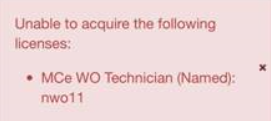
Unless you change the defaults, we try to acquire licenses for you every time you log in.
In the case of a concurrent license, this message means that other people are currently using all the licenses you have been granted access to, you will have to wait for them to be available. You could either log out and try logging in again in a few minutes, or you could go to the 'my licenses' in the configuration page every few minutes, or you could go there and then click on the required license every few minutes. Each time you do either of the first two actions, unless you have turned it off, we automatically try to grab all the licenses you are entitled to.
In the case of a named license, it means that you have been assigned PERMISSION by your administrator to use the license, but there are none available. Some reasons for this can be:
- Your company didn't buy enough licenses for the number of people they are giving access to this license. The solution is to either restrict the number of users or purchase more licenses.
- You used the browser to 'wipe data' to wipe out MCe. If you do this, we have no way of telling the server, so you are still holding that license. Your BETTER option is to 'Retire Device' first, that way we can tell the server that you are no longer using it. If you lost a device and/or wiped it out, it will require a call to support to help you recover that license, there will be a small Professional Services charge for that, or just wait 48-72 hours and it will be available .
This can never come up for an enterprise license.