Maintenance Connection Everywhere (MCe) · EAM/CMMS manuals
See also Missing PMs start here
And our 'PMs not running index'
As you go through, take screen shots showing that the listed issue is not the problem. If you follow through each step, in more than 20 years there has not been a case that was not in the list below, if you need support, we will be asking you to show the steps you took.
If the PM is in MCe Automations
This document is split into 2 sections, the top is a flowchart, the bottom is screen shots showing how to determine and fix the issues
Flowchart to check
---
config:
  theme: 'forest'
---
flowchart TD
    classDef Start fill:#FFA000,color:#FFF,stroke:#F00,stroke-width:2px;
    classDef External fill:#00921a,color:#FFF,stroke:#000,stroke-width:2px;
    classDef UserQ fill:#FFF176,color:#000,stroke:#FFEB3B,stroke-width:2px;
    classDef End fill:#7B1FA2,color:#E1BEE7,stroke:#00,stroke-width:2px;

    A[MCe Automations]:::Start                                       --> IsNotCreatedOrNotIssued{Not Created or<br>Created but not<br>issued?}
    IsNotCreatedOrNotIssued                              -- Not Created --> IsActive{Is the<br>PM active?}
    IsNotCreatedOrNotIssued                              -- Not Issued --> X10[Fix Status]:::End
    IsActive                                                               -- No --> X20[Fix Active]:::End
    IsActive                                                               -- Yes --> IsNotScheduledYet{Is it not scheduled yet?}
    IsNotScheduledYet                                           -- Yes --> IsScheduleEnabled{Is the Schedlue<br>enabled?}
    IsNotScheduledYet                                           -- No --> X30[Schedule it]:::End
    IsScheduleEnabled                                           -- No --> X40[Set Schedule enabled]:::End
    IsScheduleEnabled                                           -- Not Applicable --> DidCorrectMeterEtcHappen{Did the correct meter, spec or asset change happen?}
    DidCorrectMeterEtcHappen                           -- Yes --> IsNextPMContingentOnPreviousWOStatus{Is next PM contingent on previous WO status}
    DidCorrectMeterEtcHappen                           -- No --> X50[Fix]:::End
    IsNextPMContingentOnPreviousWOStatus -- Yes --> I[Get previous WO to required status or change required status]:::End
    IsNextPMContingentOnPreviousWOStatus -- No --> HasScheduleNotStarted{Has the schedule not started yet?}
    HasScheduleNotStarted                                 -- No --> IsEndDateBeforeToday{Is end date before today?}
    HasScheduleNotStarted                                 -- Yes --> X60[Wait or Fix]:::End
    IsEndDateBeforeToday                                   -- Yes --> X70[It's done, if not: Fix]:::End
    IsEndDateBeforeToday                                  -- No --> DoesEndAfterNOccurences{Does it end after some number of occurrences}
    DoesEndAfterNOccurences                           -- No --> IsItOutOfSeason{Is it out of season?}
    DoesEndAfterNOccurences                           -- Yes --> X80[It's done or change # of occurences]:::End
    IsItOutOfSeason                                               -- Yes --> X90[No problem]:::End
    IsItOutOfSeason                                               -- No --> IsConditionalExpressionBlocking{Do you have a conditional expression that is blocking it}
    IsConditionalExpressionBlocking                  -- No --> IsNoOp{Is it on a 'no operation' step?}
    IsConditionalExpressionBlocking                   --Yes-->X100[No problem, or fix it if problem]:::End
    IsNoOp                                                              -- Yes --> T[No problem or add something at that step]:::End
    IsNoOp                                                              -- No --> IsAssetDisabled{Is asset disabled?}
    IsAssetDisabled                                               -- No --> IsAssetAddedToPM{Has the asset been added to this PM?}
    IsAssetDisabled                                               -- Yes --> X110[If it should be PM'd still, enable it]:::End
    IsAssetAddedToPM                                         -- No --> X120[Add it, and maybe add it's classification]:::End
    IsAssetAddedToPM                                 -- Yes --> IsRuleOrEvent{Is there a SQL job, Rule or Event that is causing a problem? Noting that Accruent MC rules that crash do so silently because they run 'inside the trigger' so they can be hard to diagnose}
    IsRuleOrEvent                                       -- Yes --> X130[Check and fix the SQL, Rule or Event]:::End
    IsRuleOrEvent                                        -- No --> X140[Send email to support@  MaintenanceConnection .ca sending screen shots showing all the above are 'ok'. Note .ca not .com]:::External
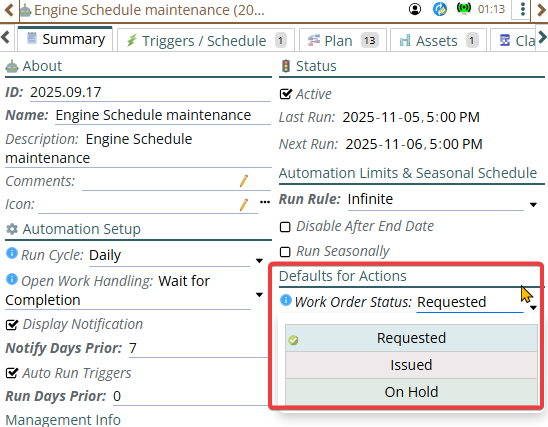
Check and Fix Status
State is not what you remembered, PM is generating work orders but you aren't seeing them because they are being created in Requested or On Hold state, not issued
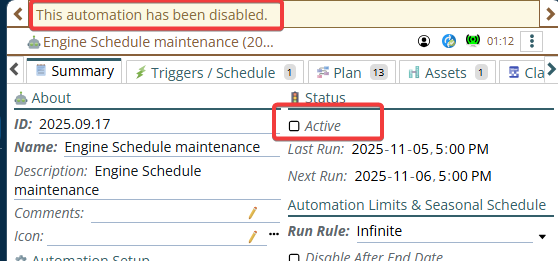
Check and Fix: Is the PM active
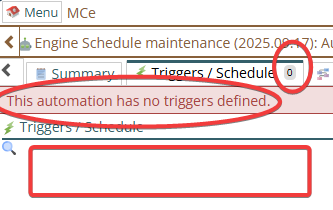
Is it not scheduled yet?
Is it not based (A PdM etc.., not a PM?)
If the trigger type is Meter, Specification or Asset Change instead of Schedule did the correct item change/occur?
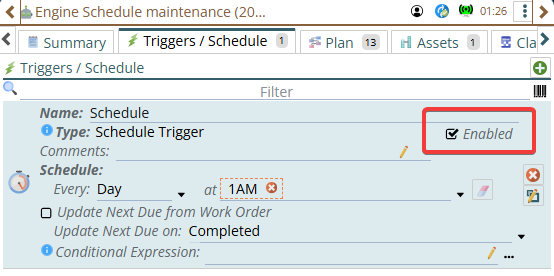
Check and Fix: Is Schedule enabled? Enable it.
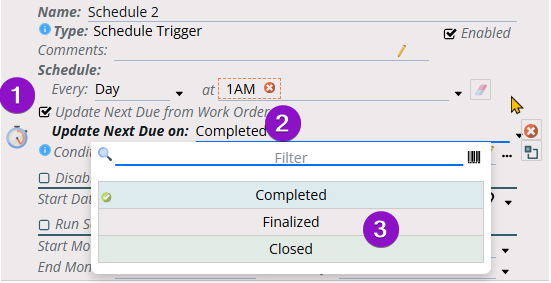
Check and Fix is the Schedule based on previous WO Status
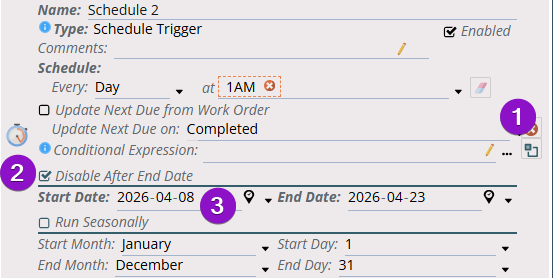
Check and Fix: Has the schedule not started yet?
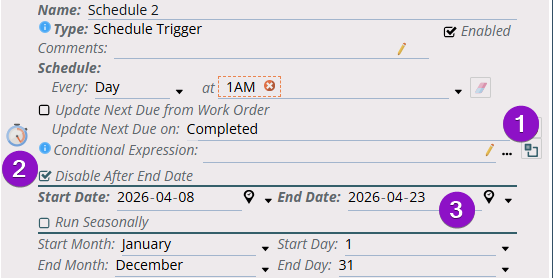
Check and Fix: Has it got an end date that is before today?
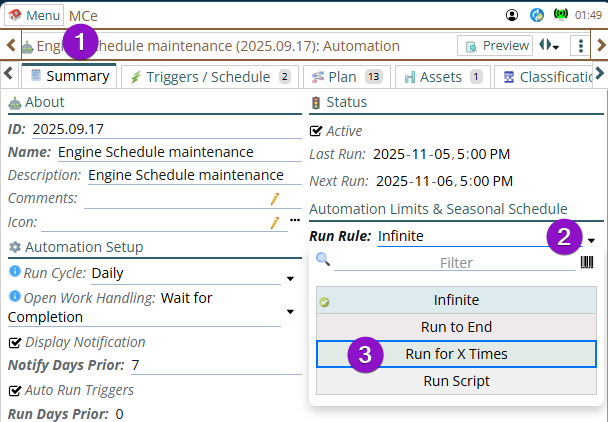
Check and Fix: Does it end after some number of occurrences
And has that number of occurrences happened. If there is a max number of times the automation will run, then if it has reached that limit for this asset, this automation will stop creating for this asset.
Check and Fix: Is it on a "no operation" step?
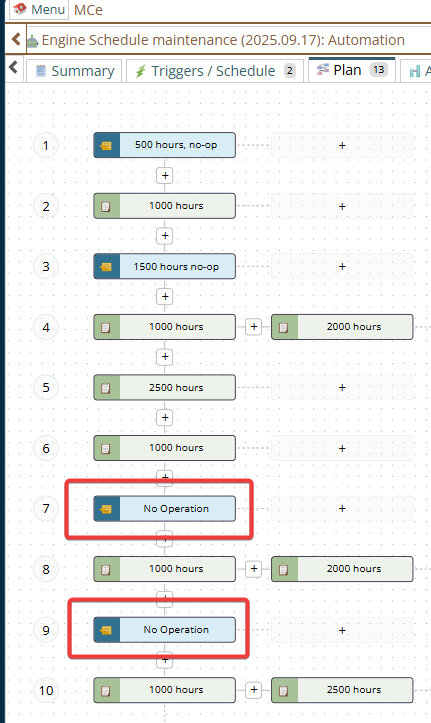
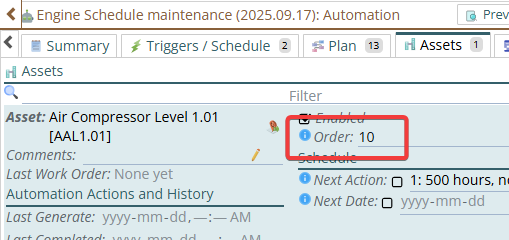
Then check to see if the next step is just after a no op step.
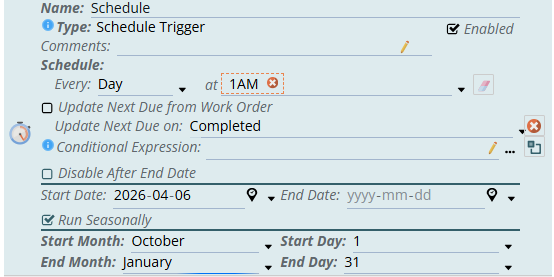
Check and Fix: Is it out of season?
You can pick any period that is less than 12 months. As much as 264 days. It is no problem to go over a calendar year end, as below:
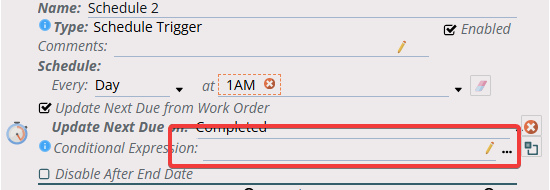
Check and Fix: Do you have a conditional expression that is blocking it?
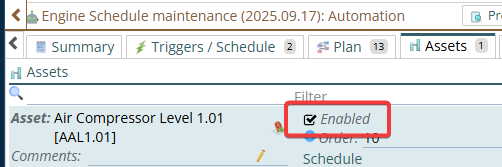
Check and Fix: Has the asset(s) been disabled?
Check and Fix: Is the asset not being added to the schedule?
In the example below only Truck assets are being added automatically. Enter the classifications you want to add
Note: This only will happen for NEW assets, existing assets with those classification(s) will not be added.