

 Maintenance Connection Everywhere (MCe) · EAM/CMMS manuals
2022.01 Update
For Clarity, the "Use HTTPS" setting changes the Kerberos encryption to TLS 1.2 encryption.
If TLS 1.2 is set up in the environment:
Active Directory SSL with version 10.2.2 or above (We have specifically tested it with 10.2.2, it may work with previous version with correct setup) to run specifically with TLS 1.2 However:
LoginHub with AD has *NEVER* supported unencrypted connections to AD – even when using 'plain' LDAP. So going back to 2005, the connections were enforced to be encrypted. The 'change' here is that you can now use specifically TLS 1.2 instead of
So it doesn't matter what your setup was. Our connections to AD have ALWAYS been encrypted.
The connection to SQL is the one that we allowed to be unencrypted if you wanted.
2021.06 Update
Any version 10 works with TLS1.2 connections to SQL as long as your server is correctly setup. Note this has NOTHING to do with anything in LoginHub other than making sure that you have the Use SSL setting.
Note: We have always been encrypted, but some versions prior to 10 (due to their age) including LoginHub 8.9, we defaulted to TLS 1.1 instead of 1.2
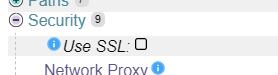
The Security setting "Use SSL" has been around since version 8 and it 'forces' the use of HTTPS instead of HTTP. However, we recommend the redirect be set up in IIS instead or as well.
A bit of history in 2020
Several things have happened in 2020.
- More time was spent looking into the issue
- A new version of LoginHub was released with some feature changes that moved it
- from "possible to do but it is not supported so everyone will have to pay by the hour to realistically get it working"
- to "supported and for many people no by the hour support will be needed."
From a Client perspective, it should just work.
From a Server perspective, you need to set up your server correctly.
In the upgrade, all we did is move a configuration switch from .NET Framework 4.5 to .NET Framework 4.6.1 (default, you can – and you could previously – change it yourself to 4.6 or 4.5). In 4.6, TLS 1.2 is enabled by default. Whereas in 4.5, you (whoever is looking after the server) has to manually turn it on in Windows. This default enabling and disabling is in .NET Framework and the operating system (Read as: The Windows Registry) in both cases can override the default.
There are still many ways that the server itself can change the default to not support TLS 1.2. This would be outside of LoginHub as we don't touch those, but a human can and/or other software, particularly during installs, can. But we, LoginHub, leave it exactly the way we find it and we, LoginHub do not read those settings – it is the Microsoft .NET code that reads your settings.
So again:
- when we used .NET Framework 4.5, in a default install, .NET 4.5 did not support TLS 1.2 – but you could at the Microsoft/OS level set it so that 4.5 used TLS 1.2.
- Installing a newer version of .NET Framework does not change the version used at runtime for a specific product. So in MC LoginHub, you would also have to change the config file installed beside the product, which is what we did in LoginHub 8.9, so on an install you would no longer be pointed at 4.5, you would be pointed at 4.6,1 on an upgrade you would need to verify that the config file now has 4.6.1 – it should have updated automatically by the LoginHub upgrade, but it would be a good idea to check and make sure.
- now that we use .NET Framework 4.6, in a default install, .NET 4.6 supports TLS 1.2 – but you can at the Microsoft/OS level set it so that 4.6 uses something other than 1.2
In the same way, we always supported encryption, the .NET code we used was chosen because it automatically supported the highest that the other pieces (in particular, SQL Server) support on that machine.
Parts of LoginHub when thinking about TLS
There are 4 major logical components that make up LoginHub (only 2 of which exist in MRO). These components are:
- Web Front End
- Web Active Directory Login
- SQL Server Connection
- Direct LDAP Connection
To address each of these pieces:
Web Front End (Part 1)
This is fully done in Windows, nothing in Maintenance Connection LoginHub
This component runs through IIS and supports 100% of the encryption (or lack of encryption) that IIS supports. Enabling encryption on this layer requires 1 of 2 approaches
- Destroy Windows's ability to understand all kinds of encryption other than the type you want enabled (this is the traditional route, and works but opens serious security holes) (for instance prior to MC 8.5 this worked since MC only talked unencrypted, in 8.5 this partially worked with additional configuration since only most of MC 8.5 could talk encrypted) (In LoginHub this would often break certain pieces of configuration because LoginHub always defaults to the OS .NET settings which use encryption when available [and disabling features without changing the OS .NET settings breaks LoginHub since it uses encryption when available and doesn't allow easy unencrypted failover])
- Use correctly built features in IIS to force TLS 1.2 (this is the correct route but requires Windows Server 2019)
The problem with approach "a" is it actually makes unencrypted the default operation for MANY processes. It broadly breaks all the encryption algorithms but doesn't correctly enable system level features to ensure all the OS level bits use TLS 1.2 instead of defaulting to the *working* unencrypted options.
This has been the approach that many have taken and wrongly concluded things like "It only works with TLS version X enabled". This is because the sledgehammer approach doesn't correctly upgrade the remaining configuration switches.
Both approaches have worked always in LoginHub. Using approach "a" requires additional support hours since it is incomplete work and .NET refuses to switch over to TLS 1.2 without additional configuration that is not being performed. This additional configuration IS NOT AN APPLICATION CONFIGURATION switch and thus is not included as normal support.
Web Active Directory Login (Part 2)
This is fully done in Windows, nothing in Maintenance Connection LoginHub
This is unique to LoginHub. This relies extensively on IIS and OS level configuration to be correctly setup. The OS must be able to understand and decrypt Kerberos and other AD tokens. The OS must also be configured to talk to Active Directory endpoints via encrypted channels. This is all backchannel and when not done will either work (but not encrypted) or not work. There are zero switches in LoginHub to configure this behavior as it is OS level only.
SQL Server Connection (Part 3)
This is fully done in Windows, nothing in Maintenance Connection LoginHub
This component is both system level and .NET version specific. Encryption requires multiple levels of configuration and .NET will by default use encryption when available.
This has changed slightly since April 2020. We are now telling the application configuration to use a newer set of system defaults which according to MS should start by defaulting at TLS 1.2 and then walk backwards through the versions until it finds one that works. Previously the older settings _supported_ TLS 1.2 but required OS level configuration in order to turn on. OS level configuration is not standard support.
When hard disabling TLS versions like approach "a" in the front end. It can cause .NET to break in its failover of TLS versions. This is NOT support, it is OS level configuration that needs to be correctly setup so that .NET doesn't throw errors trying to fail over to lesser TLS versions because of transient issues like network packet loss.
When using encryption both sides must support it. Setting up TLS 1.2 on SQL Server is its own set of headaches and due to many factors just checking for "encryption enabled" doesn't actually tell you accurately if the connection is running TLS 1.2 or if the connection attempted to but was blocked for other reasons.
Because diagnostics of this process is intense and requires massive quantities of effort by numerous professionals this is a process that can take unknowable amounts of time. The defaults in LoginHub 8.9 should start connecting at TLS 1.2 though rather than the previous .NET framework defaults of TLS 1.1. Because "defaults" just means the values that MS originally setup, this is not guaranteed to be true and may require additional OS level configuration to restore settings to the expected security levels.
Direct LDAP Connection (Part 4)
This is a feature (LDAPS) that was added to LoginHub initially in 2016 and recently moved from available/possible with work to a supported feature. Previously you would have either ran an unencrypted connection or had a few extra configuration steps in order to use encryption.
In LoginHub:
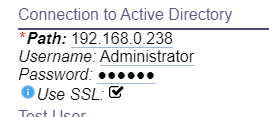
You need to turn on LDAPS in LoginHub directory configuration. This is the ONLY LoginHub specific part. You tell it to use SSL.
Windows:
Everything else is fully done in Windows, nothing in Maintenance Connection LoginHub
Just because the connection is encrypted though doesn't mean it is TLS 1.2. TLS 1.2 requires the Active Directory server (and all failover servers) to have proper support implemented.
Protocol choice is delegated to the .NET framework so if it doesn't decide to connect via TLS 1.2 and instead connects via a lesser version the issue is OS level (and could be the other server side).
Summary
LoginHub 8.9 brought a new configuration switch moving the use of LDAPS to a supported feature. Previously it was only available via advanced configuration that triggered additional support costs. LoginHub 8.9 moved to using a newer set of .NET Framework configuration switches at runtime which according to MS should cause it to try TLS 1.2 by default rather than with additional configuration steps. LoginHub itself only contains exactly 1 configuration switch for enabling encryption (LDAPS), all other configuration switches are in the operating system and thus are not guaranteed to be matching the standards and thus cannot be directly supported (we do offer assistance by the hour though through our professional services).
Footnotes
-
1: Update 2021: We now use .NET Core ↩