

 Maintenance Connection Everywhere (MCe) · EAM/CMMS manuals
Barcode printing to be the most useful
MCe has very powerful barcodes. With QR codes and MCe you can create a single barcode that will let you do all these:
- go straight to an asset (or other item like person, part etc..,)
- and the very same barcode can be used for looking up that asset, part or whatever in our pickers.
- and the very same barcode can be used for finding that asset in a list
Essentially, when your phone app (or QR code app) reads the barcode, it sees that it is a URL type QR code, and it takes you to that URL. If you aren't logged in - we record that info, then ask you to log in, after you log in, if you have the correct permissions, we take you to the object (asset, person etc..,) that you scanned.
But when our pickers read the QR code, we recognize it as a URL, and we parse it to grab the ID.
We have a sample report, last updated 2026.6.25, barcodeassetsample_2026-06-25_14-18.kdl1 but the key is to use this format for your URL to achieve both purposes: Note that it is all one one line technically, it is wrapping after the -, not a separate line.
ReportRequest.UrlContent(`~/.well-known/api/viewer/v1/db(connectionkey=${ReportRequest.COnnectionKey})/Asset(id=${encodeURIComponent(row.assetid)})/`)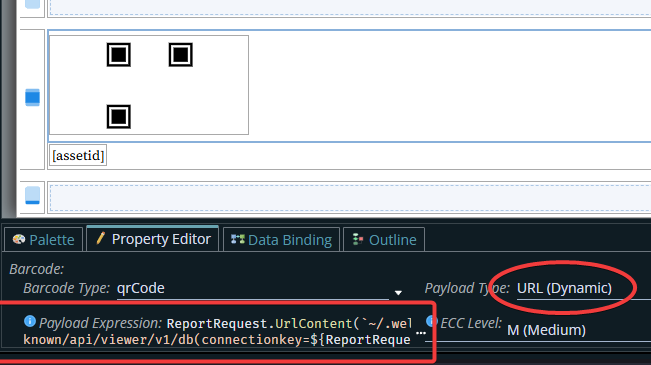

See also Long lasting barcodes
Brief QR Code info
You may hear talk of 'static' or 'dynamic' QR codes.
This is a marketing term! The QR codes themselves are identical. Utterly, completely identical.
The difference is: Does the URL in the QR code go directly to what it is talking about, or does it go through a server that interprets it and then routes you to the correct place.
You can think about 'tiny urls' as an example. We support both, but you need to decide before you print your QR codes.
You have several options to consider for your QR codes including these:
1. You print your QR codes to directly go to the link. This is the easiest, but have 2 disadvantages:
If you ever change your server address, you either have to build a redirect server based on the old address, or you have to reprint your barcodes
They are typically long, most redirect services (including ours) typically use a much shorter URL in the barcode and then interpret that out to the longer full server URL, so you need a physically bigger barcode. But typically, to be fair, this is not a problem in the EAM/CMMS environment.
This is the one that the attached report implements.
2. You go with a service that does 'dynamic' QR codes. This is not usually going to be a very good idea, because they tend to be designed for email marketing and advertising purposes, not for maintenance. They usually assume a small number of URLs that are tightly controlled that will mostly be 'reused' for new purposes after a few months.
3. You build your own redirect service, and build an interface between your EAM/CMMS and your redirect service. You get to decide how you want to do this.
4. You have us provide a redirect service, and we (with you in the design, or you do it) build an interface between your EAM/CMMS and our redirect service, essentially redirect rules.
5. You have us provide a redirect service, but you provide and own the base URL, we host it and you DNS direct to our server. As above, there will need to be an interface between your EAM/CMMS and our redirect service.
Options 2 is the only option that is bad for all EAM/CMMS customers regardless of whether they use our software or any other EAM/CMMS software that allows intelligent link barcodes.
With option 3 you have higher management and since you are only doing this for yourself, higher cost and your IT staff has to keep up on technical details.
Option 4 will typically be far lower cost than option 3, but if you want to change to another provider, you have to print new barcodes. But it is still a significant cost.
Option 5 is slightly more expensive than Option 4, and if our server IP addresses change, you will need to change your DNS for that, or give us access to manage it for you. The advantage here is that if you ever want to leave us (over 22 years, as of 2025, we have about 3% that have left us) it is 'easy' because you own the tinyurl part, so you take it with you.
Option 1 is the easiest, but has the least long term flexibility. If replacing all your QR codes is 'easy', then
Option 1 is the best for most. If replacing the QR code labels is hard, then pick from options 3, 4 and 5.
Of the options 3, 4 and 5. You should likely go with #5 under the "your data is your data" philosophy.
FAQ:
Q. Can I use a 'traditional' 1 dimensional barcode instead of a QR code?
A1. Technically, but only technically: mostly. You could use any Alpha-Numeric barcode (not many) that allow long enough codes.
But you lose the 'click and go' of a URL QR code.
Instead you read it, then copy paste it into a browser URL window.
If you think that is OK, the bigger problem is that the longer a barcode is, the harder it is for any device - software or hardware - to read it.
The reason the auto industry embraced QR codes over the older very long and skinny barcodes is because of how hard it is to scan them correctly, quickly and reliably.
They fail on all 3 counts.
That's why QR codes were invented - to replace 1 dimension barcodes for long values.
A2. No. You will not be happy with anything other than QR codes.
Q. I thought all QR codes were URL links.
A. Nope. They originally supported tags for the car industry.
After that they branched out into binary code, any random string, 'just a number', email address and a bunch of other specific options.
Most companies that put a URL into a QR code set it up as a URL code instead of 'just a string'.
To be fair probably more than 99% of the actual use of QR codes is indeed the URL format which is the more or less obvious reason that many people think incorrectly that QR == URL.
Q. Can I use other 2D barcodes such as Aztek?
A. Conditional yes. Everything inside MCe works equally well with several other 2D formats as with QR.
So in MCe - no difference at all. However, most phones these days have an optimized QR reader that, as in the sample report, you can utilize.
If you use a different 2D barcode, you will have to find either a camera app that supports those codes or a special app. The special app is less convenient because to make it work as slick as the camera app, which often is a one button double push or similar to get into it.
And even if you do replace the camera app with another camera app that supports the other barcode reader - what about your service requesters? Telling them they have to replace their camera apps to read your barcodes from the camera app is not likely to be practical.
So, stick with QR codes, formatted the way we recommend, if you can.
Footnotes
-
1: To install a report kdl, you need an administrator. Go into the report definitions, then on the 3 dot menu, choose 'import' then pick the kdl file to import. Edit to your heart's content. ↩