Maintenance Connection Everywhere (MCe) · EAM/CMMS manuals
See also Why aren't my PMs running - Start here
And our 'PMs not running index'
This document is split into 2 sections, the top is a flowchart, the bottom is screen shots showing how to determine and fix the issues
These issues do NOT occur on our SaaS - we design them away.
SQL_Latin1_General_CP1_CI_AS
No PMs are running, we are on prem (We host MC ourselves)
Flowchart to check
---
config:
  theme: 'forest'
---
flowchart TD
    classDef Start fill:#FFA000,color:#FFF,stroke:#F00,stroke-width:2px;
    classDef External fill:#00921a,color:#FFF,stroke:#000,stroke-width:2px;
    classDef UserQ fill:#FFF176,color:#000,stroke:#FFEB3B,stroke-width:2px;
    classDef End fill:#7B1FA2,color:#E1BEE7,stroke:#00,stroke-width:2px;

    Start[No PMs are running, we are on prem]:::Start --> IsSQLAgentRunning{Is SQL agent<br>running?}
    IsSQLAgentRunning                                                                                        -- Yes   --> IsJanatorialLoaded{Is the Janatorial<br>task loaded}
    IsSQLAgentRunning                                                                                        -- No    --> SetQLAgentRunning[Set SQL<BR>agent running]:::End
    IsJanatorialLoaded  -- No    --> JanitorialNeedsLoading[Install it]:::End
    IsJanatorialLoaded  -- Yes   --> IsJanatorialRunning{Is janitorial<br>job running}
    IsJanatorialRunning -- No    --> SetJanitorialTaskRunning[Set Janitoral running]:::End
    IsJanatorialRunning -- Yes   --> DoYouHaveTheCorrectCollation{MS SQL server and databases collation set to<br>SQL_Latin1_General_ CP1_CI_AS?}
    DoYouHaveTheCorrectCollation -- Yes -->    isEntDeleted{Is there<br>a reg container record referencing an Ent database that has been deleted or doesn't<br>exist}
     DoYouHaveTheCorrectCollation -- No --> FixCollation[Set the collation in your MS SQL Server, reg and ent databases to SQL_Latin1_General_ CP1_CI_AS ]:::End
    isEntDeleted              -- No -->    MCeOrMC{MCe Automations?<br>or MC PMs?}
   isEntDeleted              -- Yes --> DeleteReferenceToEnt[Delete container record]:::End
    MCeOrMC                  -- MCe --> SeeMCe[See MCe<br>chart, link below]:::External
    MCeOrMC                   -- MC   --> SeeMC[See Accruent MC<br>chart, link below]:::External
Overview
The jan_all SP in the reg database, does cleanup of various sorts and most important it does the MC PM generation. It uses the MS SQL agent, not the MC aka Microsoft, agent.
It is NOT needed or used by MCe automations.
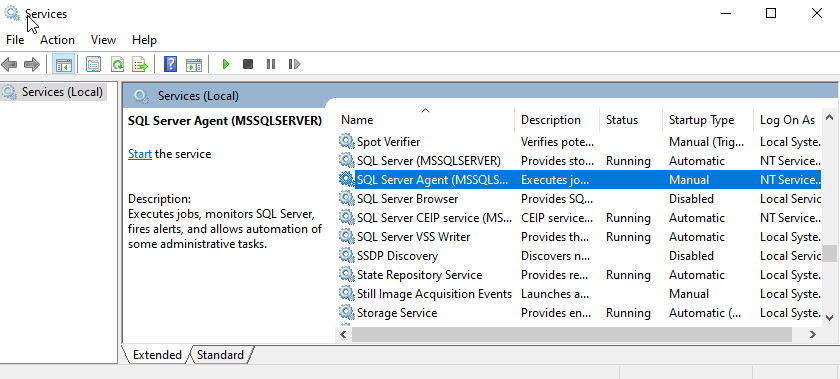
Is SQL agent running?
- For automation, you will need access to the server where you open the SQL Studio management to check if the SQL Agent is running. If not, then you will need the SQL “sa” account to be able to check or have access as a system admin.
This step verifies SQL Server Agent is installed and running.
Is Janitorial task running?
For the next steps, you need to have SSMS (SQL Server Management Server)
You need to log on with sa or a user with sa equivalent, in particular rights to install jobs in the SQL Server agent.
If you don't see the SQL server agent, you are either
- using MS SQL Express (we don't support that for a variety of reasons)
- or your user doesn't have enough rights
- SQL Server agent is not installed (this is very unlikely but possible, the instructions for installing are at the bottom of this document.)
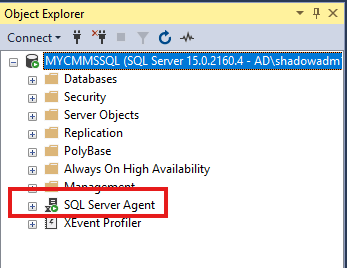
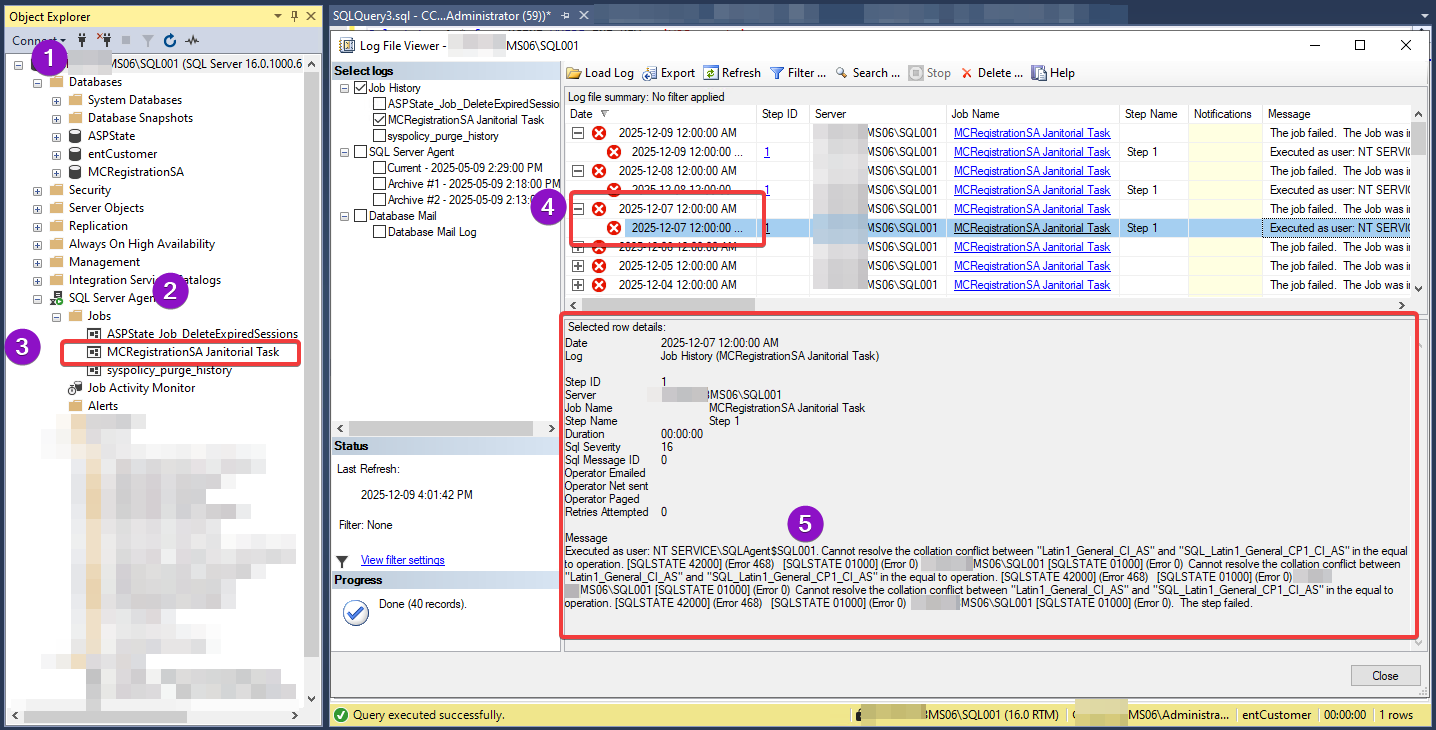
Drill down to see the jobs in the Agent (see image below)
SQL Server Agent in the screen shot below, the little red dot means it isn't running, the image above shows a green dot showing it is running. Make sure you are looking at the correct instance of SQL server to look for the job (where you have more than one instance of SQL Server, which is very common with our customer base.)
If the mcRegistrationSa Janitorial Task is in the list, that is the first step. If not, see (fix below)
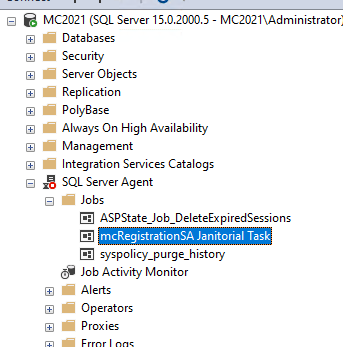
right-mouse on the mcRegistrationSa Janitorial task
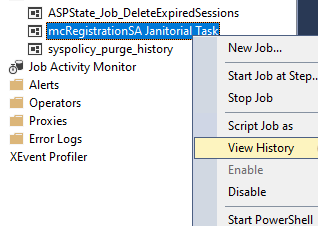
If you DO have it: Check whether it is Enabled or Disabled (just below the "View History")
If you have it and it is enabled, view the history.
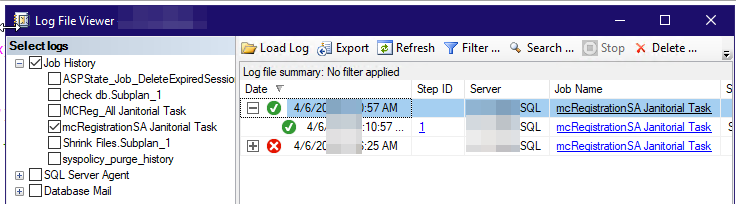
This next shows you when the task is running and is Successful (assuming today is 2025.11.29)
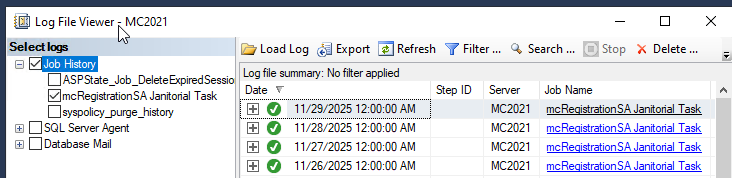
If it failed it would not have the green checkmark,
1. it would have been red
2. and you can click on the plus to see the details
3. and then click on the second line to give you all the useful information, but....
4. You then have to scroll down to see where the error is, where the SQL error message is.
Once you have the error, solving it is beyond this document, it could be one of 100's of possible issues ranging from server configuration to database configuration. But it will take a technical person to solve it.
One starting with MC 2025 is if your server and/or database is not set to the SQL_Latin1_General_CP1_CI_AS
One of the Accruent prerequisites for 2025 is that the collation sequence must be SQL_Latin1_General_CP1_CI_AS for all of these:
- on the SERVER - this is because temporary databases, which Accruent uses without specifying the collation, inherit the server collation, and then proceed to fail with a collation error.
- on the reg database
- on the ent database(s)
Must be set to the US standard collation SQL_Latin1_General_CP1_CI_AS.
This SQL_Latin1_General_CP1_CI_AS collation is defined by the following characteristics:
- Latin1: Uses the Latin 1 character set (ASCII) with Code Page 1252.
- CI (Case Insensitive): Treats uppercase and lowercase letters as equal (e.g., 'A' equals 'a').
- AS (Accent Sensitive): Treats accented characters as distinct from their non-accented counterparts (e.g., 'A' differs from 'Ä').
Must NOT be set to any other collation, not in the server, not in the databases. Cannot even be set to the "rest of the world" English collations "Latin1_General_CI_AS" (even if on quick glance it appears the same) or "Latin1_General_100_CI_AS".
How to check, run this SQL:
SELECT SERVERPROPERTY('collation') AS ServerCollation;
If you have the wrong collation and need a TEMPORARY solution until you can fix the collation, the following may work for you: PM collation error temporary fix
But if you upgraded to Accruent MC 2023 at some point ...
There is a special case that shouldn’t affect most users, but might affect you.
In MS SQL, the default collation for the SERVER is set depending on the country Microsoft thinks the server is in when you install MS SQL.
But the default collation for the DATABASE is set by Accruent, and is only correct if Microsoft thinks it is in the “USA” when installing.
The _multidbupdate SP in Accruent MC 2023 incorrectly uses the two different collations without doing anything to map it. We provided Accruent with a fix for this and they included it in their Accruent MC 2025 upgrade (we have a great, long standing relationship with Accruent, we’ve been working with them to enhance their product offerings since 2003). But if you upgraded to Accruent MC 2023 you will need this if your computer didn’t think you were installing in the USA. The exact collation causing the conflict will vary depending on the country MS thought you were in, and the server name etc.., may be different on your system, but if you get an error like the one at #5 below, you likely need our fix. It won't fix everything but it will fi some.
Executed as user: NT AUTHORITY\SYSTEM. Cannot resolve the collation conflict between "Latin1_General_100_CI_AS" and "SQL_Latin1_General_CP1_CI_AS" in the equal to operation. [SQLSTATE 42000] (Error 468) [SQLSTATE 01000] (Error 0) MCC-APS-ITIQPro\MSSQL001 [SQLSTATE 01000] (Error 0) Cannot resolve the collation conflict between "Latin1_General_100_CI_AS" and "SQL_Latin1_General_CP1_CI_AS" in the equal to operation. [SQLSTATE 42000] (Error 468) [SQLSTATE 01000] (Error 0) MCC-APS-ITIQPro\MSSQL001 [SQLSTATE 01000] (Error 0) Cannot resolve the collation conflict between "Latin1_General_100_CI_AS" and "SQL_Latin1_General_CP1_CI_AS" in the equal to operation. [SQLSTATE 42000] (Error 468) [SQLSTATE 01000] (Error 0) MCC-APS-ITIQPro\MSSQL001 [SQLSTATE 01000] (Error 0). The step failed.
In the Registration database, find the _multidbupdate stored procedure and change a SELECT statement like this: (it may be formatted differently - different whitespace)
cr.dbserver_name

  FROM (SELECT

    'localhost' name

  UNION

  SELECT

    name

  FROM sys.Servers) a

  INNER JOIN (SELECT DISTINCT

    Replace(dbserver_name,'.accruentsystems.com','') dbserver_name

  FROM container_resource) cr

    ON a.name = cr.dbserver_name

  ORDER BY cr.dbserver_name
to this:
cr.dbserver_name

FROM (SELECT

    'localhost' AS name

  UNION

  SELECT

    name COLLATE SQL_Latin1_General_CP1_CI_AS

  FROM sys.servers) a

INNER JOIN (SELECT DISTINCT

    REPLACE(dbserver_name, '.accruentsystems.com', '') AS dbserver_name

  FROM container_resource) cr

ON a.name = cr.dbserver_name COLLATE SQL_Latin1_General_CP1_CI_AS

ORDER BY cr.dbserver_name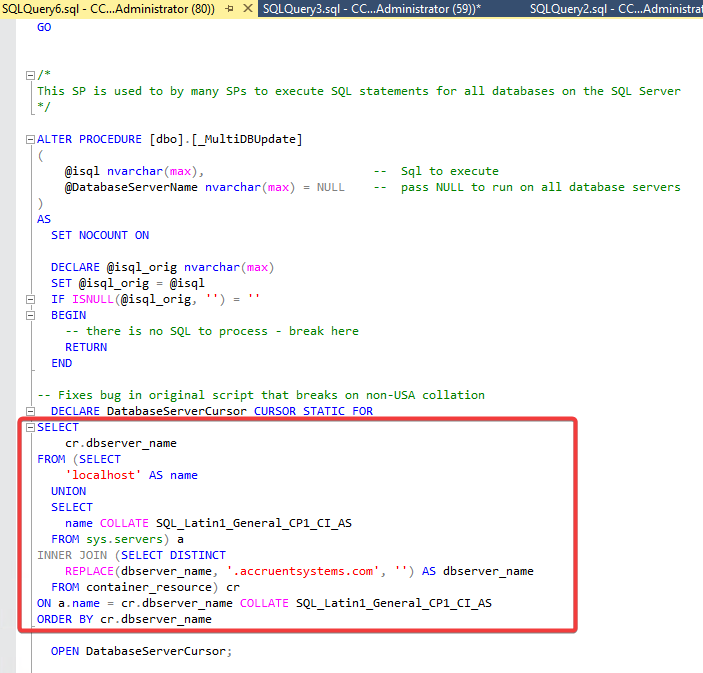
Other causes:
The error shown in the screen below is the problem (or the 1st problem), so that gives technical people what they need to now figure out why the PMs aren't running - or why some PMs aren't running especially if you have more than one database.
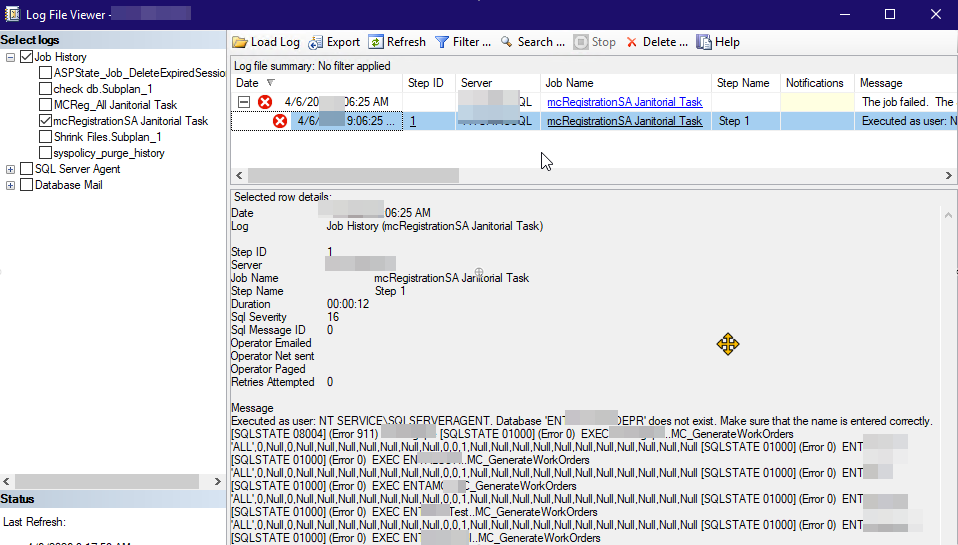
In the case above, it was because a database didn't exist but was referenced in the MC Reg database. But again, that is one of 100's of possible errors that may cause the problem, so don't focus on the "database does not exist", focus on how this lets you get the error.
And here it is 'successful' after a fix. (In our case, it was a bug in the Accruent script, after correcting the bug in the script, it ran fine.
Verified Janitorial task is NOT present:
These instructions are separated to the bottom because doing this when it isn't needed wipes out history making it hard to find and fix the real problem.
Warning do NOT run this unless the mcRegistrationSa Janitorial task is NOT present.
If you install this when the mcRegistrationSa Janitorial task is already installed, this will delete all the history on it and take away any info to help resolve the real issue
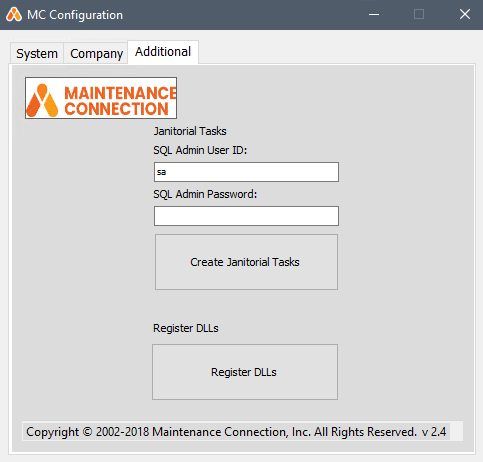
So ... if you are, from above, sure it is NOT present, then you need to do this step in the Accruent MC MCConfig.exe