

 Maintenance Connection Everywhere (MCe) · EAM/CMMS manuals
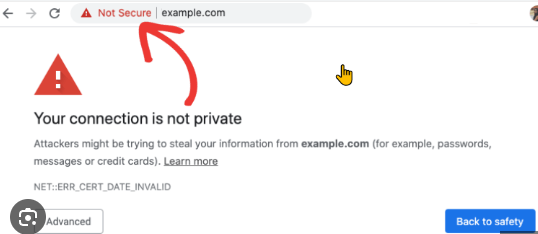
How can I tell if the browser decided I'm running in 'not secure'?
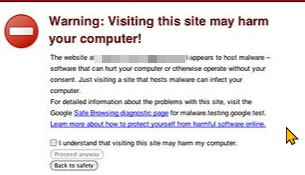
Different browsers will show it in different ways, the simplest is this example, but you might get a full-screen warning or a warning page
Can't I just ignore this and run unsecured?
Some tell us "but I have a certificate" (usually this means they have a self signed certificate). But the warning means that the browser doesn't trust it for whatever reason. It may have trusted it last week, but the browser version you upgraded to this week, perhaps without noticing, doesn't. It has nothing to do with our software, it has everything to do with the browser rules.
Some tell us "But the other software we run in the browser works fine with our HTTPS: even though the browser says it isn't secure, why doesn't the browser like your software" ... So sure, if the software doesn't use any of the features that require 'secure' (like many camera related features, some drive access, and more), it will run fine - but that is just because it isn't using anything that the browser is blocking, not because the browser likes it better.
Some significant issues when you are running with it unsecure:
- some features of MC will not work. some features of MCe will not work. The browser blocks them, sometimes with no indication to our code so we can't tell you it isn't working. Which features vary from version to version of the browsers, with newer features more likely to be broken - but not always - around 2017-2019 and continuing to today a lot of features around the camera for example were broken if you don't have a 'trusted' certificate. So you have to convince the browsers your certificate is trusted.
- Is slower. The faster protocols like /2 require HTTPS and a trusted certificate.
- Enables Man-in-the-Middle (MitM) attacks. A malicious actor or a disgruntled employee on the internet can use tools to sniff passwords with MC (but not with MCe - MCe encrypts before sending them) and put in other attacks. And don't say "We are on an intranet, we are safe" we have had customers, most recently in late 2025 that admitted to us that their internal network was attacked through another vector (different program) even though they thought nothing could be seen/affected from outside.
- As above, some things that work 'today' won't work 'tomorrow'. The more sophisticated the software, the more likely it is using features that are purposely broken now or in the future.
- You teach users bad habits. Once you tell users "It's ok, just ignore the 'not secure' for MC/MCe" you are training them ignore it when it is really a true threat. This is not a minor point - this type of mistake has bankrupted companies, so don't treat this one as a minor issue.
- If you have compliance or audit requirements - most standards prohibit running unsecure.
- Self signed certificates can be good 'forever' this means that if someone compromises one - you can have a long term security liability.
How long are they good for
SSL certificates, as of 2025, typically last for just over 1 year (398 days, just over 13 months) before they expire, but this period can vary depending on the certificate type and the level of validation. This applies to all major certificate types: DV (Domain Validation), OV (Organization Validation), and EV (Extended Validation).
The maximum lifespan for SSL/TLS certificates is being reduced to 47 days by 2029, as part of a phased plan approved by the CA/Browser Forum. This change aims to improve security by making sure certificates are updated more frequently and to promote better compliance with evolving standards.
But it takes me forever to get and install a new certificate
Or the statement will be "My last certificate was for <x> years ... can't I get another 5 year one and be done with it for 5 years?
No. Because security issues are found in real time, for security, it is necessary to have SSL certificates invalidate themselves in as short a period as necessary. Some people reportedly in the CA/Browser forum group argued for 15 or 10 day SSL certificates - so that bad actors could be shut down within a week. The compromised with 47 days as the target.
You need to automate the process to update your SSL
The real 'solution' is to stop taking 'forever' to get and install new certificates automatically, before they expire. With 47 days as the target, you should be targeting your process to be getting new certificates every 30 days so that when something goes wrong, you have 2 weeks to fix it before everything stops working
Can I use a 'self signed'
Since around 2019 it has become necessary to have a 'trusted certificate'. It has also, on purpose according to the browser writers, become more and more difficult to have what used to be common, a so called "self signed certificate'. We understand it isn't impossible, but customers report it has gotten harder and harder through the years as the rules continue to tighten up. There is no reason to believe that self signed certificates will become easier to have browsers accept as 'trusted', indeed, the evidence is it will continue to get harder as bad actors find ways to take advantage of the current rules.
While we try to help where we can, this is not our area of expertise. It is even harder when it comes to servers that aren't visible with a DNS record on the internet. There are companies that specialize in this. Some free such as the widely used and trusted 'letsencript.org', but the free ones provide you documentation, not hand holding - you need to figure it out by yourself (We use the Lets Encrypt organization https://letsencrypt.org and have since their original beta). Some that cost money - but will provide you with more hand holding, from time to time we have use paid ones as well, most we use Lets Encrypt. Unfortunately, there are 1000 ways you can set up your network, and so we have not tried to become experts in how to set up SSL in various customer configurations. We can try to help you with our Professional services, but in most cases it will be less expensive if you use a company that specializes in it.