

 Maintenance Connection Everywhere (MCe) · EAM/CMMS manuals
We can see looking at Accruent's code that this is a bug that has existed for a very long time. We don't have files handy for going back to 2003 and not worth opening the archives for this, but we can see it has been a bug for many years, so likely going back to 2003. It is fixed for some users but not others in MC 2025, it depends on the customer's definition of 'fixed'. How to deal with your needs in MCe reports is also discussed.
The Accruent MC Work Order report has a a field labeled "Last PM:"
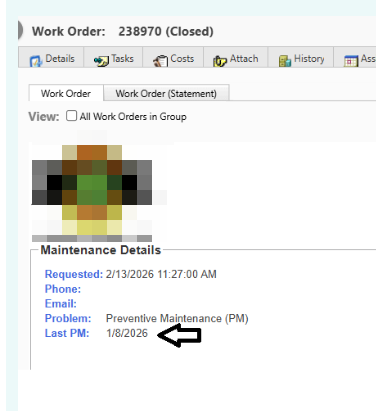
When running on 2022 and earlier, this just looks for the most previous work order "the last before this" WO not for 'the last PM',
(
  SELECT TOP 1 pmwo.Complete
  FROM WO pmwo WITH (NOLOCK)
  WHERE
    pmwo.Complete IS NOT NULL
    AND pmwo.AssetPK = WO.AssetPK
    AND pmwo.WOPK < WO.WOPK
  ORDER BY pmwo.WOPK DESC
) as LastPMDate
What is a PM?
There are several definitions, and individual customers differ on how the customer wants to define it. And this is why the fix in MC 2025 only is a fix for some customers.
Is it based on the work order type being only PM?
Is it based on the work order type being a code that starts with PM?
Is is based on the work order type being one of a set of codes, PM being likely one of them?
Is it based on the work order being created by Automations (MCe) or PM Generator (MC)?
- Even if the Work order type the PM generates is Other?
(
  SELECT TOP 1 pmwo.Complete
  FROM WO pmwo WITH (NOLOCK)
  WHERE
    pmwo.Complete IS NOT NULL
    AND pmwo.AssetPK = WO.AssetPK
    AND pmwo.WOPK < WO.WOPK
               AND pmwo.TYPE = 'PM'
  ORDER BY pmwo.WOPK DESC
) as LastPMDate
The next screen shows a list of possible Work Order types that might be in your system: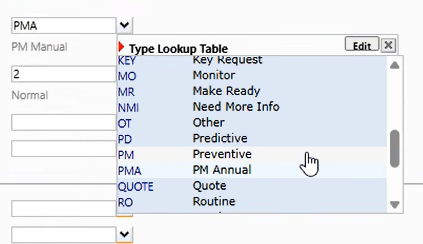
The next screen shows "PMA" as it "PM Annual" picked as the work order type, not "PM".
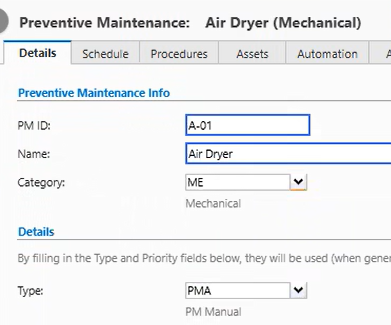
In MC 2025 Accruent applies a definition that is:
- It based on the work order type being only and exactly 'PM'.
- It does not matter whether it was generated by the PM generator or manually.
- If the work order type is PMA or anything other than PM then it is 'not a PM' even if generated by the PM generator.
In MCe we are taking the approach that we let you decide, you can pick one, more or all of the following:
- Is it based on the work order type being exactly 'PM'
- Is it based on the work order type starting with 'PM' (If you are familiar with SQL,
like 'PM%) - Is it based on it having been generated by the Automations (MCe) or PM generations (MC) modules? (If you are familiar with SQL:
isgenerated = true, one (or both) ofPMPKorPMPIDis filled in.
In addition, on any report that gets this value, you can create a list of work order types if the pattern like 'PM%' doesn't work for you. (in ('PM','Annual PM', 'Weekly PM', 'Other PM'))
Since Accruent's fix in MC 2025 only looks at whether the TYPE is PM this means
- if the WO was created and 'given' the type of PM, Accruent will consider it a 'PM',
- but EXCLUDE PMs that were generated but given a different WO type even if it includes PM in the definition.
Ours allows your choice of definition, our default in MCe reports is the same as Accruent's : WOType = 'PM' bearing in mind, you can easily change this in MCe reports. A more advanced might be:
- A WO with
isgenerated = true, or WOtype like "PM%" or WOtype =" PM" is not null or PMPID is not null or apsAutomationPK is not null or apsAutomationID is not null
MCe report that applies the MCe fix
We have a custom MC report that uses the above MCe default. To use see: editing a custom report ASP page
Now test running it