
 Maintenance Connection Everywhere (MCe) · EAM/CMMS manuals
When creating a new stockroom there are several questions that must be answered
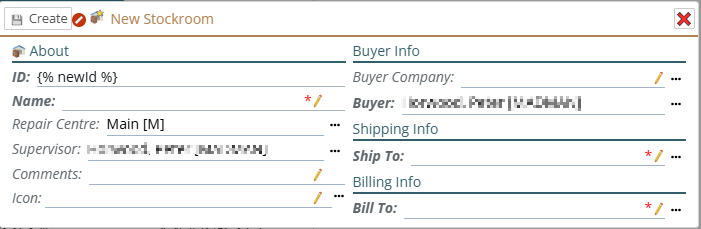
ID and Name
The ID must be unique (no other stockroom may share it) the Name can be used for more than one stockroom, but for most purposes this is not recommended.
A common pattern is to make the ID and Name the same, there is a way in preferences to do this and then in UI Config you would hide either the name or the ID.
Both Name and ID can be set automatically through a variety of options (again in preferences) there are basics documented there, and our Professional Services can help you with those or with more advanced options.
The Buyer, shipping and billing companies
In smaller, and some larger, organizations, these will always be the same for all three fields and for all stockrooms. In larger organizations, there will often be many different contact info for buying, shipping and billing, possibly all the same or some the same in any given stockroom.
When you create 'companies', you can create an internal 'company' or companies that have all the information associated with the information required.
Buyer company
The Buyer company is the internal contact info for who will be handling all or most of the purchases into this stockroom.
Shipping to company
This 'company' (most of the time an internal 'company') will have all the info for shipping to product to this stockroom
Billing info
And this, usually internal 'company' will have the info for who to bill
Save your changes
When you are happy with your choices, the 'Create' button in the upper left will save all your changes. If it is greyed out, it means you still have some required fields that have to be filled in.