

 Maintenance Connection Everywhere (MCe) · EAM/CMMS manuals
The 'good' news is ... that 404 error is telling you that LoginHub has done its job and has passed it off to Express!
If you get a 404 error trying to get into MC Express, it means that your IIS server is set up - it returned the 404, but MC Express is not set up correctly

OR
Your instructions to LoginHub to go to it are not set up properly.
Below are the default settings. And you almost always will want the default settings.
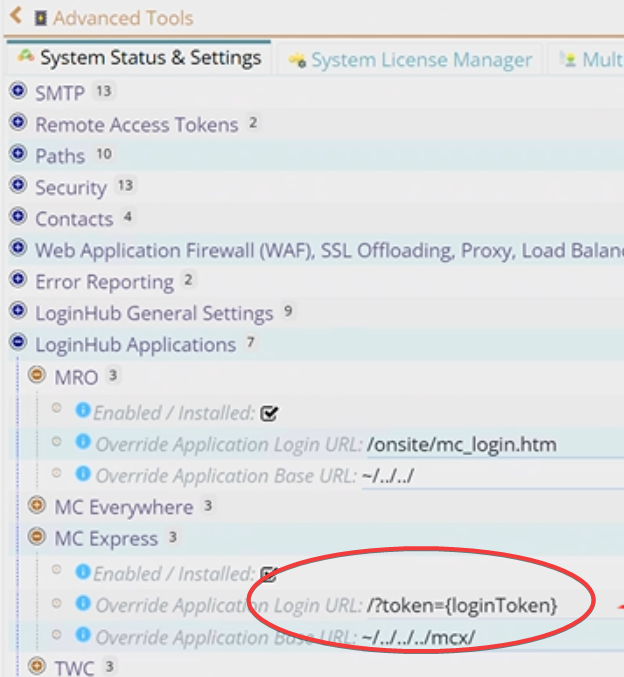
So that 404 error is saying either
- Express isn't properly installed in some way or
- Less likely you've installed in a non standard directory and you have to give the correct relative URL here or
- EXTREMELY unlikely: Accruent changed the 10+ year old code, since the early days of Express, for how the token is supposed to be passed
The 404 error should be giving you the details of what it's trying to server which hopefully will help you figure out what is wrong with the install. Depending on your browser, it may show you the details, or you may have to go digging in the developer console of the browser, and exactly where varies from browser to browser, version to version, and may vary if you have plugins in your browser.
There are rare times you want to get into the 'developer console' in a browser. When you do there are several ways.
- In Windows, the most reliable way is to hit right mouse and choose inspect.
- If your Fkeys have not been reassigned, you can often press
F12function key in your browser to get developer tools, unfortunately a lot of software reassigns Fkeys so this may not work for you. - On many browsers, click the three-dot menu in the top-right corner, go to More Tools, and select Developer Tools.
- On many browsers, pressing
Ctrl + Shift + Jwill work. - In the Android and Apple apps, there is a button is the user button that lets you open up the console on the device, it also works on other devices,