
 Maintenance Connection Everywhere (MCe) · EAM/CMMS manuals
Synchronizing Maximo Assets with ITIQPro MCe or upgrading to MCe
When synchronizing asset data between IBM Maximo and ITIQPro's MCe, one of the most important design decisions is not simply which assets to synchronize, but how those assets should be organized once they are in MCe. We will work with you to optimize the synchronization or to help with the migration to MCe to give you maximum value.
This matters because Maximo and MCe approach large asset populations somewhat differently.
A Maximo implementation may contain tens or hundreds of thousands of asset records whereas MCe has customers especially in the GIS environment with millions. Although Maximo supports parent/child asset relationships and location hierarchies that act in place of a real tree, users frequently interact with large asset sets through searches, filters, classifications, locations, and other attributes rather than primarily navigating them as a visual asset tree.
MCe can take a different approach. Its Asset Tree allows assets to be organized into a hierarchy that users can browse naturally:
Site → Building → Floor → Area → System → Equipment → Component
or:
Plant → Production Line → Machine → Assembly → Component
or whatever hierarchy makes sense for the organization.
Consequently, when implementing a Maximo/MCe integration, simply reproducing the Maximo asset list in MCe is usually not the best design. The better question is:
How should the Maximo asset population be represented as a useful MCe Asset Tree, and at what point should MCe contain more detail than Maximo?
1. Start by Deciding What the MCe Asset Tree Should Represent
Before configuring synchronization, determine what users should see when navigating assets in MCe.
For example, suppose Maximo contains:
- BUILDING-01
- AHU-01
- AHU-02
- CHILLER-01
- CHILLER-02
- PUMP-101
- PUMP-102
- PUMP-103
Importing those records directly into MCe without considering hierarchy may technically synchronize the data correctly, but it misses one of the major advantages of MCe.
The same records might be substantially more useful when presented as:
Building 01
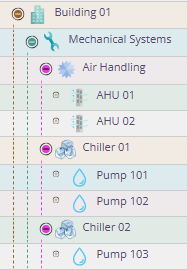
Users can now understand where equipment belongs simply by navigating the tree.
This becomes increasingly valuable as the asset population grows.
2. Existing Maximo Assets Can Be "Treed" During Synchronization
There are several ways that the integration can determine where a Maximo asset belongs in the MCe hierarchy.
The appropriate method depends on how the Maximo implementation currently represents its asset structure.
Option A — Use Existing Maximo Parent Relationships
If your Maximo asset records already maintain meaningful parent relationships, this is generally the most straightforward mapping.
For example, Maximo might effectively contain:
| Asset | Parent |
|---|---|
| PLANT01 | |
| LINE01 | PLANT01 |
| CONVEYOR01 | LINE01 |
| MOTOR01 | CONVEYOR01 |
| GEARBOX01 | CONVEYOR01 |
During synchronization, those relationships can be translated into the corresponding MCe Asset Tree:
PLANT01
- LINE01
- CONVEYOR01
- MOTOR01
- GEARBOX01
- CONVEYOR01
The Maximo asset remains the authoritative synchronized record while MCe gains a navigable representation of the relationships.
This is usually the preferred approach when the Maximo hierarchy is already maintained consistently.
3. Derive the Tree from an Existing Naming Convention
Many organizations have effectively created a hierarchy in Maximo even when they have not explicitly maintained one.
For example:
- PLANT01
- PLANT01-LINE01
- PLANT01-LINE01-CONV01
- PLANT01-LINE01-CONV01-MOTOR01
The asset identifier itself contains enough information to reconstruct the intended hierarchy.
The synchronization process can use this convention to create the MCe tree automatically.
For example:
PLANT01
- LINE01
- CONV01
- MOTOR01
- CONV01
This can be particularly useful for established Maximo databases where changing thousands of existing records simply to support the integration would be undesirable.
The important requirement is that the naming convention be sufficiently consistent that deterministic rules can be established.
4. Derive the Tree from Other Maximo Information
The hierarchy does not necessarily have to come directly from the Maximo Asset parent field.
Depending on the customer's Maximo configuration, useful structural information may exist in:
- locations
- site
- parent assets
- classifications
- asset identifiers
- system or subsystem identifiers
- custom fields
- organizational fields
- combinations of several fields
For example, Maximo may effectively describe an asset as:
Site: Calgary Plant Location: Building A / Mechanical Room Classification: Pump Asset: PUMP-104
An integration rule could use some or all of that information to determine an appropriate MCe tree location.
The objective is not necessarily to duplicate the Maximo data model exactly. The objective is to produce an MCe structure that accurately represents the equipment while being useful to the people navigating it.
5. The MCe Tree Does Not Necessarily Need to Be Limited to Maximo Assets
This is where the integration can become considerably more powerful.
Once a useful hierarchical structure exists, there may no longer be a good reason for every MCe asset to also be a Maximo asset.
An organization may deliberately keep the Maximo asset population at a particular level of detail because creating every maintainable component as an independent Maximo asset would make the system cumbersome.
For example, Maximo might stop at:
AHU-01
However, maintenance personnel may actually think of the equipment as:
AHU-01
- Supply Fan
- Motor
- Bearings
- Belt Drive
- Return Fan
- Motor
- Bearings
- Filter Bank
- Filter 1
- Filter 2
- Filter 3
- Heating Coil
- Cooling Coil
- Dampers
- Temperature Sensor
- Vibration Sensor
There may be little value in adding every one of these components to Maximo if Maximo only needs AHU-01 for the organization's enterprise asset-management processes.
MCe, however, can represent that additional detail naturally because the components are organized underneath the AHU rather than becoming additional entries in an increasingly large flat working set.
6. A Hybrid Asset Model Is Often the Best Design
For many Maximo integrations, the most useful architecture is therefore a hybrid asset model.
Some assets exist in both systems:
Maximo & MCe or Maximo only-managed assets
These are synchronized between Maximo and MCe and generally correspond to the level at which the organization wants Maximo to manage asset identity and enterprise information.
Below those assets can be:
MCe-managed assets
These exist only in MCe and provide additional operational or maintenance detail.
For example:
Plant 1 (Maximo)
- Production Line 1 (Maximo)
- Packaging Machine 01 (Maximo)
- Electrical Cabinet (MCe)
- VFD 1 (MCe)
- VFD 2 (MCe)
- Conveyor Assembly (MCe)
- Drive Motor (MCe)
- Gearbox (MCe)
- Belt (MCe)
- Safety System (MCe)
- Light Curtain (MCe)
- E-Stop Station 1 (MCe)
- E-Stop Station 2 (MCe)
- Electrical Cabinet (MCe)
- Packaging Machine 01 (Maximo)
Maximo remains responsible for the enterprise asset:
Packaging Machine 01
while MCe provides the additional granularity useful to technicians.
This avoids forcing the organization to choose between an excessively coarse maintenance model and an excessively large Maximo asset population.
7. Define the "Maximo Boundary"
Once MCe-specific assets are allowed, the integration needs a clearly defined boundary.
A useful concept is the Maximo Boundary.
Everything at or above that boundary participates in Maximo synchronization. Everything below it can be maintained exclusively by MCe.
For example:
Building 1 — Maximo ↳ HVAC System — Maximo ↳ AHU-01 — Maximo ↳ Supply Fan — MCe ↳ Motor — MCe ↳ Bearings — MCe
AHU-01 represents the synchronization boundary for that branch.
This distinction is important because synchronization should never accidentally create thousands of detailed MCe-only components in Maximo merely because somebody added useful detail to the MCe tree.
8. Synchronization Direction Must Be Defined Explicitly
Once the two systems can contain different asset populations, it is important to define ownership of the synchronized fields and records.
There are effectively three categories of information.
Maximo-Owned Information
Certain fields may be authoritative in Maximo and synchronized to MCe.
Examples might include:
- Maximo Asset ID
- description
- status
- site
- location
- classification
- parent
- manufacturer
- model
- serial number
- selected financial or organizational information
If these fields are Maximo-owned, changing them in MCe should either be prevented or understood to be overwritten during the next synchronization.
Bidirectionally Synchronized Information
Some implementations may intentionally allow selected MCe changes to update Maximo.
These fields need explicit rules covering:
- which fields can be changed
- which users can change them
- conflict handling
- validation
- synchronization timing
- failed updates
- audit history
MCe-Owned Information
MCe can also maintain information that Maximo does not need.
This includes both MCe-specific fields and entire MCe-specific asset records.
Those records must be excluded from synchronization back to Maximo.
9. Do Not Use "Exists in MCe" as the Rule for Synchronizing to Maximo
Once this model is adopted, the synchronization logic should not assume:
"Every MCe asset belongs in Maximo."
Instead, the system should have a reliable way to identify the synchronization status and ownership of an asset.
Conceptually, an MCe asset might be one of:
- Maximo Managed — corresponds directly to a Maximo asset.
- MCe Managed — exists only within MCe.
- Structural — exists primarily to organize the tree.
- Externally Managed — potentially synchronized from another system.
The actual implementation may use synchronization identifiers, integration metadata, flags, mappings, or other mechanisms rather than literally exposing these categories to users.
The important point is that the distinction must be deterministic.
An MCe-only child should never unexpectedly appear in Maximo because it happened to be underneath a synchronized asset.
10. Consider Structural Assets That Do Not Represent Physical Equipment
A tree also allows MCe to introduce useful organizational nodes that would not necessarily justify being Maximo assets.
For example:
Calgary Facility
- Building A
- Roof
- RTU-01
- RTU-02
- Mechanical Room
- Boiler 01
- Boiler 02
- Roof
- Building B
- Exterior
- Parking Lot
- Landscaping
Some of these nodes may be physical assets, while others exist mainly to make navigation intuitive.
That is acceptable provided the distinction is understood.
Trying to force every useful organizational node into Maximo can defeat the purpose of introducing the MCe hierarchy.
11. More Detail Does Not Mean Every Component Should Become an Asset
The availability of a tree should not lead to the opposite problem: creating an asset for absolutely everything.
A useful test is whether making something an independent MCe asset provides operational value.
A child asset is generally useful when users may need to independently:
- identify it
- inspect it
- maintain it
- create work against it
- record history against it
- attach documentation to it
- track its condition
- record specifications
- replace it
- analyze failures
- associate IoT or sensor information with it
- report on it independently
If none of those apply, the information may be better represented as a specification, attribute, document, procedure item, or other metadata on the parent asset.
The objective is a useful hierarchy, not merely the deepest hierarchy technically possible.
12. Consider Asset Movement and Reorganization
The synchronization design should also determine what happens when the hierarchy changes.
For example, suppose Maximo changes:
PUMP-101 from:
CHILLER-01 → PUMP-101
to:
CHILLER-02 → PUMP-101
Should MCe automatically move PUMP-101 within its Asset Tree?
Usually the answer will be yes when the Maximo relationship is authoritative.
However, there is an additional consideration if PUMP-101 has MCe-only children:
PUMP-101
- Motor
- Coupling
- Vibration Sensor
Normally those MCe children should move with their synchronized parent.
This allows the Maximo hierarchy to remain authoritative without destroying the additional detail maintained in MCe.
13. Asset Deletion Requires Similar Care
Deleting an asset in one system should not automatically be treated as a simple database delete in the other.
Consider:
AHU-01 (Maximo)
- Motor (MCe)
- Belt Drive (MCe)
- Filter Bank (MCe)
If AHU-01 disappears from Maximo, simply deleting AHU-01 from MCe could potentially orphan or delete valuable MCe maintenance history.
A production synchronization design should therefore define what a Maximo deletion means.
Depending on the implementation, the appropriate action may be to:
- deactivate the asset
- mark it as no longer synchronized
- retain it for historical purposes
- prevent new work
- move it to an inactive portion of the tree
- require manual review before removal
This is especially important when MCe contains information that does not exist in Maximo.
14. Preserve the Maximo Identity
For every synchronized asset, MCe should retain a reliable integration identity that is independent of the asset's visible name.
This is important because names, descriptions, locations, and even organizational structures can change.
The synchronization mechanism should be able to determine:
This MCe asset is the same Maximo asset we synchronized yesterday.
It should not have to infer that solely from the current display name or tree location.
That identity also provides the mechanism for determining which assets are eligible to synchronize back to Maximo.
In general the preferred plan for this will be to use the MCe ID field as the Maximo name. There are alternatives we can discuss with you as we design your synchronization.
15. Decide the Asset Strategy Before the Initial Synchronization
These decisions are considerably easier to make before importing the entire Maximo asset population.
Before performing the initial synchronization, determine:
- Which Maximo assets should exist in MCe?
- What should determine their location in the MCe Asset Tree?
- Is the Maximo parent relationship sufficient?
- Can an existing naming convention be used?
- Should Maximo Locations participate in constructing the hierarchy?
- Which system owns each synchronized field?
- Can users create additional MCe-only assets?
- How are MCe-only assets identified?
- Which MCe changes are permitted to synchronize back to Maximo?
- What happens when a Maximo asset moves, becomes inactive, or is deleted?
- How are conflicts handled when the same information changes in both systems?
- At what level should the Maximo-managed hierarchy stop and the more detailed MCe hierarchy begin?
The last question is particularly important.
Choosing the Right Level of Detail
There is no universal rule that says:
"All assets must exist in both Maximo and MCe."
However for most customers, it is reasonable, but not required to have a rule that says
"All assets in Maximo must exist in MCe."
For example, you might want to upgrade to MCe department by department and only include the relevant assets. So if Fire moves first, only the Fire department assets would move to MCe initially. or in a larger system you might want to take advantage of multiple databases in MCe, you might for example have one database for each of:
- Municipal equipment
- Municipal buildings
- Parks and Rec
- Fire department
- Police department
Nor is there a requirement that the two systems represent assets at exactly the same level of detail.
A better design is to determine what each system is intended to accomplish.
Maximo can continue managing the asset population appropriate to the organization's enterprise processes.
MCe can synchronize those assets, organize them into a useful Asset Tree, and—where beneficial—extend that hierarchy with substantially more detailed operational assets.
The result might look like:
Enterprise Asset Structure — Maximo + MCe
Facility ↳ Building ↳ System ↳ Major Equipment
Detailed Maintenance Structure — MCe
↳ Assembly ↳ Component ↳ Subcomponent ↳ Sensor / Maintainable Item
The boundary does not even need to occur at exactly the same depth throughout the tree. A critical production machine may justify considerably more detail than a simple piece of auxiliary equipment.
The Key Principle
The Maximo asset list should be treated as the starting point for the MCe asset structure, not its limitation.
If your Maximo already contains useful parent relationships, those relationships can be used to construct the MCe tree. If the organization has encoded hierarchy into asset naming, those conventions can be translated into a real tree. Other Maximo information can also be incorporated where appropriate.
Once that hierarchy exists, the organization can decide how much additional maintenance detail belongs exclusively in MCe.
This allows Maximo to remain at the level of asset detail appropriate for its role while MCe can provide a richer, more intuitive maintenance hierarchy.
There is little benefit in deliberately reproducing an unwieldy asset presentation in MCe merely because that was how the assets have or had to be managed in Maximo.
The goal of the integration should not be to make MCe look exactly like Maximo. The goal should be to preserve the information and business processes that Maximo owns while taking advantage of the capabilities MCe provides.