

 Maintenance Connection Everywhere (MCe) · EAM/CMMS manuals
TL;DR
If you log in with LoginHub and right AFTER logging in, you get a 500 - Internal server error, it is very likely that:
- you have tried to set MC up to handle password expiries, which, on an Identity Provider like Entra, AD, Octa, Auth0, Ping, Google etc.., can only be handled by the Identity provider.
- This combined with a bug in Accruent MC, ends up with an 500 Internal server error after logging in with the Accruent MC MGR (aka MRO) product.
- It is NOT a problem with the MCe products (including the Admin1 MRO product)
- It does not appear to, in some versions of MC, be a problem/bug if you go into MC Technician Work center
- It does not appear to, in some versions of MC, be a problem/bug if you go into the MC Service Requester portal
The fix is: Do NOT turn on, or turn off if you have it on, password expiry in MC when you are managing users in an Identity Provider (Ping, Google, AD, Octa, Auth0, Entra), leave the expiry at 'Never'
It has also been reported once that it can happen with a disabled account
Check under the Accruent MC section of our documentation for other specific causes of 500 errors.
Details:
The error looks essentially like this. The 500 error showing up over top a greyed out home page.
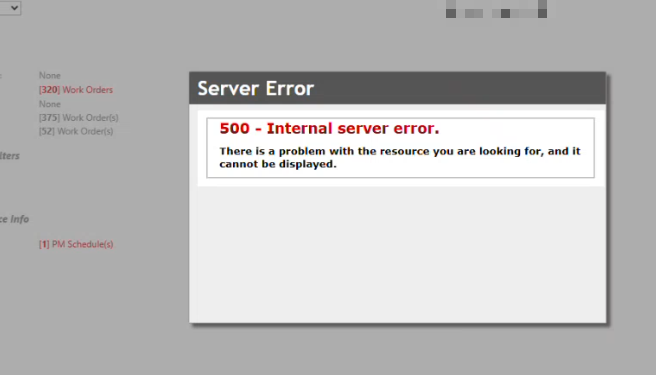
In developer console, the error is explained further as being a problem with the MC Reset Password asp page


It is caused by a combination of:
1. A long standing (more than 1 decade) bug in MC MGR
2. Someone in your organization setting up MC to manage passwords - when it can not because you are managing passwords in your IP (Identity provider, Octa, Entra, Ping, Auth0, AD, Google or one of 100's of others we support)
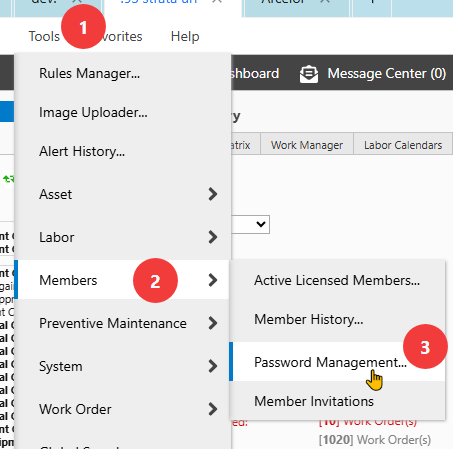
The following is found in the Accruent MC MGR Tools > Members > Password Management:
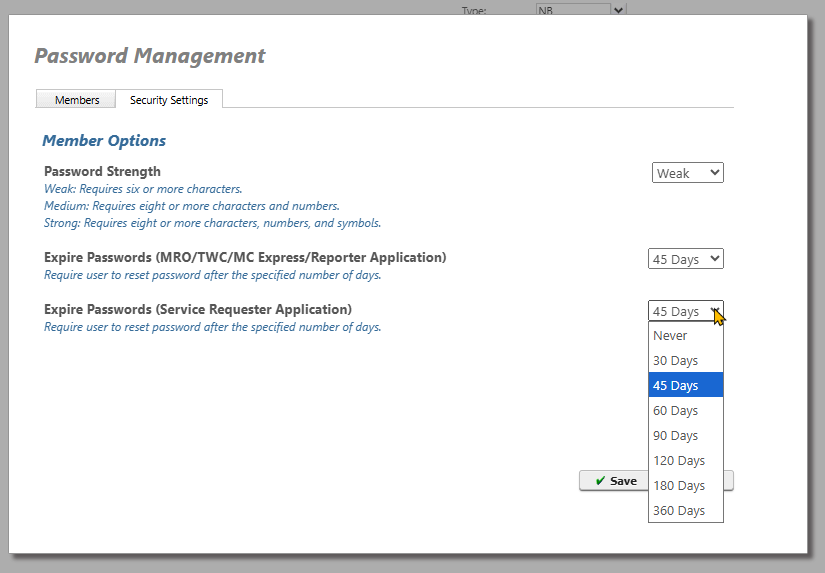
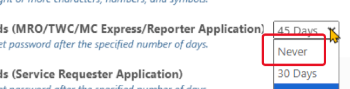
Leave (or set) both of the expire days to 'Never'
OR, for on prem customers (not SaaS), set the pass_use_reset false in the reg database container table.
